Why AI Agents Give Wrong Answers (And How to Fix Them)
A customer asks an AI agent how to cancel their subscription. The agent answers confidently: go to the billing page, click cancel, done. Three months ago, that was true. Last month, the company moved cancellation to account settings. Nobody updated the help article. The customer follows the AI’s instructions, hits a dead end, and opens a ticket anyway.
The model didn’t hallucinate. It read the document it was given and reported what it said. The document was wrong.
This is the failure mode behind most “AI gave a wrong answer” complaints, and it has most time not related the model.
This blog breaks down the seven most common ways business knowledge breaks AI agents, and what fixing it actually looks like.
The Important Reason Your AI Agent Gets Answers Wrong
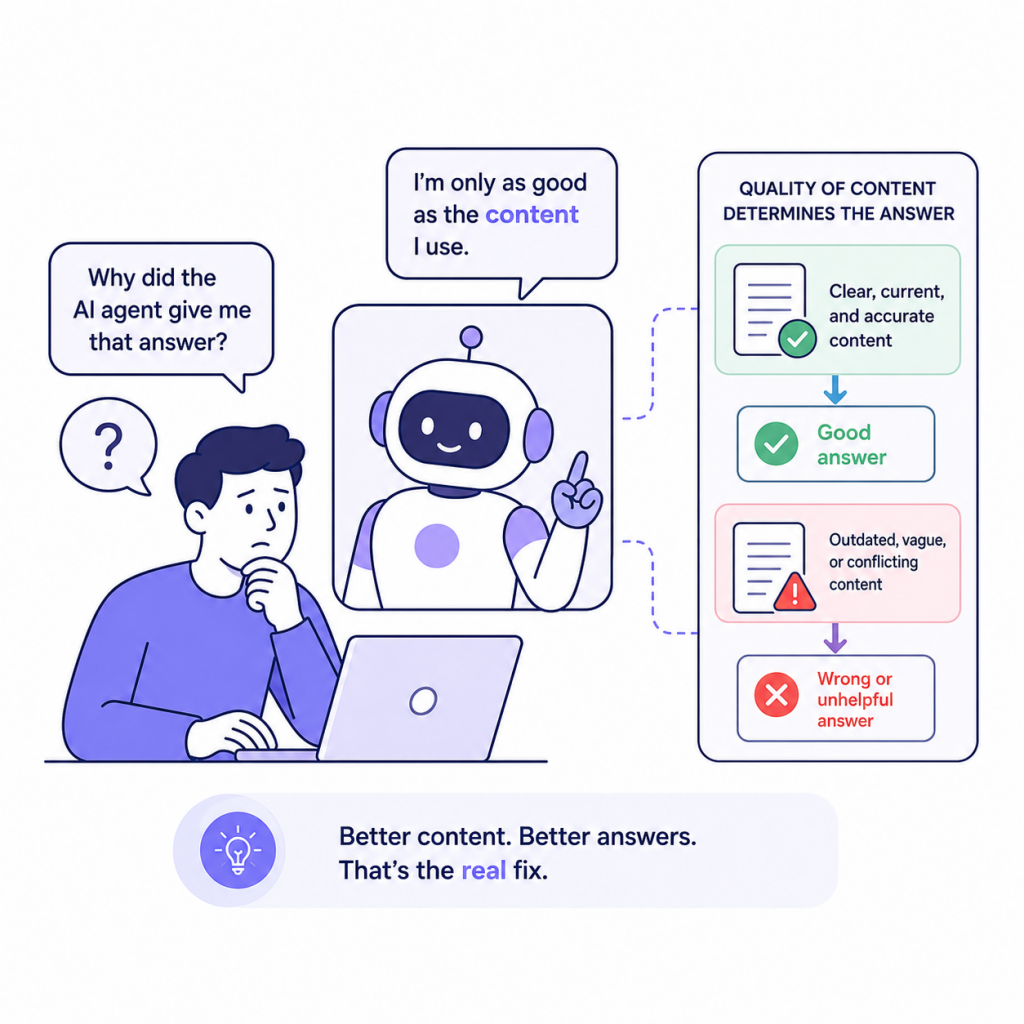
Before diagnosing accuracy problems, it helps to understand how a modern AI agent actually works in a business context.
Most business AI agents use a method called Retrieval-Augmented Generation, (RAG). When a customer asks a question, the agent does not simply rely on what the model learned during training. Instead, it searches your connected knowledge sources, pulls the most relevant content it finds, and uses that content to generate an answer.
This is what makes AI agents useful for customer support, sales, and operations. They can answer from your specific policies, your current product documentation, your billing rules, and your internal workflows, not just generic internet knowledge.
But the quality of the answer depends entirely on the quality of what the agent retrieves.
If the retrieved content is current, clear, and specific, the answer will be useful. If it is outdated, vague, duplicated across conflicting sources, or buried inside a long mixed-topic article, the answer will fail. Not because the model invented something, but because it faithfully used the wrong source.
This is why the most common AI accuracy problems in business are not hallucination problems. They are content problems.
Think of an AI agent the way you would think of a new support hire on their first day. Give that person clear policies, updated guides, and well-organized training material, and they can help customers confidently. Hand them a folder of outdated documents, contradictory instructions, and notes nobody has touched in two years, and even a capable person will make mistakes. The same logic applies to AI, only faster and at scale.
The Seven Reasons Your AI Agent Gets It Wrong
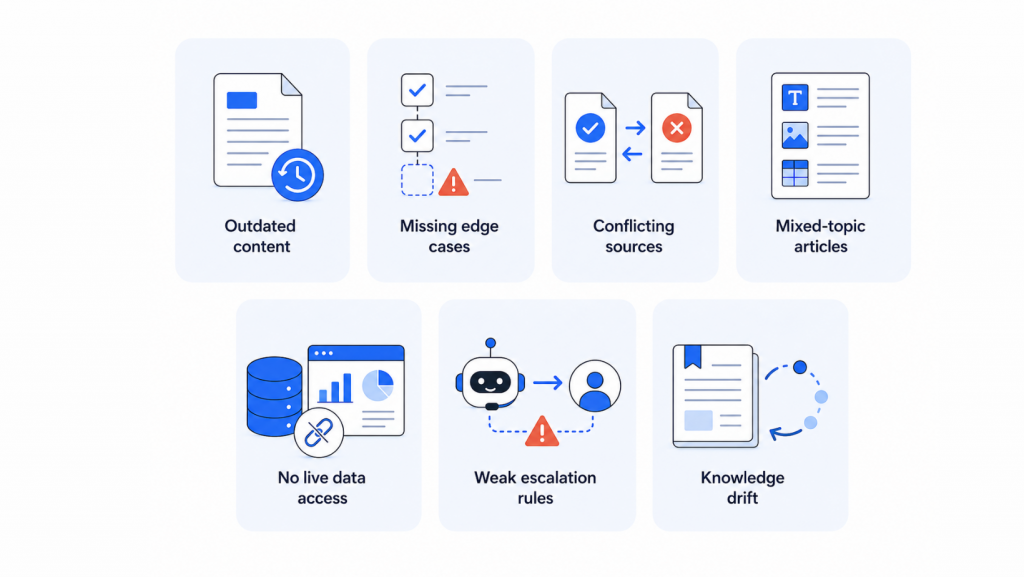
AI agents are only as good as the content they access. Learn the seven most common reasons they get answers wrong.
1. Outdated Content
The cancellation flow moved to a new page. The refund window dropped from 30 days to 14. A pricing tier got renamed. The help article describing the old version is still sitting in the knowledge base, and nothing marks it as outdated.
A human support rep would catch this from context, a Slack message, a team update. An AI agent has no such context. It retrieves the old article, treats it as current, and hands the customer instructions for a flow that no longer exists.
What makes this dangerous is that the answer doesn’t look wrong. It’s specific, confident, and pulled from a real company document. It just describes a version of the product that’s already gone.
Every policy or workflow change should come with a corresponding update to the connected knowledge, before the next customer asks, not after the first one complains.
2. Coverage Gaps
Most AI knowledge setups start with whatever’s easiest to grab: website pages, a handful of FAQ entries, one or two product guides. That covers the basic questions fine.
Real support isn’t basic.
A failed payment that might have gone through twice raises questions a basic FAQ was never built to answer. Is the second charge a pending hold or a completed transaction? Does it reverse automatically? How long does that take? Did it affect the subscription? None of that lives in a standard billing page, so the agent falls back to “check your billing dashboard,” which is technically correct and useless to someone who already checked and is now more confused.
The gaps that hurt most live in billing edge cases, refund exceptions, plan-specific rules, onboarding failures, and known bugs with workarounds. Nobody writes these down first. Customers need them most.
3. Conflicting Sources
As a company grows, knowledge accumulates across different teams and tools. The support team writes a help article. The product team publishes a new guide. The marketing team keeps an older landing page live. A sales rep shares a one-pager that has not been updated since the pricing change six months ago.
Each source was accurate at some point. When they stop being updated in sync, your AI agent faces a serious problem: multiple documents describing the same topic differently.
One article says refunds are available within 30 days. A newer policy page says 14 days. A support macro says refund eligibility depends on the customer’s plan. A sales FAQ says customers can cancel anytime for a full refund.
A human support agent knows which rule is current. An AI agent does not, unless that priority is explicitly defined. Without it, the agent may retrieve whichever source scores highest in the retrieval process, or worse, combine details from multiple conflicting documents into an answer that sounds authoritative but is not.
This matters most for billing, refunds, contract terms, security, compliance, healthcare, insurance, and enterprise agreements. In those areas, a single inconsistency does not just create a bad customer experience. It creates business risk.
The fix is not uploading more content. It is organizing existing content so the AI knows which source is approved, which is outdated, and which rules apply to which customer situation.
4. Poor Content Structure
Sometimes the content is completely correct and the AI still gets it wrong, because of how the article is built.
A help center page that covers setup, pricing, troubleshooting, and cancellation for both monthly and enterprise plans works fine for a human. They scan, they skip, they read the section they need. An AI retrieval system doesn’t scan. It pulls a chunk. If that chunk is the enterprise cancellation rules and the customer is on a monthly plan, the agent now has correct information about the wrong plan.
One article, one topic. If refund rules differ by plan, that’s two articles, not one with a footnote. Annual contract cancellation gets its own page. Numbered steps stay numbered. Rules stay next to their exceptions, not three paragraphs away. The goal isn’t more writing. It’s making what already exists pullable in one clean piece.
5. No Integration with Live System
Documentation explains how your process works. It can’t tell a customer what’s happening in their account right now.
A customer asks where their order is. Without a live connection to the order system, the agent reaches for the only thing it has: your standard shipping timeline. The customer already knew that. They didn’t ask how shipping normally works. They asked about their order, which might be stuck, delayed, or flagged for an address problem nobody’s looked at yet.
The answer was accurate. It was also useless.
The same gap shows up for payment status, subscription changes, refund progress, and appointment slots. Anything account-specific. Without live data, the agent is describing the map while the customer is standing in the territory, lost.
A real AI agent connects static knowledge to live systems where it matters: check the order, pull the actual plan, look up the real refund status. A chatbot describes processes. An agent acts on them.
6. No Escalation Path
An AI agent that attempts everything is a liability with good intentions.
Refund disputes, legal complaints, account security flags, billing confusion that needs a transaction history pull, enterprise contract exceptions. These need a human, and the best AI response is a fast, clean handoff, not a longer AI answer.
“Escalate complex questions” sounds like a rule. It isn’t one. The agent needs topic-by-topic thresholds: which billing questions it can resolve and where it stops, what refund amount triggers human review, what phrasing signals a customer who’s done being patient.
The handoff itself has to carry context. It should include the customer’s original question, what the AI already answered, any information collected during the conversation, and the reason for escalation. Otherwise, the human agent starts with no background, the customer has to repeat everything, and the AI ends up creating more friction instead of reducing it.
The same configuration gap shows up with model choice. A model picked for cost at setup and never revisited shapes how the agent handles conversations whether anyone designed it to or not. A lighter model can flatten out on a customer describing a multi-step billing problem across several messages, losing thread or jumping to an answer too early. The customer reads that as the agent not listening. A heavier model on simple, high-volume queries like order status or password resets adds cost and latency nobody notices a benefit from. Either mismatch can also throw off the brand voice the agent is supposed to carry. Matching the model to the conversation load is part of configuration, and it’s worth revisiting as the agent takes on different types of queries over time.
7. No Maintenance Loop
Nothing about a good AI agent is “set it and walk away.”
Every conversation is a signal. Unanswered questions point to missing knowledge. Repeat escalations show where the agent should be able to help but can’t. Negative feedback flags answers that were technically present but not actually helpful. Low-confidence responses point at content that’s ambiguous or contradictory.
Most teams check these signals only after something visibly breaks. The teams that get the best results check on a schedule: update docs after every product change, archive sources before they start influencing wrong answers, track which questions the agent keeps fumbling.
That loop, deploy, observe, update, repeat, is the entire difference between an agent that gets worse every month and one that gets sharper.
How YourGPT Helps Fix the System
The seven problems above share a common root cause: disconnected knowledge. When information is outdated, incomplete, or isolated from business systems, AI agents struggle to give accurate answers. YourGPT helps solve this at every layer.
- Knowledge coverage: Teams can connect help center articles, product docs, FAQs, internal SOPs, support macros, past resolved tickets, Notion, Google Drive, Dropbox, Confluence, YouTube transcripts, and other business sources. This helps the agent answer from the same knowledge your team already uses.
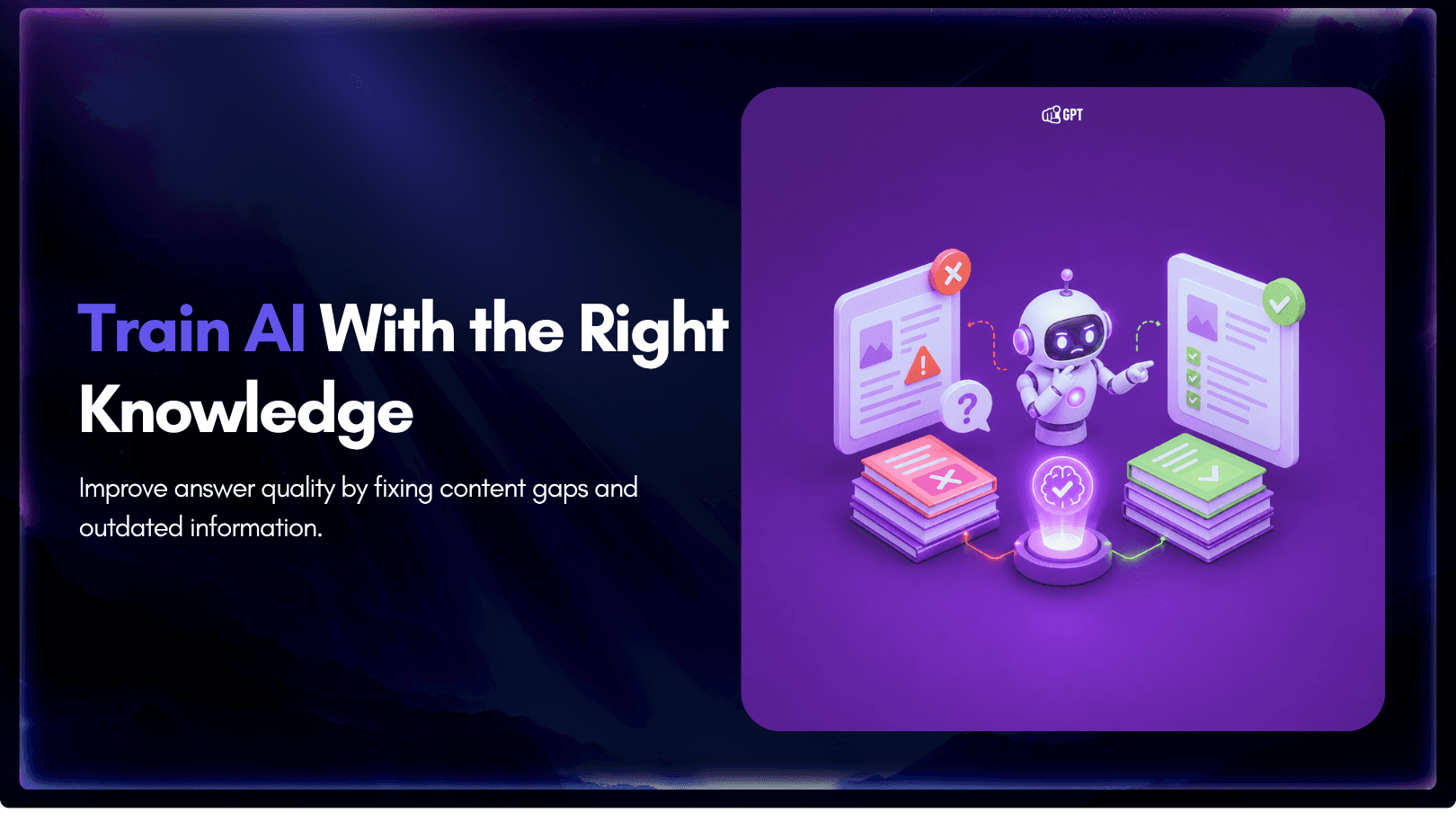
- Content quality: YourGPT helps teams spot training issues where answers become unclear because the source content is contradictory, outdated, duplicated, or incomplete. Fixing those weak points gives the agent a cleaner base for accurate answers.
- Live data and workflow integration: Some questions need more than static documentation. With YourGPT you can connect to APIs, MCPs and CRMs, teams can connect agents to live business systems, check customer context, trigger approved actions, or route a case to the right workflow.
- Agent behaviour and boundaries: Teams can configure the agent’s role, tone, response style, supported topics, restricted topics, and escalation rules. This helps the agent answer with the right level of confidence and hand off cases that need human review.
- Self-learning improvement loop: YourGPT can help teams improve the agent over time by learning from customer conversations, unresolved questions, feedback, and repeated support patterns. This makes it easier to find missing knowledge, update weak answers, and keep the agent aligned as products, policies, and customer questions change.
The goal is to make the AI agent easier to trust. When the knowledge is current, the structure is clear, the workflows are connected, and the agent has the right boundaries, wrong answers become easier to find, fix, and prevent.
The Way to Improve AI Answers: Fix the Source Content
If your AI agent gives wrong or unhelpful answers, review the content it uses before changing the model or rewriting prompts.
Start with 20 to 30 real customer questions from support tickets, chat logs, help center searches, and sales calls. Use real questions because they show where customers get confused, what words they actually use, and where your existing content is unclear.
AI Answer Accuracy Checklist
For each common customer question, check:
- Does the correct answer exist in your knowledge base?
- Is the answer current with your latest product, pricing, policies, and workflows?
- Is the answer direct enough for the AI to use without guessing?
- Is there more than one version of the same answer?
- Do any articles, docs, or policies contradict each other?
- Does the answer change by plan, region, language, customer type, or product version?
- Are those differences clearly separated?
- Does the article answer one main question, or does it mix several topics together?
- Are edge cases and exceptions clearly documented?
- Is there a clear handoff rule for cases the AI should not answer on its own?
Content Fix Checklist
Update the content in this order:
- Remove outdated articles, old policies, and expired product instructions.
- Merge duplicate answers into one clear source.
- Split long mixed-topic articles into smaller single-topic pages.
- Rewrite vague answers into direct, specific instructions.
- Add missing exceptions your support team already handles manually.
- Separate answers by plan, region, customer type, or product version where needed.
- Add clear escalation rules for billing, refunds, account access, legal, safety, and high-risk issues.
- Review the articles your AI uses most often.
- Run the agent against realistic customer questions after making changes, not only predictable internal test cases.
These questions reveal content gaps faster than polished test cases because they contain confusion, missing context, and conflicting signals, which is exactly where AI answers usually break.
FAQs
Why do AI agents give wrong answers?
AI agents usually give wrong answers because of one or more issues in the setup: outdated knowledge, conflicting sources, poor content structure, incomplete information, weak model selection, or unclear agent instructions.
For example, the agent may find an old help article, a policy that conflicts with another page, or a broad document that mixes billing, refunds, account access, and product limits together. In those cases, the answer may sound confident but still be wrong.
The model is only one part of the system. The knowledge base, workflow rules, integrations, and agent configuration all affect answer quality.
Is every wrong AI answer a hallucination?
No. A hallucination means the model generated information without a reliable basis. Many wrong business answers come from a different problem: the agent used bad or outdated source content.
If an old pricing page says one thing and the current policy says another, the agent may repeat the old answer. That looks like hallucination to the customer, but the actual problem is conflicting or stale knowledge.
This is why fixing content often improves AI accuracy before any model change is needed.
How does bad knowledge structure affect AI answers?
AI agents work better when each document has one clear purpose. Long articles that combine many topics make it harder for the agent to find the exact answer.
A single article covering cancellations, refunds, failed payments, upgrades, plan limits, and exceptions can create confusion. The agent may pull the right article but use the wrong section.
Better structure means focused pages, clear headings, current policies, separate rules for different plans or regions, and direct answers written in the same language customers use.
Why does incomplete information cause wrong answers?
An answer can be technically correct but still incomplete. This happens when the content misses the conditions that decide when the answer applies.
For example, a refund rule may depend on billing date, payment method, plan type, country, usage, or account status. If those details are missing from the knowledge base, the agent may give a general answer where a conditional answer is required.
Good AI content should include the rule, the exceptions, the required checks, and the point where the agent should hand off to a human.
Can the model choice affect AI answer accuracy?
Yes. A less capable model may struggle with complex instructions, long context, policy exceptions, multi-step reasoning, or cases where several sources need to be compared.
However, switching to a smarter model will not fix outdated content, contradictory documents, missing policies, or unclear escalation rules.
The best results usually come from both sides: a capable model and a clean knowledge base with clear workflows, updated sources, and well-defined agent behavior.
How does agent persona configuration affect answers?
The agent persona controls how the AI should respond, what tone it should use, what it should avoid, and when it should escalate instead of answering.
If the persona is too vague, the agent may answer with the wrong confidence level, use a tone that does not match the brand, skip important checks, or answer questions that should be handled by a human.
A good configuration should define the agent’s role, supported topics, restricted topics, escalation rules, tone, response length, and how it should handle uncertainty.
How can teams improve AI agent accuracy?
Start by auditing the knowledge base and agent setup together.
Remove outdated pages, merge duplicate answers, resolve conflicting policies, split long articles into focused pages, add missing exceptions, choose a capable model, and configure the agent persona with clear boundaries.
Then test the agent with real customer questions from support tickets, chat logs, help center searches, and sales calls. These questions show where your content, workflows, or configuration still need improvement.
Conclusion
Upgrading your AI model will not solve a core knowledge problem. You cannot fix missing documentation by rewriting your prompts, and you cannot fix contradictory policies simply by adding more content.
Reliable AI agents depend entirely on reliable business knowledge. When your help articles, standard operating procedures (SOPs), and product guides are accurate, updated, and well-structured, your AI agent can provide customers with actionable answers.
Building this foundation is more challenging than selecting a model. It requires proper content management, clear governance decisions, and regular maintenance. However, this is the effort that yields long-term value. Every article you refine, every policy conflict you resolve, and every edge case you document makes the agent more effective for future customers.
The most successful companies treat their knowledge base like a core product. It must be launched, maintained, versioned, and improved continuously. YourGPT provides the platform to manage this system, the principle remains the same regardless of the tool you use. If you want your AI agent to deliver better answers, you must first improve the source material it relies on.

Related posts