What is a good AI resolution rate for Shopify?
TL;DR
A good AI resolution rate for Shopify reflects how reliably an agent answers questions and completes customer requests. The percentage depends on the work it handles: product questions, order tracking and refunds require different capabilities. The strongest result is more requests resolved correctly across your store, with fewer repeat contacts and a better customer experience.
An AI agent can finish more customer requests while its resolution rate goes down. That sounds like a contradiction until you look at the work it has taken on.
An agent answering product questions has a different job from one that also checks delayed orders and initiates eligible returns. Adding those harder requests can bring the average down, even when the original tasks still work just as well. The store gets more useful work from the agent; the headline percentage looks worse.
For Shopify support, a good resolution rate therefore needs to answer two questions: how reliably does the agent finish the work you give it, and how much of the store’s support demand does that work represent? The answer becomes useful when you can connect it to correct outcomes, fewer repeat contacts and the cost of serving customers.
What makes an AI resolution rate good
A percentage becomes a useful target only after you define the work it covers. Product questions depend on accurate catalog information. Order tracking needs current records. Refunds also need authorization, eligibility checks and a confirmed transaction result. One target for all three hides these differences.
YourGPT agents can resolve up to 90% of repeated queries. Your store’s result depends on the questions customers ask, the quality of its knowledge and the actions it can complete. Establish a baseline on your own requests before setting a target.
A good result should satisfy three conditions: the assigned work is completed accurately, it covers enough demand to be useful, and the total cost and customer experience make the deployment worthwhile. A high rate on a rarely asked question may contribute less than a lower rate on a frequent request.
For an initial target, name an improvement you can verify. A store might aim to raise correct order-status resolutions from 140 to 160 out of 200 eligible requests, moving from 70% to 80% without increasing same-issue repeat contacts. Those numbers are illustrative. The method is what transfers to another store: keep the work comparable and make the target describe a customer outcome.
How to calculate your storewide resolution rate
For this guide, AI resolution rate is the percentage of requests in a defined group that the AI agent brings to completion, including the final action when one is required. A person may provide context or approval along the way. The outcome is AI-resolved when the agent finishes the work, and human-resolved when a person takes over and completes it. Record human assistance separately within AI-resolved outcomes so you can distinguish these from fully autonomous resolutions. Always name the group you are measuring. Some reports measure AI-involved conversations; others measure all support workload. Those percentages answer different questions.
For your own evaluation, keep three measures together. The following example is hypothetical, not a customer result or industry benchmark.
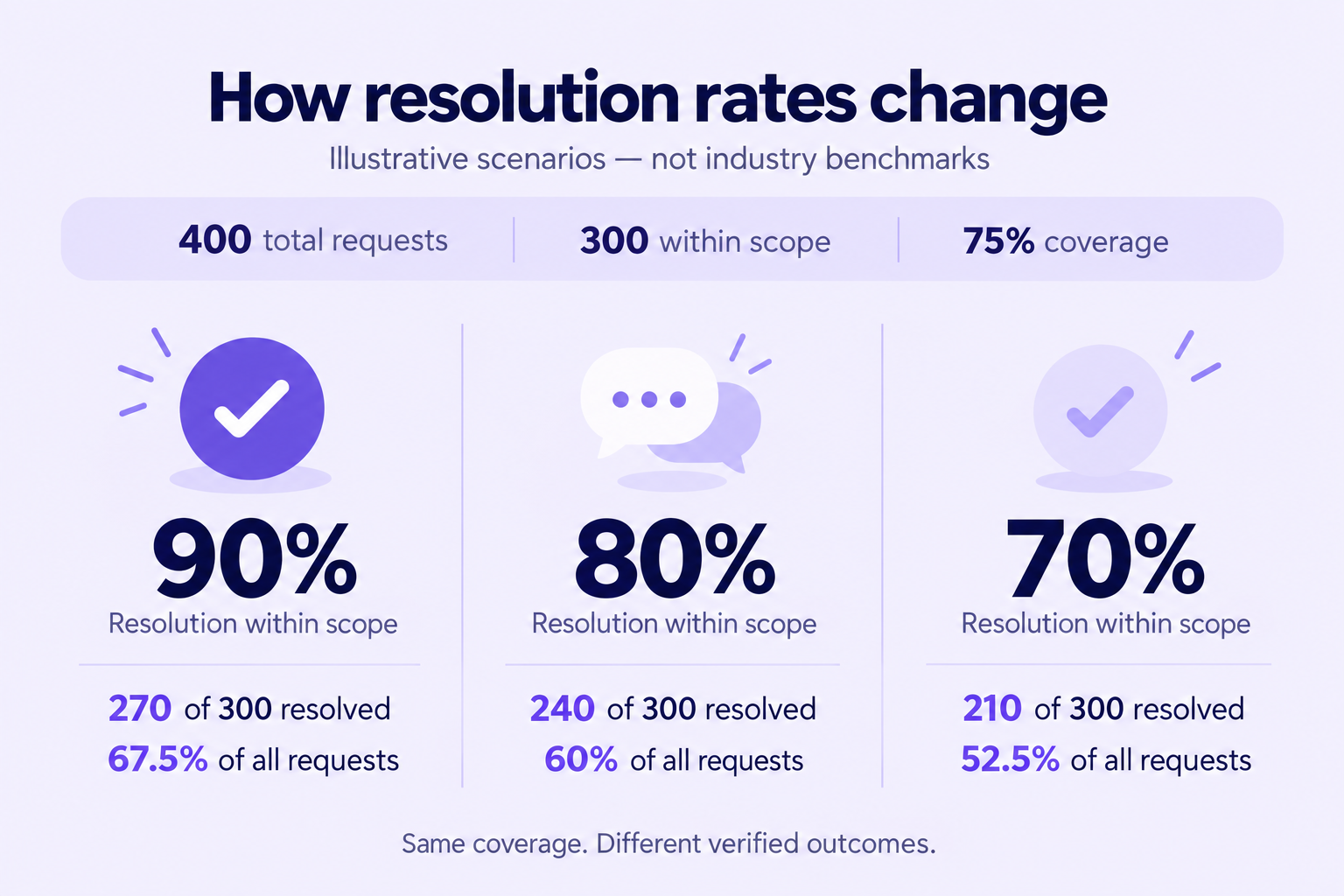
A Shopify store receives 400 support requests in one reporting period. Before the period starts, the team defines which request types the agent should handle. 300 requests fall within that scope, and the agent successfully resolves 270 of them.
The remaining 30 scoped requests need help or remain unresolved. Another 100 requests were outside the agreed scope.
| Measure | Calculation | Result | What it tells you |
|---|---|---|---|
| Scope coverage | 300 eligible requests ÷ 400 total requests | 75% | How much of the queue the agent is expected to handle |
| Resolution within scope | 270 AI resolutions ÷ 300 eligible requests | 90% | How reliably it completes its assigned work |
| Overall AI resolution | 270 AI resolutions ÷ 400 total requests | 67.5% | How much total support demand it resolves |
Overall AI resolution = scope coverage × resolution within scope. This relationship holds when all three measures use the same reporting period and request-counting rules, and the AI resolutions belong to the defined scope.
Scope coverage here means eligibility, not whether the agent actually replied. An eligible request that bypasses the agent still belongs in the scoped denominator.
Reporting the scoped and overall rates together shows both reliability on assigned work and the contribution to the whole queue.
With the same 300 eligible requests, resolving 240 gives an 80% scoped rate and a 60% overall rate. Resolving 210 gives 70% within scope and 52.5% overall. The illustration keeps coverage fixed so you can see the effect of completing more requests.
These formulas are an evaluation framework. Your platform may use different units or labels. For example, Gorgias calculates AI automation against total billable workload, while its coverage metric measures AI involvement. Read the definition before comparing a dashboard figure with your own calculation.
Keep failures in the denominator
Define eligibility before judging outcomes. If order tracking is in scope and a lookup fails, that request remains an unsuccessful scoped request. The same applies when a policy answer is missing or the agent routes an eligible question to a person.
Removing those failures would make the number improve without improving support. Record the cause instead: missing knowledge, unavailable integration, incorrect reasoning or a necessary escalation.
Use consistent rules for spam, duplicate contacts and mixed-intent conversations. If one customer contacts you through web chat and email about the same order problem, avoid treating the second contact as an unrelated success. Document any limits in your ability to match conversations across channels.
What counts as a resolved Shopify request
With the denominator fixed, the next question is what belongs in the successful count. A closed conversation is a useful reporting event, but you still need evidence that the request was handled correctly.
Use these four checks when reviewing an AI resolution:
- The answer or outcome matches the request. The customer received the information or completed task they needed.
- Any required action succeeded. The relevant system confirms the action, and the agent describes its actual status accurately.
- The AI completed the request and any required final action. Human input or approval can support an AI resolution. The distinction is who completes the request: the AI finishes the work in an AI resolution, while a full handover leaves completion to a person.
- The same issue did not remain unresolved. If the customer comes back because the answer was wrong or the promised action failed, review and correct the original resolution record. A new, unrelated question does not make the earlier resolution a failure.
An accurate answer can be a complete resolution without changing a record. If a shopper asks whether a product contains wool and the verified product specification answers the question, a database write adds nothing.
Action requests need different evidence. If the shopper asks to cancel an order, an explanation of the cancellation policy does not complete that request. The agent needs permission to act, a valid order state and confirmation that the cancellation succeeded.
Shopify keeps order status and payment status separate. A canceled order can still have refund work remaining. If the customer requested both cancellation and a refund, checking only the cancellation status is insufficient.
For refunds, separate refund initiated from funds received. Shopify’s guidance on pending and failed refunds directs teams to inspect the transaction details and explains that bank availability can follow processing. A confirmed initiation may complete the task the agent is authorized to perform, provided it accurately explains the remaining processing. It cannot support a claim that the customer’s bank has already credited the money.
Choose a sensible follow-up window
There is no universal waiting period that proves every Shopify issue is resolved. Product questions, return labels and payment processing have different follow-up patterns.
Choose an observation window appropriate to the request type, record it before comparison and use it consistently. Mark recent outcomes as provisional until that window has elapsed. Compare completed cohorts, rather than combining fully observed requests with conversations that ended minutes ago.
A follow-up is also not automatically a failure. A shopper asking a new question after a successful return is different from a shopper reporting that the return label never arrived. Review the relationship between the messages before changing the result.
Set separate targets for answers and order actions
A combined rate becomes easier to improve when you can see the work behind it. Keep the familiar categories from your support queue, then define what success requires in each one.
| Request type | Evidence of a complete outcome | When a person should help |
|---|---|---|
| Order status | Correct order identified and current tracking or fulfilment information explained | Conflicting records or an exception requiring investigation |
| Product question | Answer matches the relevant product and variant information | Missing specifications or advice outside approved knowledge |
| Shipping or returns policy | Current policy answers the customer’s actual question | Customer requests an exception to the policy |
| Return initiation | Eligibility checked and the required return request or label confirmed | Unclear condition, disputed eligibility or an approval requirement |
| Refund or cancellation | Authorized action succeeds and its status is communicated accurately | Payment disputes, restricted order states or a decision beyond the agent’s authority |
| Custom order or discretionary credit | Usually a documented human decision under the store’s rules | The agent can gather context, but should not invent an approval |
These are starting points for defining scope, not automatic permissions. A return workflow may be suitable for one store and require review in another.
Separate knowledge from live store data
A trained shipping policy answers what normally happens. It cannot establish where a particular parcel is right now. Likewise, recognizing a customer’s name does not prove the agent has accessed the correct order.
Use approved product and policy sources for knowledge questions. Use an authenticated connection to the relevant store or fulfilment system for order-specific answers. Verify that the agent can access the right record without revealing another customer’s information.
Our Shopify integration brings store context and agent capabilities together. For evaluation, test each enabled action separately. Successful product recommendations do not demonstrate that refunds or cancellations are ready to run without review.
Keep assisted work visible
Some conversations begin with a routine question and develop into an exception. Record that change instead of silently removing the conversation from the original report. A separate exception label can explain the result while preserving the initial cohort.
Separate human assistance from a full handover. An eligible refund approved by a team member, then successfully issued and confirmed by the AI, is an AI resolution with human assistance. When the person takes over and completes the refund, the resolution is human-led.
Both can be useful outcomes. Within AI-resolved requests, track which needed assistance and how much human time they required. For full handovers, track whether the AI supplied the order details and conversation context that helped the person finish. This preserves the distinction between who completed the request and who contributed along the way.
Check whether reported resolutions are real
A dashboard classifies conversations according to its reporting rules. A quality review checks whether those classifications deserve your trust. Keep the reported rate and the audit findings visible rather than assuming they are the same measure.
For example, an agent might answer a return question using an outdated policy. The customer leaves, and the system marks the conversation resolved. The audit should record an incorrect answer even if the customer never comes back. Silence supplies no evidence that the policy was right.
Use confirmed outcomes wherever your systems can establish them. Where you rely on a sample of conversations, state the sample size, selection method and error count. Do not describe every reported resolution as individually verified when only a subset was reviewed.
Use a small scorecard alongside the resolution figure:
| Check | What to inspect | Why it matters |
|---|---|---|
| Answer accuracy | A reviewed sample checked against current policies and records | Detects confident but incorrect replies |
| Same-issue repeat contacts | Customers returning about an unresolved request | Shows whether apparent resolutions lasted |
| Action success | Confirmed completions compared with attempted actions | Separates tool failures from answer quality |
| Customer satisfaction | Scores together with response count and response rate | A handful of survey responses may not represent the queue |
| Handoff quality | Context delivered and time until a human responds | Reveals whether escalation actually helps the customer |
| Cost per verified resolution | Relevant operating cost divided by verified AI resolutions | Connects quality with business value |
For the cost calculation, define which expenses you include. Subscription, usage, connected services and human review all affect the result. Costs and resolution counts must cover the same complete reporting period.
Use a reviewed sample to check quality, not as the denominator for total operating costs. Avoid counting the same human costs in both automated and manual totals.
Review a mix of successful-looking conversations, handoffs and known failures. Sampling only escalations misses incorrect answers that the system marked as complete. Include different channels, languages and request types when they are part of your deployment.
Keep raw counts beside percentages. Eight successes out of ten requests and 800 out of 1,000 both equal 80%, but they provide different amounts of evidence. A small pilot can reveal failure patterns; it cannot establish a dependable long-term rate by itself.
Improve the requests your agent cannot finish
Once the scorecard shows where requests fail, improvement becomes specific. Start with a frequent failure that you can fix and verify. Changing several unrelated parts at once makes it harder to know what helped.
Close gaps in product and policy knowledge
Review unresolved questions for missing details: a return exception that never reached the policy page, a product variant with incomplete specifications or contradictory delivery information.
Use a short correction cycle:
- Find the authoritative answer. Confirm the current policy or product detail with the person who owns it. Resolve conflicting sources before adding more material.
- Update the source and training. Refresh the affected content so the agent has the corrected information. YourGPT supports several knowledge sources, including the content your team maintains for these answers.
- Retest the request in context. Check the original question, a differently worded version and a related edge case. Confirm that the correction improves the answer without contradicting another policy.
- Watch subsequent conversations. Check whether the same question still reaches a person or produces a repeat contact. A source edit is useful when future requests are handled more accurately.
Confirm actions before reporting success
Trace a failed action from the customer’s request to the connected system. Check identity verification, permissions, required information, business rules and the returned result.
An unavailable service should produce a clear explanation or handoff. Retrying an action must not create duplicate refunds or duplicate return requests. Keep confirmation checks in the workflow, and test failure cases as deliberately as successful ones. The same answer, action and verification sequence underpins agentic AI in customer experience.
Improve over time through self-learning
Conversation review helps you find the next knowledge gap. Smart Learning identifies unresolved queries and suggests FAQs from past conversations. Your team reviews and refines those suggestions before adding them to training.
Use that process to address recurring questions with verified answers. An unusual customer request should not become a new store policy simply because it appeared in a conversation. Assign ownership for proposed changes and retest the affected request type after updating the knowledge.
When a lower resolution rate means better support
Once a request type works reliably, the next opportunity may be work the agent does not yet handle. Evaluate that expansion separately from improvements to its existing tasks.
Return to the hypothetical queue of 400 requests. The agent resolves 270 of 300 eligible requests. Now suppose another 80 requests become eligible. Assume performance on the original 300 stays unchanged, and the agent completes 34 of the 80 additional requests.
| Measure | Original scope | Expanded scope |
|---|---|---|
| Eligible requests | 300 | 380 |
| Requests resolved by AI | 270 | 304 |
| Resolution within scope | 90% | 80% |
| Overall AI resolution | 67.5% | 76% |
The combined scoped rate falls, but 34 more customer requests are completed by AI. The added category resolves 34 of 80 requests, or 42.5%. That is the figure to investigate when deciding whether the expansion is useful.
Those 34 resolutions may justify the additional integration, review and operating costs. They may not, particularly if the remaining 46 requests involve confusing handoffs or extra customer effort. Compare the new category with how the store handled that same work before. Check accuracy, repeat contacts, handling time and cost, rather than approving or rejecting it because the combined percentage moved.
This example assumes unchanged performance on the original work so the effect of expansion is clear. In a live deployment, check that assumption by reporting the original and added categories separately.
Use the report to choose the next improvement
A useful report should make the next decision clear. Keep the definition stable long enough to see whether an improvement worked, and record changes that affect comparison.
- Choose the cohort. State the dates, channels, request types and exclusions. Count customer requests consistently rather than mixing messages, tickets and billable events.
- Write the acceptance rules. Define successful answers, required action confirmations, human involvement and follow-up handling.
- Review the baseline. Check a representative set of conversations and keep separate totals for AI-resolved, human-resolved and unresolved requests. Within AI-resolved outcomes, identify those that needed human assistance.
- Fix a defined failure. Record what changed in knowledge, permissions or workflow and which request types it affects.
- Compare the next completed cohort. Report coverage, scoped resolution, overall resolution and quality checks together. Note volume changes and seasonal differences.
Seasonal sales, delivery disruptions and new product launches can change the request mix. Comparing an ordinary week with a week dominated by missing parcels may say more about the queue than the agent. Show results by intent before attributing the difference to a model or prompt change.
End the report with a decision supported by the results:
| What the report shows | What to investigate next |
|---|---|
| Reliable resolutions within a small scope | Another frequent request type with clear acceptance rules |
| Broad coverage but many failed actions | Permissions, required data and integration responses before adding more scope |
| A rising reported rate with more incorrect answers or repeat contacts | Whether the success classification is overstating completed work |
| Stable quality but little reduction in human workload | Whether automated requests are very quick while remaining cases take much longer |
Assign the next change to an owner and name the outcome you expect it to improve. This turns reporting into a way to allocate effort: better knowledge where answers fail, better connections where actions fail, and better handoffs where a human decision is required.
Frequently asked questions
How do I calculate the AI resolution rate for my Shopify store?
Divide the requests completed by AI by the requests in the group you are measuring, then multiply by 100. For example, 80 completed requests out of 100 eligible requests gives an 80% scoped rate. If the store received 200 requests in total, its storewide rate is 40%. Use the same period and counting rules for both.
What is the difference between AI resolution and ticket deflection?
AI resolution describes a completed customer request. Deflection generally describes demand kept away from human support, although platforms define it differently. Avoiding a handover does not establish that the answer was correct or the task succeeded. Check the reporting definition and completed outcome before comparing a deflection figure with a resolution rate.
Why is my Shopify AI resolution rate lower than expected?
Look at the unresolved requests by type. Product questions may expose missing or conflicting information; order questions may need live store data; refunds may fail because of permissions or eligibility rules. A broader mix of difficult requests can also lower the average. Identify which category changed before deciding whether the problem is knowledge, an integration or the scope itself.
How can I improve my Shopify AI resolution rate?
Start with a frequent request the agent cannot finish. Correct missing product or policy information, connect the current order data it needs, or repair the action that fails. Test that specific change on real examples, then review subsequent outcomes and repeat contacts. Expand into another request type once the existing work is reliable.
Can AI resolve Shopify refunds and returns as well as product questions?
Yes, when the agent has the necessary store connection, permissions and policy rules. Answering a returns-policy question needs accurate knowledge; initiating a return or issuing a refund also needs a successful action. Some decisions may require human approval before the AI completes the task. Exceptions outside the approved rules need a handover.
Conclusion
A good Shopify AI resolution rate tells you how much dependable work your agent is doing. The number needs a defined scope, evidence of correct handling and a view of the requests still reaching your team. Without those, two identical percentages can describe very different levels of service.
The useful target is more customer requests completed correctly at a worthwhile cost. Sometimes that means fixing a missing policy or an unreliable order lookup within the current scope. Sometimes it means accepting a lower combined rate while the agent learns to handle a broader set of requests. The expansion example makes the distinction concrete: 304 completed requests can be a better result than 270, even when the displayed scoped rate falls.
For your next review, choose one request category with enough volume to matter. Check what the agent completed, what it left unfinished and why. Decide whether the next improvement belongs in its knowledge, its ability to act or its handoff to a person. Then compare the next reporting period on the same terms, including customer feedback and repeat contacts.
That is how the metric earns its place in an operating decision. It shows where the agent is useful today and what needs to change for it to do more tomorrow.
Resolve more Shopify requests
Train an agent on your store knowledge, connect the actions you need and test it on real support requests.

Related posts