Shopify WhatsApp Chatbot Setup Guide (2026)
Shopify stores often use a chatbot on their website to handle product questions, order updates, and support. But customers also message on WhatsApp expecting the same quick answers. Most of them already use WhatsApp throughout the day, so reaching out there feels natural.
A chatbot that works across both channels responds in seconds, guides purchase decisions with product suggestions and stock updates, and recovers abandoned carts automatically. All without your support team handling every message.
This guide shows you how to create a Shopify chatbot and WhatsApp chatbot, step by step, so you can manage both channels from one place.
📚 Related Reading
7 Strategic Benefits of Integrating a WhatsApp Chatbot with Shopify
Integrating an AI-driven WhatsApp bot into a Shopify ecosystem transforms customer interaction from a reactive support channel into a proactive revenue generator. By leveraging the WhatsApp Business API, merchants can automate critical touchpoints across the customer lifecycle, driving measurable improvements in conversion rates and operational efficiency.
Instant 24/7 Support
Resolve FAQs at 2 AM instantly. Eliminate wait times so shoppers buy with confidence.
Boost Conversion Rates
Actively guide browsers and answer product doubts in real-time, just like an in-store assistant.
Recover Abandoned Carts
Leverage WhatsApp’s 98% open rate to instantly nudge customers back to checkout with direct links.
Automate Tracking Queries
Let customers self-serve order status instantly, slashing repetitive tickets by up to 30%.
Personalized Upselling
Increase Average Order Value (AOV) by smart-suggesting relevant add-ons based on purchase history.
Build Post-Purchase Loyalty
Send proactive shipping alerts and easy feedback requests to build trust and encourage repeats.
Slash Support Costs
Free your human team from routine queries so they can focus on complex, high-value issues.
Step-by-Step Guide: Adding AI on Shopify and Whatsapp in 5 Minutes
First, we will create the AI agent and connect it to your Shopify store so it can instantly learn about your products, inventory, and policies.
Step 1: Create Your YourGPT Account
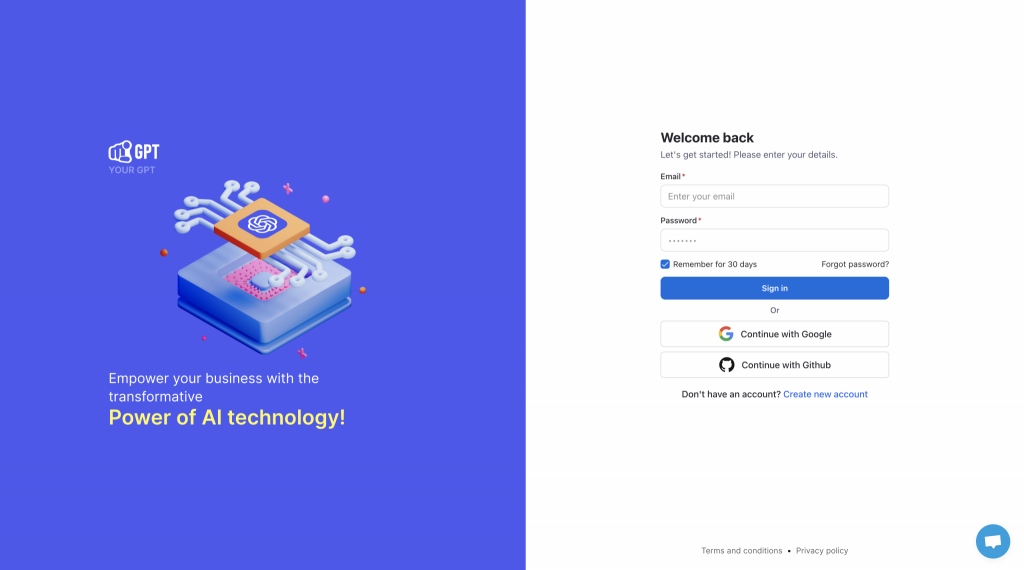
Start by visiting YourGPT. If you don’t have an account, sign up to access the dashboard. If you already have one, simply log in.
Step 2: Train the AI on Your Store Data
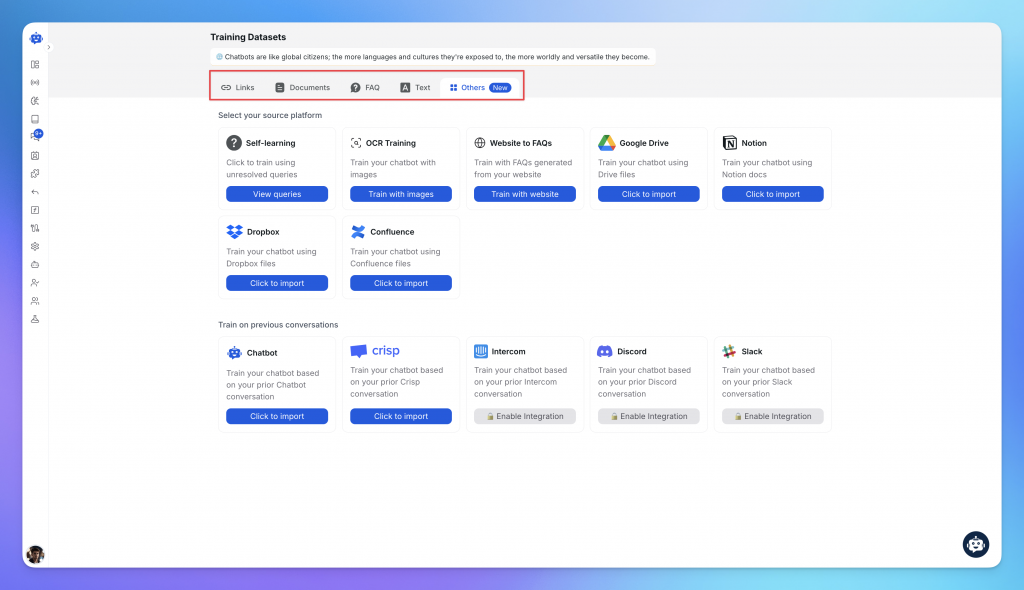
Before connecting to the store, give your AI the knowledge it needs to answer customer questions. Navigate to the Knowledge Base section. Here, you should upload your essential store policies:
- FAQs & Policies: Upload PDFs or paste text for your Shipping, Return, and Refund policies.
- Website Links: Add your store URL so the AI can crawl public pages.
Your AI is now “smart” and ready to answer general questions about your business.
Step 3: Customize the Chat Widget
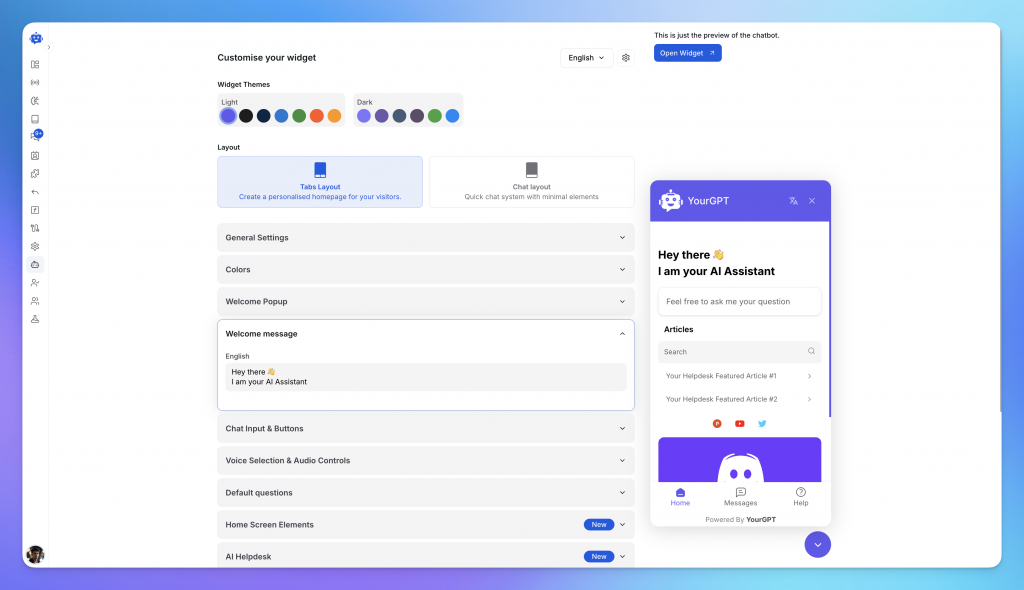
Now, make the chatbot look like part of your brand. Go to the App Appearance or Widget Settings section.
- Branding: Upload your logo and set the bot’s name (e.g., “Store Assistant”).
- Colors: Match the chat bubble color to your Shopify theme.
- Welcome Message: Set a friendly greeting that encourages customers to ask questions.
Step 4: Connect & Configure Shopify
Now that the AI is trained and branded, it is time to make it live on your store. Go to the Integrations section, select Shopify, and click Connect. Follow these three configuration steps:
- 1. Enable Integration: Toggle the integration status to “Enabled” to authorize the connection between YourGPT and your Shopify store.
- 2. Widget Script Installation: You need to add the chatbot script to your store’s theme.
- Go to Shopify Admin → Online Store → Themes.
- Click the three dots in the top navigation bar and select Edit code.
- Under the Layout folder, find and click on
theme.liquid. - Paste the provided script code just before the closing
</body>tag. - Click Save.
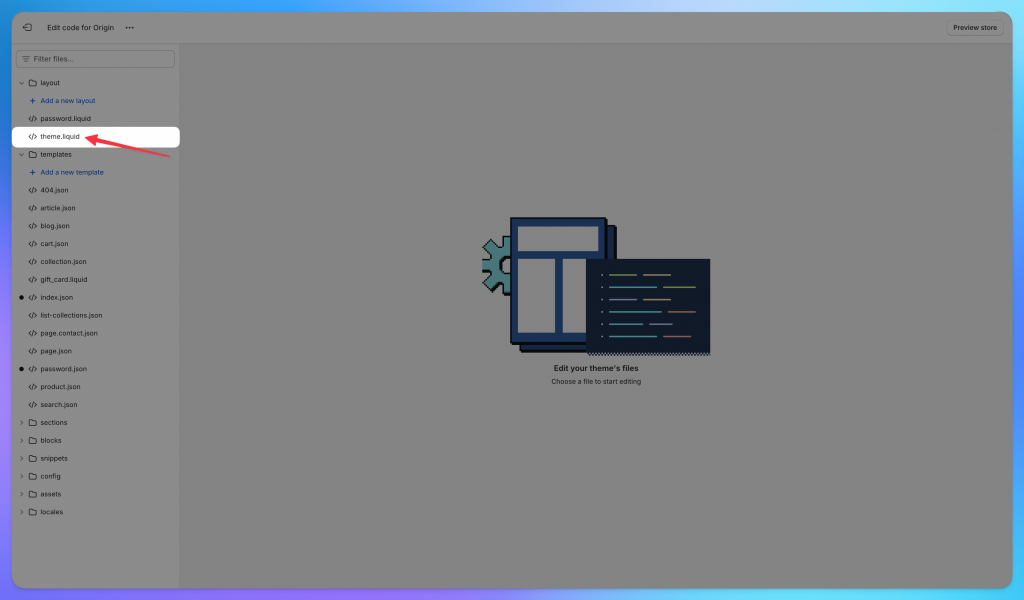
For a detailed guide on setting up a Shopify AI chatbot, follow the steps in this article: How to Set Up a Shopify AI Chatbot
- 3. Webhooks & Synchronization: Ensure the AI stays up-to-date with your inventory. Enable synchronization for Products and Customers. This allows the AI to recommend products based on real-time stock levels and help registered customers with their specific data.
Connect That Same AI to WhatsApp
Now that your AI is live on your Shopify website, we will extend its capabilities to WhatsApp. This allows the same intelligence to handle mobile customers using the exact same knowledge base and product data.
Step 5: Connect WhatsApp Business API
Return to the Integrations tab in YourGPT and select WhatsApp.
- Choose the Auto Setup method for the fastest connection.
- You will need to log in with your Facebook Business account and link your dedicated business phone number.
- Verify the number via OTP to complete the setup.
Step 6: Unlock Advanced Capabilities
Standard text replies are good way interact, but sometimes you need more engaging and dynamic interactions.
- Create Custom WorkFlows: If you need your bot to send interactive Carousels, Product Cards, or follow specific business logic, you can build these custom journeys inside the AI Studio.
- Use Studio AI Copilot: You don’t need to build these manually. simply use the Studio AI Copilot. Just type what you want (e.g., “Create a workflow that shows a carousel of our top 3 best-selling shoes when a user asks for recommendations using our knowledgebae”), and the Copilot will build the complete workflow for you instantly.
- Enable Image Understanding: Want your bot to see? To let the AI analyze images sent by customers (like a photo of a damaged product or a style reference), go to General Settings on your dashboard and ensure Agent Mode is enabled.
Step 7: Go Live Your setup is complete. The AI agent that assists customers on your website is now also managing your WhatsApp Business number. It uses your Shopify data to seamlessly answer product queries, check order statuses, and recover sales across both channels simultaneously.
7 Applications of WhatsApp Chatbots for Shopify
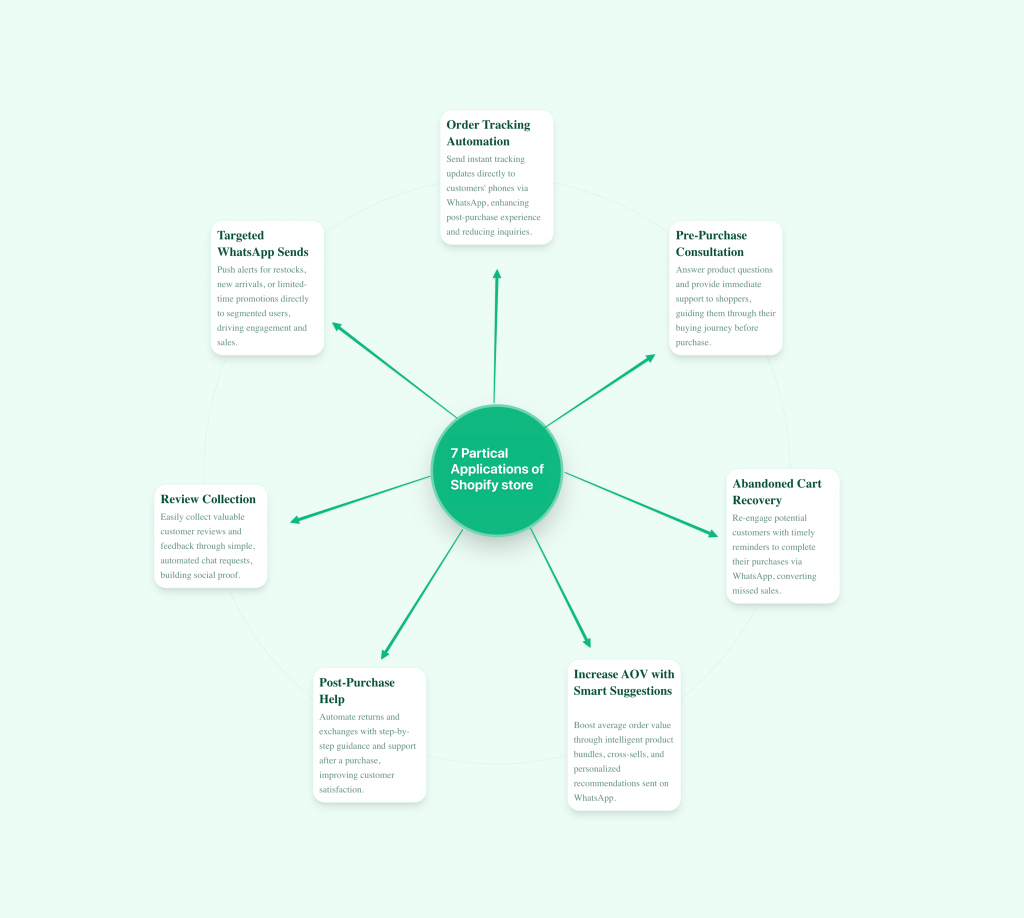
Integrating WhatsApp automation into your Shopify store does more than just answer simple questions. It optimizes your entire customer lifecycle. Here is how successful merchants use this technology to drive efficiency, increase revenue, and improve customer retention.
1. Automating Order Tracking: Reducing “Where is my order?” (WISMO) inquiries frequently overwhelm support teams. A WhatsApp chatbot solves this by integrating with your Shopify backend to fetch real-time shipping data. Customers receive instant tracking links and delivery estimates without waiting for a human agent. This automation significantly lowers support ticket volume and increases customer satisfaction.
2. Instant Pre-Purchase Consultation: Uncertainty regarding crucial product details like sizing, materials, or inventory leads directly to site abandonment. An AI chatbot addresses this by serving as an intelligent, round-the-clock resource. By utilizing stored data to instantly answer specific product questions, the chatbot effectively removes barriers to purchase, resulting in lower bounce rates and higher sales capture.
3. High-Impact Abandoned Cart Recovery: While email open rates for cart recovery often struggle, WhatsApp messages achieve open rates over 90%. When a customer abandons checkout, the chatbot triggers a timely, friendly reminder containing a direct link to complete the purchase. This direct channel creates a frictionless path back to the cart, leading to higher recovery rates.
4. Increasing Average Order Value (AOV): You can boost revenue per transaction through intelligent upselling. The AI analyzes customer intent to make logical recommendations, such as suggesting a matching belt for trousers or batteries for an electronic device. These personalized suggestions appear at the moment of high purchase intent, effectively driving up your Average Order Value.
5. Automating Post-Purchase Resolution: The post-purchase interaction is a cornerstone of customer loyalty to brands. The chatbot streamlines the complex returns and exchanges process by guiding customers, checking eligibility automatically, and providing instant instructions. Managing these critical interactions quickly and with full transparency maximizes customer trust and drives repeat purchases.
6. Review Collection: Social proof is essential for Shopify growth, yet getting customers to leave reviews is often a challenge. A WhatsApp chatbot supports this process by providing a smooth, conversational way to request feedback after an order is delivered. The mobile-first experience leads to much higher engagement than traditional email review requests.
7. Targeted WhatsApp Sends: Reach your customers with timely updates like new arrivals, restocks, or flash promotions. Messages appear directly on their lock screens, making them far more likely to see and act on your offers than with traditional email.
4 Critical Configuration Mistakes to Avoid
Your chatbot is only as smart as the data you feed it. Most issues aren’t “AI glitches”—they are setup errors. Here is how to fix the root causes of poor performance.
FAQ
How do I add WhatsApp chat in Shopify? ▼
You can add WhatsApp chat by connecting your WhatsApp Business API number to YourGPT. After creating your WhatsApp chatbot, copy the WhatsApp chat button script from YourGPT and paste it into your theme.liquid file before the closing body tag. Once saved, a WhatsApp button appears on every page of your store and customers can start chatting instantly.
Do I need a WhatsApp Business API number or can I start with a regular WhatsApp account? ▼
A regular WhatsApp account cannot send automated updates or connect to Shopify in any meaningful way. If you want order tracking, abandoned cart reminders, and automated conversations, you must use a WhatsApp Business API number. The API unlocks all automation that connects Shopify to WhatsApp.
Can a WhatsApp chatbot check order status without involving my team? ▼
Yes. When YourGPT is connected to Shopify, the chatbot can pull order data directly from your store. Customers can type their order number or use the phone number they ordered with. The chatbot returns shipping progress, tracking links, delivery timelines, and any updates logged in Shopify.
Will the WhatsApp chatbot replace my support team? ▼
No. It handles routine questions such as delivery estimates, return rules, product details, payment options, and order status. Your team steps in only when the customer needs human judgment. This lets your agents focus on complex cases instead of answering the same five questions all day.
Can the chatbot help recover abandoned carts in Shopify? ▼
Yes. A WhatsApp abandoned cart message performs much better than email because customers check WhatsApp more often. The chatbot sends a reminder with product images, pricing, and a link back to the exact checkout page. This brings back customers who were close to purchasing.
Does the WhatsApp chatbot support variant-based questions such as size, color, or availability? ▼
Yes. When Shopify is connected, the chatbot can read variant availability and answer questions such as size fit, colour options, material details, and restock expectations. This reduces hesitation for customers who cannot find the information on the product page.
Can customers request returns or exchanges through WhatsApp? ▼
Yes. The chatbot can collect order details, verify eligibility, and guide the customer through your return or exchange policy. This reduces the number of emails and cuts the response time significantly.
What happens if a customer wants to talk to a human instead of the chatbot? ▼
You can enable human handoff inside YourGPT. If the customer requests an agent or the chatbot detects an issue outside its scope, the conversation transfers to your support team. The entire chat history stays visible so your team has full context.
Can the chatbot understand questions that are not in my FAQ list? ▼
Yes. YourGPT learns from your product data, policies, and documents. When customers ask questions not explicitly listed in your FAQ, the chatbot uses your uploaded content and Shopify data to reply. This creates a more natural support experience.
Is coding required to install or maintain a WhatsApp chatbot for Shopify? ▼
No. Setup involves connecting your API number and pasting one script into Shopify. All ongoing updates, automation rules, replies, and message templates are managed inside YourGPT. You never modify code again after the initial installation.
Conclusion
Every Shopify store eventually reaches a point where support becomes harder to manage. Customers want quick updates, straightforward answers, and someone available when they need help. WhatsApp fits naturally into this pattern because it’s already part of the customer’s day.
A WhatsApp chatbot helps your store keep up. It responds immediately, clears common doubts, retrieves order updates, and nudges shoppers who left during checkout. Your team gets fewer repetitive questions. Customers move through the buying process with less friction.
Setting everything up through YourGPT keeps the process simple. Connect your WhatsApp API number, upload the information customers usually ask for, link Shopify, and switch on the workflows you need. Once active, the chatbot works alongside your store quietly and consistently.
Over time, you’ll notice fewer routine tickets, faster purchase decisions, and a smoother experience on both sides. If you want a practical way to improve support and create a more responsive store without adding workload, integrating a WhatsApp chatbot through YourGPT is a great step that delivers consistent value.
Turn WhatsApp Into Your Shopify Support Channel
Add a WhatsApp chatbot to your Shopify store to answer product questions, send order updates, and recover abandoned carts without adding more agents. Connect YourGPT, link WhatsApp and Shopify, and start handling support in minutes.
No credit card required • 7 days access

Related posts

18 Lead Generation Strategies & Tactics That Work in 2026