What Is a Ticketing System? Definition, Benefits & Selection Tips for 2026

TL;DR
A ticketing system converts requests that arrive by email, chat, phone, or web form into trackable records with an owner, a status, and a priority level.
Centralizing requests this way cuts response delays, gives support teams visibility into backlogs, and creates a record useful for reporting and audits.
Options range from lightweight help desk tools built for small teams to full IT service management platforms used by enterprise IT departments.
Selecting the right option comes down to matching required features, automation depth, and pricing structure against actual ticket volume and workflows instead of a vendor’s full feature list.
A ticketing system turns chaos into a queue. Every request, whether it lands by email, chat, phone, or a web form, becomes one record with an owner, a status, and a clear next step. Nothing gets lost. Nothing gets worked twice.
The category covers a wide range of tools, from lightweight systems built for small support teams to full IT service management platforms used by large IT departments. The real differences between them, in automation, integrations, and reporting, matter more than what a vendor’s website promises.
This guide covers what a ticketing system actually does, how a ticket moves from creation to close, the main types worth knowing, the real benefits, and a simple way to choose the right one in 2026.
What Is a Ticketing System?
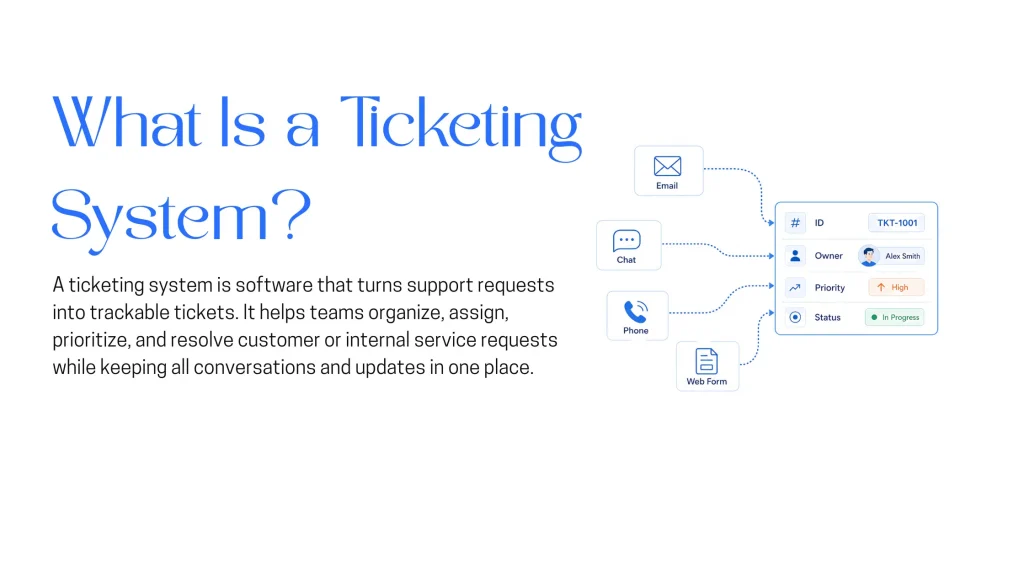
A ticketing system is software that converts support or service requests into individual tickets, each with a unique ID, an assigned owner, a priority level, and a status that updates as the request moves toward resolution. Instead of requests living in a shared inbox or a group chat, every request becomes a discrete, trackable unit of work.
At a minimum, a ticketing system does the following:
- Captures requests from multiple channels (email, web form, chat, phone, or an API call) and converts each one into a ticket
- Assigns a ticket to a person, a team, or a queue based on rules or manual triage
- Tracks status (open, in progress, waiting, resolved, closed) and priority
- Stores the full conversation history and any related notes in one record
- Surfaces metrics such as first response time, resolution time, and backlog size
The term applies across contexts. Customer support teams use it for external requests. IT departments use it for internal incidents and service requests. HR, legal, and facilities teams increasingly run their internal requests through the same underlying software.
Types of Ticketing Systems
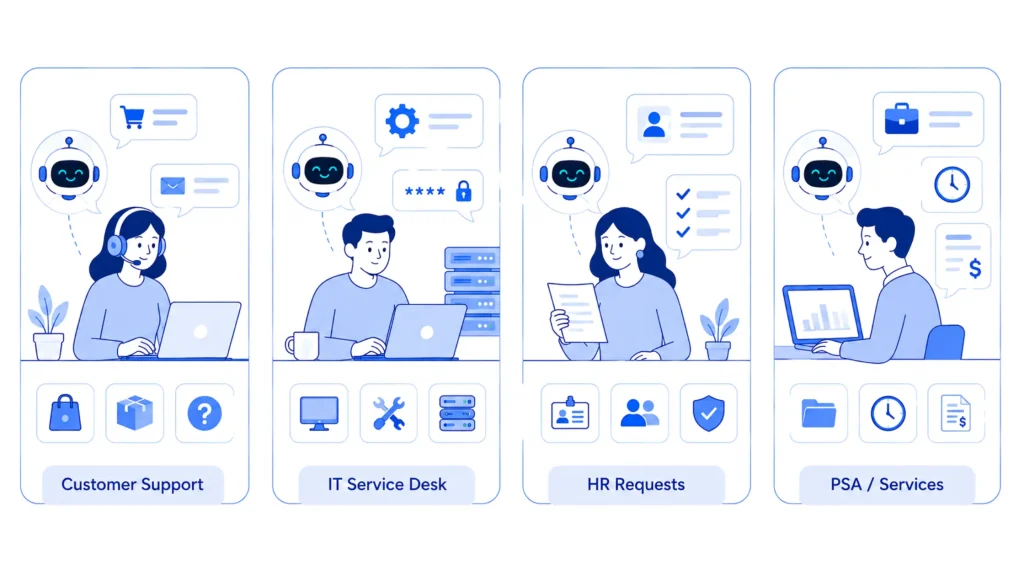
Different teams need different depth. Four categories cover most use cases.
- Customer Support / Help Desk:Built for external customer requests. This category centers on omnichannel intake, a self-service portal, and CSAT tracking, since the person on the other end is usually a paying customer rather than a colleague. An online store handling order and billing questions is a typical example.
- IT Service Desk (ITSM):Built for internal IT incidents and requests. It leans on ITIL-aligned workflows, asset management (CMDB), and change management, since IT tickets often tie back to a specific piece of hardware or a change that needs approval before it happens. An IT team tracking password resets, hardware requests, and outages is a typical example.
- Internal / HR Ticketing:Built for employee requests that fall outside IT. Approval workflows, document requests, and policy questions make up most of the volume here. An HR team managing onboarding and benefits questions is a typical example.
- PSA (Professional Services Automation):Built for managed service providers and consultancies. Ticketing ties directly to billing, time tracking, and client contracts, since the work behind each ticket usually needs to be billed back to a specific client. An MSP tracking billable hours against each client ticket is a typical example.
Most vendors now blur these categories. A platform sold as a help desk often includes ITSM-style features, and the reverse happens just as often. The category label matters less than whether the specific feature set matches the actual workflow it needs to support.
The Mechanics of a Ticketing System
A ticket moves through a fairly consistent lifecycle regardless of vendor.
- Creation and classification. A request arrives through a channel and becomes a ticket. Modern systems tag category, priority, and sometimes sentiment automatically, using rules or a trained model.
- Routing and assignment. The ticket goes to the right person, team, or skill group based on topic, workload, or an explicit rule.
- Investigation and resolution. The assigned agent works the ticket, often referencing a knowledge base, prior tickets, or the requester’s account history.
- Escalation, when needed. If the ticket breaches a service level agreement (SLA) or exceeds an agent’s expertise, it moves up a tier or gets flagged for a specialist.
- Closure and record. The ticket is marked resolved, the requester is notified, and the record stays searchable for future reference, reporting, or audits.
Automation now touches most of these steps. Rules-based systems route by keyword or form field. AI-assisted systems classify intent and sentiment before an agent opens the ticket, and some can draft a first response or resolve simple requests outright.
Traditional Ticketing Systems vs AI Ticketing Systems
Ticketing system, help desk, and service desk describe how a request gets organized. Traditional versus AI-powered describes how much of that work still requires a human at every step, and that distinction now matters more for a 2026 buying decision.
| Capability | Traditional Ticketing System | AI-Powered Ticketing System |
|---|---|---|
| Routing and Categorization | An agent or a fixed rule manually sorts each ticket by topic and assigns it to a queue | Natural language processing reads the request and assigns category, priority, and queue automatically before an agent opens it |
| First Response | An agent drafts every reply from scratch or from a saved canned response | AI drafts a suggested reply or resolves simple requests outright, with an agent reviewing or stepping in when needed |
| Self-Service | A static knowledge base that a requester has to search through manually | An AI agent trained on the same documentation answers directly in conversation, deflecting simple tickets before they are ever created |
| Scalability | Ticket volume growth generally requires adding agents at a similar rate | AI absorbs a share of repetitive volume, so ticket volume can grow faster than headcount |
| Resolution Speed | Bound by agent availability and manual triage time | Routine tickets can resolve in minutes since triage and drafting happen instantly |
| Escalation | An agent decides when to hand a ticket off to a specialist or manager | AI escalates automatically on low confidence, passing full conversation context to the human agent |
A traditional system still works. It just requires a human for every categorization and routing call. By 2026, AI classification and drafting increasingly ship as a standard capability instead of a paid add-on, which is worth confirming directly during vendor evaluation.
Key Features to Look For
- Multichannel ticket capture. Email, web forms, live chat, phone, and API-based intake should all convert into the same ticket format, so no channel becomes a blind spot.
- Automated routing and triage. Rules-based or AI-assisted logic assigns tickets to the right person or team by topic, priority, or skill, cutting the delay caused by manual sorting.
- SLA management with escalation timers. Response and resolution targets need automatic tracking, with alerts before a deadline is missed rather than after.
- A self-service knowledge base. A well-maintained set of articles lets requesters solve simple issues on their own, which keeps ticket volume from growing in lockstep with the customer or employee base.
- Reporting and analytics dashboards. First response time, resolution time, CSAT, and backlog by category or agent should be visible without exporting data to a spreadsheet.
- Integrations with the rest of the stack. CRM, chat, and internal tools like Slack or Microsoft Teams should connect directly, so agents are not switching tabs to find context.
- Role-based access and permissions. Not every internal note or customer field should be visible to every agent, particularly once HR or legal tickets share the same system as customer support.
For a closer look at how specific vendors stack up, see the current lineup of help desk software platforms.
Benefits of a Ticketing System
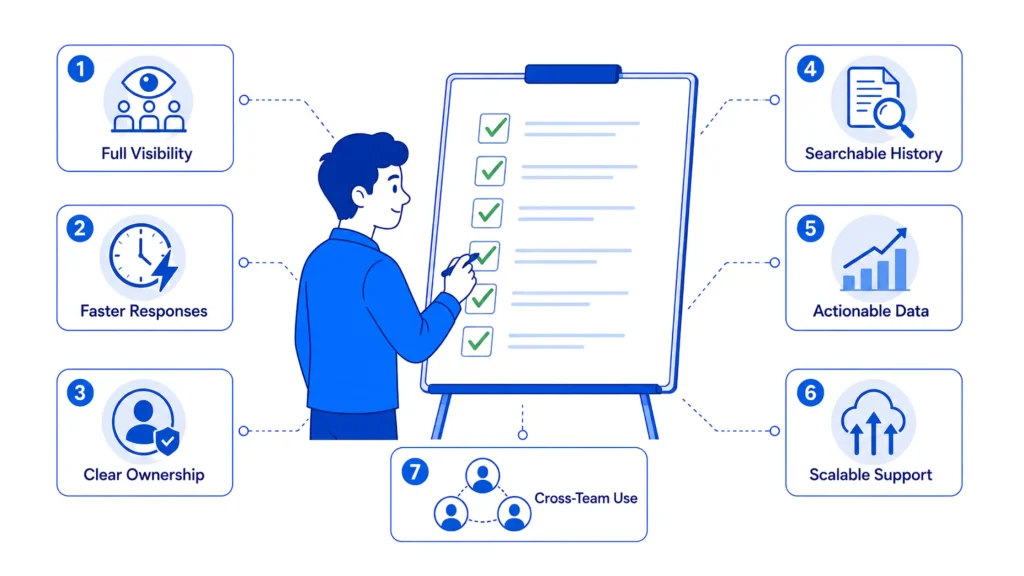
A ticketing system pays for itself before any AI feature enters the picture. The list below covers what actually changes once it is in place.
- Full visibility into every request. Nothing disappears into a personal inbox. Managers see the entire queue, spot requests that are aging, and reassign work before a deadline slips.
- Faster, more consistent response times. The gap between what businesses promise and what they deliver is well documented. In SuperOffice’s audit of 1,000 companies, the average first response to a customer service email took 12 hours and 10 minutes, and only 20% of companies answered a question fully on the first try. A ticketing system will not close that gap on its own, but the routing, SLA timers, and queue visibility it provides are what make closing the gap possible.
- Clear ownership and accountability. Every ticket has a named owner. When a request stalls, it is obvious who is responsible, instead of several people assuming someone else picked it up.
- A searchable history for every issue. Full conversation threads, internal notes, and resolution steps stay attached to the ticket. That history speeds up similar future requests and supports audits or compliance reviews.
- Data that shows where support actually breaks. Metrics like first response time, resolution time, and backlog size reveal which categories of requests take longest and which agents or teams are overloaded, turning support into something measurable instead of a black box.
- Support that scales without headcount growing at the same rate. Automated routing, canned responses, and self-service deflection absorb repetitive volume, freeing agents for requests that actually need judgment.
- One system for more than customer support. IT, HR, legal, and operations teams increasingly run internal requests through the same ticketing infrastructure, cutting the number of disconnected tools an organization has to maintain.
The Shift Toward AI-Powered Support
AI now shows up somewhere in almost every ticketing platform on the market. A few specific points are worth understanding before evaluating any vendor’s AI claims:
- Most ticketing platforms released or updated in 2026 include some form of AI-assisted classification, routing, or drafting. Zendesk’s intelligent triage categorizes and routes tickets by topic, sentiment, and language before an agent opens them, and comparable features now appear across most competing platforms.
- The effect can be substantial when the underlying documentation is solid. In one documented example, energy company Enel added generative AI to ticket routing for its IT service desk and cut the average time to resolve a batch of routine application tickets from about a day to under two minutes, with roughly 15% of tickets resolved automatically and without a human involved, according to an AWS case study.
- Results at that scale depend heavily on how well the source knowledge is structured. AI routing and drafting tools amplify whatever documentation already exists. They do not replace it.
- A ticketing system and a knowledge base start to overlap here in practice. A ticketing system with no connected self-service layer keeps every request in the human queue, while tools such as YourGPT’s AI Helpdesk pair ticket handling with an AI agent trained on a business’s own documentation, escalating to a human when it cannot answer with confidence instead of guessing.
- That escalation path matters more than the length of an AI feature list. A system that hands off cleanly when it is uncertain earns more trust than one that tries to resolve everything and gets it wrong.
- Teams weighing whether to add this layer should look at what an AI help desk actually changes about day-to-day support before comparing specific products, then review the practical steps for setting one up once the case is clear.
Choosing the Right Ticketing System
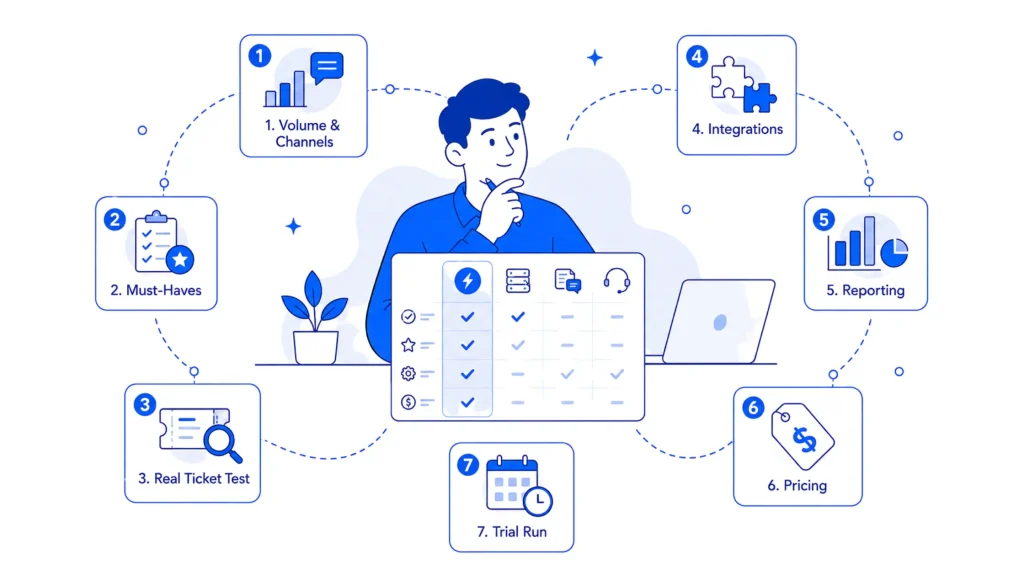
The steps below turn everything above into a practical shortlist:
- Map current ticket volume and channels. A count of monthly requests by channel (email, chat, phone, forms) sets the baseline for which plan tier and which channel support actually matter.
- Separate must-have features from nice-to-haves. SLA management, automated routing, and reporting are non-negotiable for most teams. A visual workflow builder or a mobile app might not be.
- Test automation and AI claims against real tickets. A vendor demo runs on clean sample data. Actual triage accuracy shows up only when messy, real requests move through the system during a trial.
- Check integration requirements against the existing stack. A ticketing system that cannot connect to the CRM, the internal chat tool, or the developer issue tracker creates a second source of truth instead of removing one.
- Match reporting depth to what leadership actually reviews. If resolution time by category feeds into a monthly report, confirm the platform can produce that view without a manual export.
- Compare pricing structure against projected growth. Per-agent, per-ticket, and tiered pricing all scale differently. A plan that looks affordable at five agents can get expensive fast at twenty.
- Run a trial with real tickets before committing. Most vendors offer a free trial or a sandbox. Importing a week of actual historical tickets surfaces problems a sales conversation will not.
FAQ
What is the difference between a ticketing system and a help desk? ▼
A ticketing system is the underlying capability of capturing, tracking, and routing requests. A help desk builds on top of that with a self-service portal and CSAT tracking aimed at customer-facing or employee-facing support. The terms get used interchangeably in vendor marketing, but a help desk is really a ticketing system built around a specific use case. Some AI-powered options, like YourGPT’s AI Helpdesk, add a self-service and escalation layer on top of that same foundation.
Is a ticketing system the same as a CRM? ▼
No. A CRM tracks the full relationship with a customer, including sales history and marketing touches. A ticketing system tracks individual support or service requests. Some platforms bundle both, but the core job is different. One manages relationships. The other manages requests.
What is an SLA in a ticketing system? ▼
SLA stands for service level agreement. In a ticketing system, it sets a target for how quickly a ticket gets a first response and a resolution, based on factors like priority or customer tier. Most platforms track SLA countdown timers automatically and alert an agent before a deadline is missed.
What does YourGPT’s AI Helpdesk add to a ticketing workflow? ▼
It trains on a business’s own documentation and handles routine requests without a human touching them first. Multi-source training, self-learning from real conversations, and human handoff with context preserved work together to cut down how much volume reaches a live queue, while still keeping a person available for anything the AI cannot resolve with confidence.
Can a small business use a ticketing system? ▼
Yes. Most vendors offer entry-level plans built for small teams, often covering a handful of agents with core features like email-to-ticket conversion and basic reporting included. The main task is matching the plan to actual ticket volume instead of paying for enterprise features that will go unused.
Does a ticketing system work for internal IT requests, or only customer support? ▼
Both. The same underlying technology handles either case. IT teams use it for incidents and internal service requests, often with ITIL-aligned workflows. Customer support teams use it for external requests, typically with a self-service portal and CSAT tracking layered on top. HR and legal teams increasingly run their own internal requests through the same infrastructure.
Can YourGPT’s AI Helpdesk work alongside an existing ticketing system? ▼
Yes. YourGPT’s AI Helpdesk sits in front of the ticket queue, handling self-service and first-line requests before anything reaches a human. When a request needs more than automated help, it escalates to a human agent with full conversation context preserved, which keeps the ticketing system focused on the requests that actually need a person. Most teams run the two together instead of picking one over the other.
How long does it take to set up a ticketing system? ▼
It depends on complexity. A small support team can often get basic email-to-ticket conversion and routing running within a day using pre-built templates. Full ITSM implementations with asset management, change management, and custom workflows can take weeks, particularly when integrating with existing IT infrastructure.
Conclusion
A ticketing system will not fix a support process that has no defined ownership or no agreed priorities. What it does is make the existing process visible, measurable, and harder to quietly ignore. That visibility, more than any single automation feature, is what actually changes how a team performs day to day.
The choice between a lightweight help desk tool and a full ITSM platform comes down to two honest questions: how many channels and how much volume actually need to be handled, and how much of the ticket lifecycle needs to tie into broader IT processes like asset management or change management. Answering these before comparing feature lists narrows most shortlists down to two or three real options.
Once you’re at that shortlist stage, test any AI claims against your own messy tickets, not a vendor’s clean demo data, and confirm the escalation path clearly: what happens the moment the system can’t resolve something on its own. A platform that hands off cleanly to a human agent will serve your team better long-term than one that tries to resolve everything and occasionally gets it wrong.

Related posts