Agentic AI in Customer Experience: What It Is and How It Actually Works
A customer asks where their order is. A traditional bot pastes a tracking link and calls it done. An agentic system checks the carrier API, sees the shipment stuck at a depot, applies a credit under the delay policy, updates the CRM, and messages the customer before they’ve had time to get annoyed. Same question. Completely different outcome.
That gap between answering and actually fixing something is what agentic AI in customer experience is supposed to close. Most vendors talk about it. Few support teams have actually built it.
Part of why that gap matters more now: customers aren’t really comparing your support to your competitors’ anymore. Zendesk’s CX Trends research finds people benchmark every interaction against the best experience they’ve had anywhere, full stop, which means the bar keeps moving regardless of what industry you’re in.
Retail feels that pressure first. Take a store selling custom t-shirts: no two tickets look alike because no two orders are identical, yet the customer on the other end still expects the same instant response they’d get buying something off a shelf. That’s exactly the kind of complexity a script-based bot can’t absorb.
What Is Agentic AI in CX
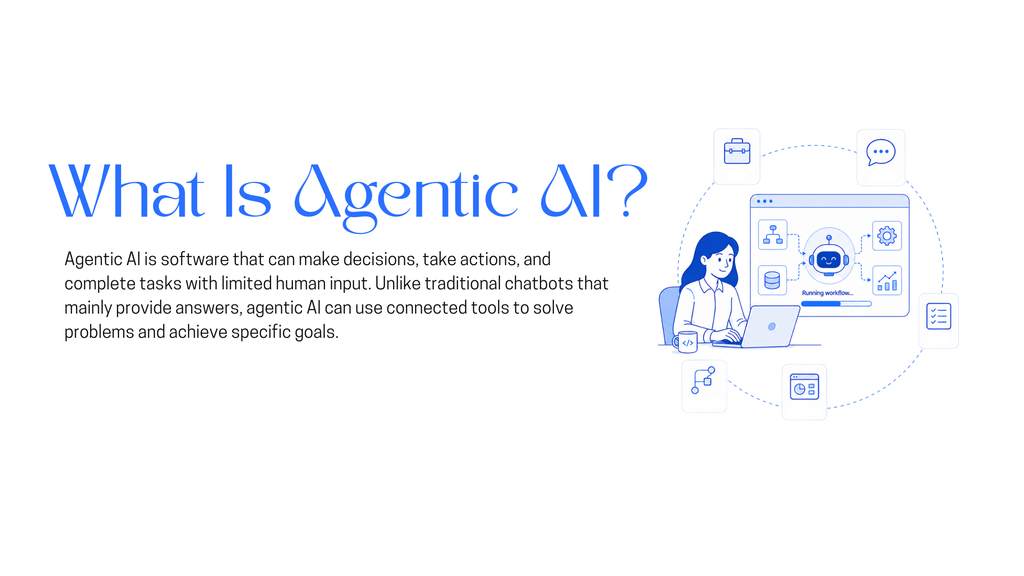
Agentic AI in customer experience is AI that doesn’t stop at generating a response. It pulls context from your systems, decides what action the situation calls for, executes that action through your CRM, billing platform, or order management tool, and checks whether the action actually solved the problem before it closes the loop. The output isn’t a message that describes the issue. It’s a resolved ticket.
That last part, checking its own work, is the piece most current deployments skip.
What Actually Separates Agentic AI From a Chatbot
A chatbot answers what’s asked. An agentic system decides what needs to happen and does it. Four things make that possible:
- It acts without waiting for a script. It weighs context and takes the next step on its own, instead of following a fixed decision tree.
- It connects to the tools that actually run your business. CRM, billing, inventory, order management. Without those connections, “agentic” is just a better-worded FAQ.
- It carries context across the whole conversation, not just one message. A customer who starts in chat and finishes on a call shouldn’t have to re-explain themselves.
- It gets sharper with every resolved ticket. Outcomes feed back into how it handles the next similar case.
Drop any one of these and you’re back to a chatbot with better copywriting.
How Agentic AI works
Three layers do the actual work. Most teams stop at the first one and call the project finished.
Answer. The system reads what the customer typed or said, figures out the actual intent, and pulls the right information from your knowledge base, policies, and past tickets. A refund question could mean policy, status, or “please start one.” Getting that distinction right up front is cheaper than three wrong answers later.
Act. This is where the system stops describing and starts doing: changing a shipping address, applying a discount, canceling a booking within the cancellation window, rescheduling an appointment. These are the tasks that quietly eat human support hours at scale, and they’re squarely within what a well-integrated agent can handle.
Resolve. This is the layer almost everyone underbuilds. Resolution means the system confirms the fix actually worked, not just that a task ran. If it holds, the loop closes and the customer gets told. If it doesn’t, the case escalates to a human with the full thread attached: what was tried, what happened, what’s recommended next. Handing off with nothing but a ticket number forces the customer to repeat everything they just explained to the bot. That’s a worse experience than never having deployed one.
The Stack Running Underneath It
None of this works off a single model. It’s layers, and each one has a job:
- Reasoning layer. The model that interprets intent and decides what to do. This is the part most vendors lead with, and it’s the easiest piece to get right.
- Retrieval and knowledge. Pulls grounded answers from your actual documentation, not the model’s best guess. If your knowledge base hasn’t been touched since 2023, no amount of reasoning fixes what comes out the other end.
- Integration layer. Function calling that lets the model trigger a real action in a real system, instead of just generating text about one. This is the technical difference between an agent and a very good FAQ.
- Feedback loop. Tracks what worked, what didn’t, and feeds that back into how future cases get handled.
Platforms like YourGPT bundle these layers together specifically for support and sales teams, which is usually faster to stand up than wiring a reasoning model, a retrieval layer, and a CRM connector together from scratch.
Where This Already Shows Up in Support
- Self-service that actually diagnoses. Instead of a static FAQ, the customer works through a multi-step problem with a system that remembers what they already said.
- Proactive detection. A missed payment or a delayed shipment gets caught and handled before the customer opens a ticket about it.
- Escalation with full context. When a case does need a human, it arrives with conversation history, customer data, and everything already attempted, so the agent starts from where the bot left off instead of from zero.
- Copilots for live agents. While an agent is on a call, the system surfaces relevant account history and suggests the next move in real time, cutting handling time without taking the agent out of the loop.
This is also where the industry is quietly redrawing the line on what “good” AI support even means. Our piece on answering versus resolving in AI customer service goes deeper into that shift, and why most support tools are still stuck on the wrong side of it.
Operational Impact of Agentic AI in Customer Experience
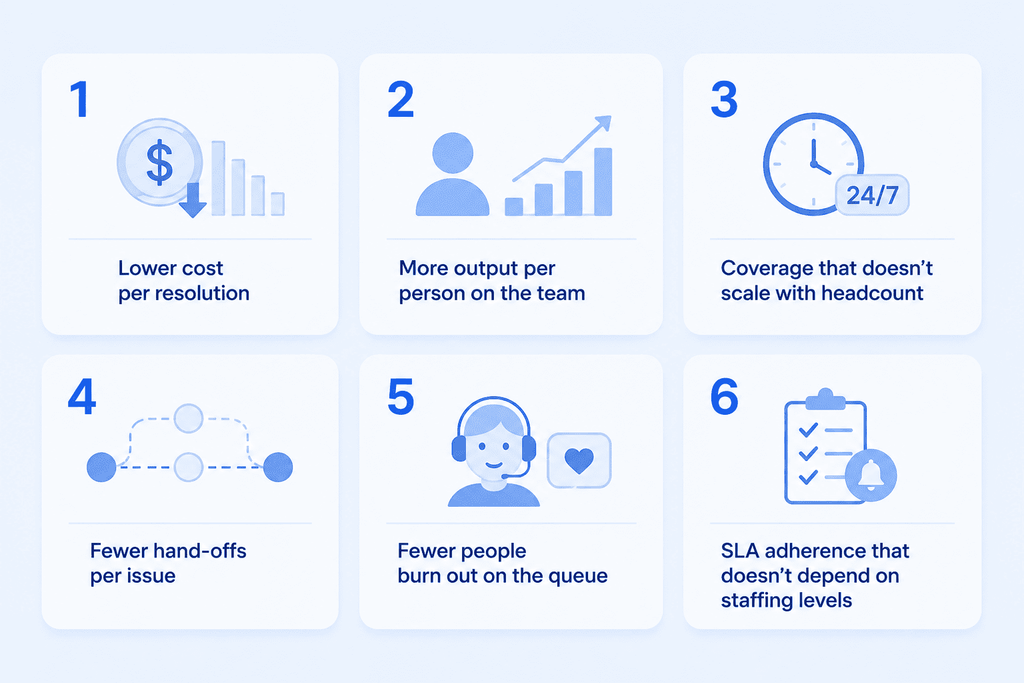
The traits are only worth caring about if they show up in numbers a support lead actually tracks:
- Lower cost per resolution. McKinsey’s research on AI-enabled service transformations found self-service driven by AI cut service interactions by 40 to 50 percent and dropped cost-to-serve by more than 20 percent, without the quality drop teams usually brace for. Gartner projects the gap widens from here: by 2029, it expects agentic AI to autonomously resolve 80 percent of common service issues, cutting operational costs by roughly 30 percent.
- More output per person on the team. Moving repetitive, process-heavy tickets off a human’s plate doesn’t just save time. It raises what each remaining human interaction is worth, since agents spend it on the cases that actually need judgment.
- Coverage that doesn’t scale with headcount. A missed payment at 2 a.m. gets caught at 2 a.m., not when the day shift logs in.
- Fewer hand-offs per issue. Problems that used to bounce between three tools and two departments get resolved inside a single interaction, because the system can act instead of just routing.
- Fewer people burn out on the queue. Repetitive, low-stakes tickets are what drives most support turnover. Move them off a person’s plate and the agents who stay spend their day on work that actually feels worth doing.
- SLA adherence that doesn’t depend on staffing levels. Automated monitoring flags a deadline before it’s missed, not during the post-mortem after.
Why Most Agentic AI Projects Still Fail
Gartner expects more than 40 percent of agentic AI projects to be canceled by the end of 2027, and the firm points to escalating costs, unclear business value, and weak risk controls as the reasons why, based on a poll of over 3,400 organizations already investing in the technology.
In customer experience specifically, the failure usually traces back to one of three things:
- Integration debt. Legacy systems with no API, knowledge scattered across wikis and Slack threads, a CRM that’s inconsistent enough to break personalization. None of it shows up until you try to build something that has to act, not just answer. Firms like Yalantis, which builds custom enterprise software across manufacturing, IoT, and engineering environments, run into this constantly: the reasoning model is rarely the hard part, wiring it into legacy infrastructure is.
- No verification step. The system completes a task and assumes that’s the same as solving the problem. It isn’t, and customers notice the difference fast.
- Governance added after the fact. Who owns each decision the agent makes, what gets logged, when a human has to step in. These need to be decided before launch, not patched in after something goes wrong.
These systems also touch payment details and, in some industries, health records, so the stakes go past a bad review. The NIST AI Risk Management Framework gives teams a structured way to decide who owns each decision, what gets logged, and when a human has to stay in the loop. It’s worth pairing with IBM’s Cost of a Data Breach Report, since most of what goes wrong in production turns out to be ordinary and preventable, not exotic.
McKinsey’s State of AI survey found that nearly half of organizations using AI report measurable improvement in customer satisfaction and competitive differentiation. The gap between that number and Gartner’s cancellation forecast is entirely about how the system was built, not whether the underlying technology works.
Risks and Challenges of Agentic AI
Agentic AI introduces risks around autonomy, security, data protection, bias, accountability, and transparency that require clear controls and human oversight.
- Autonomy risks: Set clear operational boundaries and approval checkpoints to prevent AI agents from acting beyond their authorized scope.
- Overconfidence: Add validation layers and human review for decisions based on incomplete or uncertain data.
- Escalation loops: Use fail-safes and clear human escalation rules to stop automation errors from repeating or compounding.
- API vulnerabilities: Protect system integrations with secure gateways, strong authentication, regular testing, and security audits.
- Sensitive data exposure: Use encryption, strict access controls, and compliance measures to protect customer information.
- Bias: Use diverse training data and bias detection processes to reduce unfair outcomes across customer groups.
- Accountability: Clearly define who owns AI decisions, monitors system behavior, and manages escalations.
- Transparency: Clearly tell customers when they are interacting with AI, how their data is used, and how they can reach a human.
Tips for Implementing Agentic AI in CX
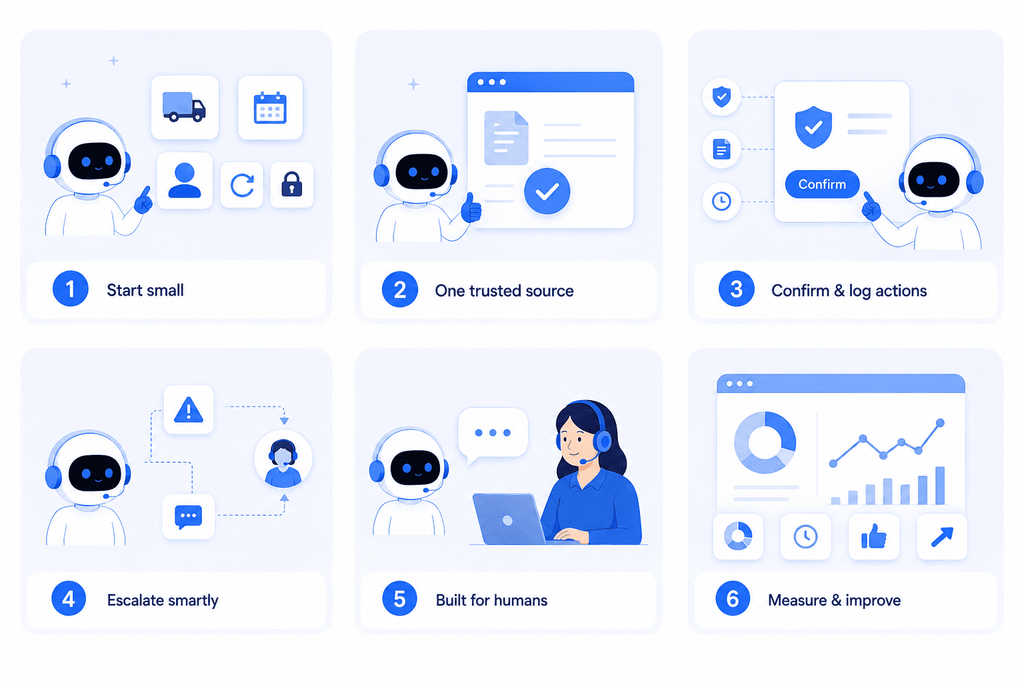
- Pick three to five request types where you can both answer and act. Shipping updates, appointment rescheduling, account lookups, simple refunds, password resets. Start where success is unambiguous, not with your hardest ticket category.
- Connect one source of truth for knowledge, and keep it current. Multiple sources with conflicting answers produce worse output than one good source.
- Require confirmation before anything irreversible. Cancellations, refunds, address changes, payment edits all need a checkpoint. Log every action, not for compliance theater, but because you’ll need the logs to debug what breaks.
- Define the escalation path before launch. Low confidence, high-stakes actions, signs of frustration, and any topic you don’t want automated should trigger a handoff, and that handoff needs to carry full context with it.
- Plan for humans, not around them. Customers still want a person for the moments that carry weight, disputes, cancellations, anything emotionally loaded. Build the agent to hand off cleanly rather than treating a human as a fallback, and let your team’s role shift toward the judgment calls the system genuinely can’t make.
- Measure containment rate, resolution time, CSAT, and escalation quality, meaning what share of escalations were actually necessary versus what the agent should have handled itself. That last number is where the next round of improvement usually hides.
The Limits of AI Autonomy
Agentic AI runs independently, but independent doesn’t mean unwatched. The implementations that actually hold up put human judgment into every layer: a governance framework that sets the boundaries, monitoring that catches drift before it compounds, and an escalation path that routes the hard cases to a person with full context attached. None of that limits the autonomy. It’s what makes the autonomy safe enough to hand real decisions to.
Key Takeaways
1. From answering to acting A traditional bot tells a customer where their order is. An agentic system checks the carrier API, sees the delay, applies the credit, and closes the case without a follow-up message. The difference is action, not just accuracy.
2. Resolve is the step everyone skips Answer and Act are the easy two-thirds of the loop. Resolve, actually confirming the fix worked before closing the case, is what separates a system customers trust from one that just looks busy.
3. Predictive is replacing proactive Catching a problem fast after it starts is proactive. Catching it before the customer notices, using account history to flag a pattern early, is where the category is headed next. Gartner expects the shift to move fast, projecting that by 2028 roughly 15 percent of routine work decisions will run through agentic AI, up from close to none today.
4. Integration decides whether “agentic” is real A reasoning model with no access to the CRM, billing, or order system is a well-dressed FAQ. What the system can actually reach determines what it can actually fix.
5. Oversight moves, it doesn’t disappear Autonomy doesn’t remove governance, it relocates it. Clear ownership, monitoring, and an escalation path let the humans on the team spend their time on the calls a system genuinely can’t make.
How to Implement AI Support Agents with YourGPT
Using AI support agents helps make customer service faster and better by taking a practical, efficient approach.
Start with a clear plan. Every business has unique support goals, so it’s important to define what you want the AI to achieve from the beginning. Here’s how to set up YourGPT:
1. Create Your Account
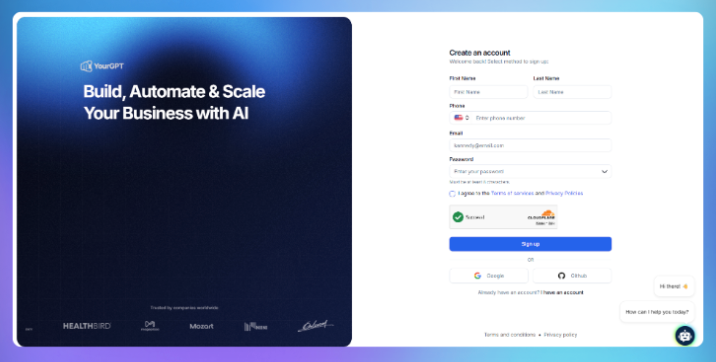
Sign up for an account in YourGPT. The registration is simple and requires only basic information to get you started quickly. Once your account is ready, you’ll have access to the AI chatbot builder dashboard.
2. Upload Your Knowledge Base Documents

Next, prepare the documents you want your chatbot to learn from. YourGPT supports a wide range of training file types, including Website, PDFs, Word documents, FAQs, PowerPoint slides, CSV files, and much more.
- Organise your documents by topic or department to help the AI understand context better.
- Avoid uploading outdated or irrelevant files to maintain answer accuracy.
Upload your files through the dashboard. The system automatically processes and indexes the content, preparing it for training.
3. Customise Your AI Agent
After uploading your documents, personalise how your chatbot communicates and performs:
- Set the Bot Persona: Define the chatbot’s tone and style to fit your brand—whether formal, friendly, or neutral. This ensures consistent messaging aligned with your company’s voice.
- Select the Latest GPT Model: Choose from the latest GPT AI models available on YourGPT, balancing accuracy, response speed, and cost to suit your needs.
- Adjust Response Settings: Fine-tune parameters like Previous Message Limit (chat History), creativity (temperature), and document chunks to pass to AI.
- AI studio: Use AI Studio to design step-by-step workflows tailored to your support processes. Customise triggers, actions, and reply flows for a truly personalised solution.
- Test Before Launch: Run sample queries to verify that the persona and model produce the desired tone and accurate answers. Refine settings as needed.
Customising your chatbot’s persona and AI model helps deliver accurate, relevant, and engaging responses tailored to your audience.
4. Integrate Your Agent Across Channels

Once trained, you can deploy your chatbot where it’s needed most. YourGPT offers easy omni-integrations with popular platforms:
- Messaging apps: Slack, WhatsApp, Telegram, Discord
- Web: Embed a chat widget on your website with a simple script
- Social media: Connect to Instagram or Facebook Messenger for customer queries
Each integration is designed for easy setup without coding, letting you reach users wherever they prefer to communicate.
5. Connect tools, actions, and workflows
Knowledge helps the agent answer well. Tools are what let it actually do the work.
This is the step where you connect the agent to the systems and actions it needs for its role. That can include functions, backend actions, app integrations, and MCP connections that allow the agent to fetch information, update records, trigger workflows, or complete tasks across your stack.
For more advanced use cases, you can use AI Studio to build sequential agent workflows. This is useful when the job is not just a single response, but a series of steps that need to happen in order. For example, the agent may first identify intent, then retrieve the right data, then decide what action to take, and finally complete that action or hand it off.
This is what turns the agent from a conversational layer into a working operational system.
6. Test and Optimise
Before going live, test your chatbot by asking questions from different topics in your knowledge base.
- Review the responses and optimise the AI for inaccuracies.
- Update or add documents as needed and retrain to improve performance.
- YourGPT also provides AI analytics to help track usage and identify areas for improvement.
7. Maintain and Improve Over Time
Support content changes. Schedule updates to your knowledge base and retrain the AI as needed. Periodic improvement keeps your AI agent effective a
FAQ
What is agentic AI in customer experience? ▼
It’s AI that perceives context from your business systems, decides on an action, executes it through tools like your CRM or billing platform, and confirms the action resolved the issue before closing the case, rather than stopping at a generated response.
How is agentic AI different from a regular AI chatbot? ▼
A chatbot answers questions using a script or a knowledge base. Agentic AI decides what needs to happen and acts on it directly, through connections to the systems that actually run the business, and it carries memory across the whole interaction instead of resetting each message.
What’s the biggest risk with agentic AI in customer support? ▼
Handing off to a system, or a human, without verifying the fix actually worked. A close second is deploying it against legacy systems with no clean API and calling that a technical problem when it’s really a governance problem.
Will agentic AI replace human support agents? ▼
No. It automates the high-volume, low-complexity work, which frees human agents for cases that need judgment, empathy, or a decision with real stakes attached. Teams that frame it as a replacement project tend to fight the rollout the entire way.
How long does it take to implement agentic AI in customer service? ▼
Teams that start with three to five well-defined workflows and one clean knowledge source usually see a working version in a day, not months. Platforms like YourGPT that bundle the reasoning, retrieval, and integration layers together cut a lot of that setup time versus building each piece separately. The projects that stretch to a year or more are almost always stuck on integration debt, not on the AI itself.
Conclusion
The difference between agentic AI that feels effortless and agentic AI that feels like a worse phone tree isn’t the model underneath it. It’s whether the system was built to verify its own work, and whether a human picks up the thread with full context when it can’t.
If you want to see what the Answer, Act, Resolve loop looks like against your own ticket queue, YourGPT walks through how it connects to your CRM and knowledge base directly, without a multi-quarter integration project. For the channel-specific side of this, our guides to the best AI voice agent platforms and leading AI chatbots for customer support cover how the same loop plays out across voice and chat, and our conversational AI playbook walks through the KPIs to track once it’s live.

Related posts
Multimodal Chatbots: Image and File Upload Workflows That Actually Deflect Tickets