How to Choose the Best Shopify AI Support Agent
TL;DR
The best Shopify AI support agent is not defined by demos, but by how it performs under real customer scenarios with accurate, source-backed answers and clear boundaries.
Reliable systems depend on strong knowledge grounding, retrieval of live store data, controlled permissions, and structured escalation, not just model quality or response fluency.
Platforms like YourGPT support this by turning defined workflows into controlled, testable systems, helping teams move from basic automation to consistent, outcome-driven support. :contentReference[oaicite:0]{index=0}
Shopify customer support looks manageable until the volume hits. Order status questions pile up. Returns land at the edge of your policy window. A discount code expires and three customers email within an hour claiming they never got the memo. These situations do not need a human every time, but they do need accuracy, and that is where most AI agents fail.
The best AI customer service agent for a Shopify store is not the one with the best demo. It is the one that handles your specific requests reliably, answers from your approved knowledge, stays within the action limits you set, and hands off to a human without losing context. This blog helps you evaluate that in a practical way, so you can make a decision based on real evidence rather than a polished walkthrough.
Most stores do not struggle to find an AI agent. The harder problem is finding one that still works after the first week, when edge cases surface, policies get tested, and customers arrive with questions the demo never covered. That is the gap this guide is built to close.
Seven Capabilities That Actually Matter
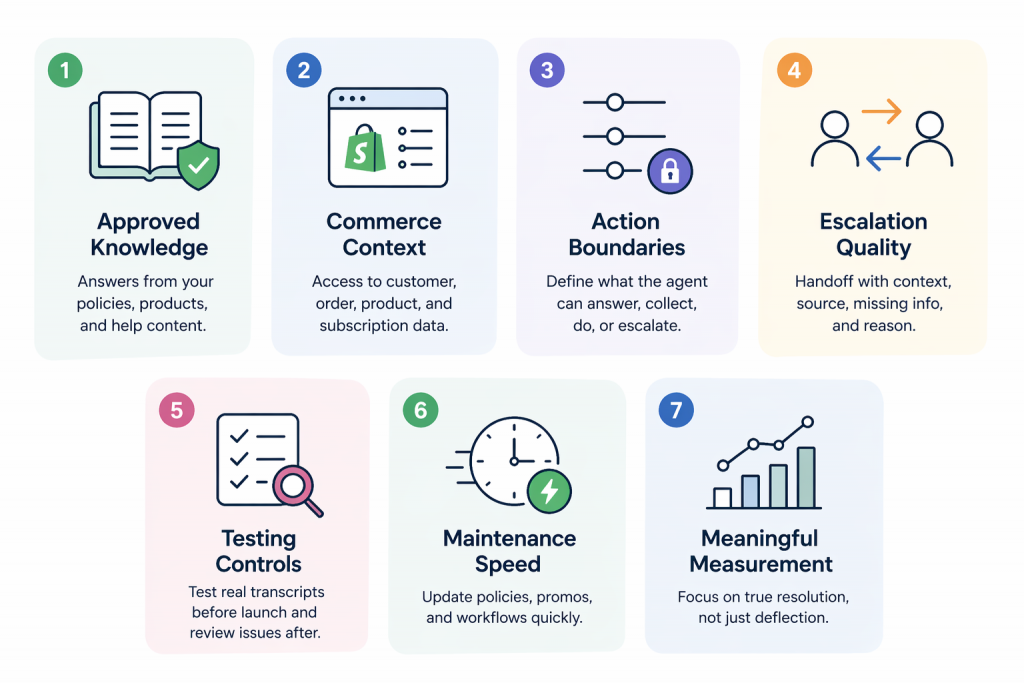
Before comparing platforms, establish what good looks like. Most vendors will show you a polished demo. What you need to evaluate is the infrastructure behind the conversation, because that infrastructure determines whether the agent performs reliably after week one.
These seven capabilities are the evaluation baseline:
- Approved knowledge:The agent answers from your current policy pages, product data, help articles, and support macros. It does not generate responses from general model memory when your store-specific policies are what the customer is asking about.
- Commerce context:The vendor can explain clearly what customer, order, fulfillment, product, or subscription data the agent can access, and under what permissions. Vague answers here are a red flag.
- Action boundaries:Your team can define what the agent may answer, collect, initiate, refuse, or route to a human. These limits should be configurable, testable, and easy to update.
- Escalation quality:When a conversation moves to a human, the handoff includes the customer’s request, the context gathered, the source the agent used, any missing information, and the reason for escalation. Without this, your human agents are starting from scratch.
- Testing controls:You can test real transcripts before launch and review weak or incorrect answers after launch, without running experiments on live customers.
- Maintenance speed:Policy changes, expired promotions, product updates, and risky workflows can be updated or paused quickly. If it takes a developer and a support ticket to update a return window, the system will cause problems during peak periods.
- Meaningful measurement:Reporting separates genuine resolution from shallow containment. Deflection numbers that hide repeat contacts, wrong answers, and incomplete handoffs are not a measure of success.
If a vendor cannot demonstrate these seven capabilities in a working environment, the product may still be useful for internal tasks. It is not yet proven as a customer-facing Shopify support agent.
Set Clear Boundaries for Safe AI Resolution
Most AI failures are not model problems. They are boundary problems.
The agent knows the policy, but applies it in the wrong situation. It answers when it should ask. It proceeds when it should stop.
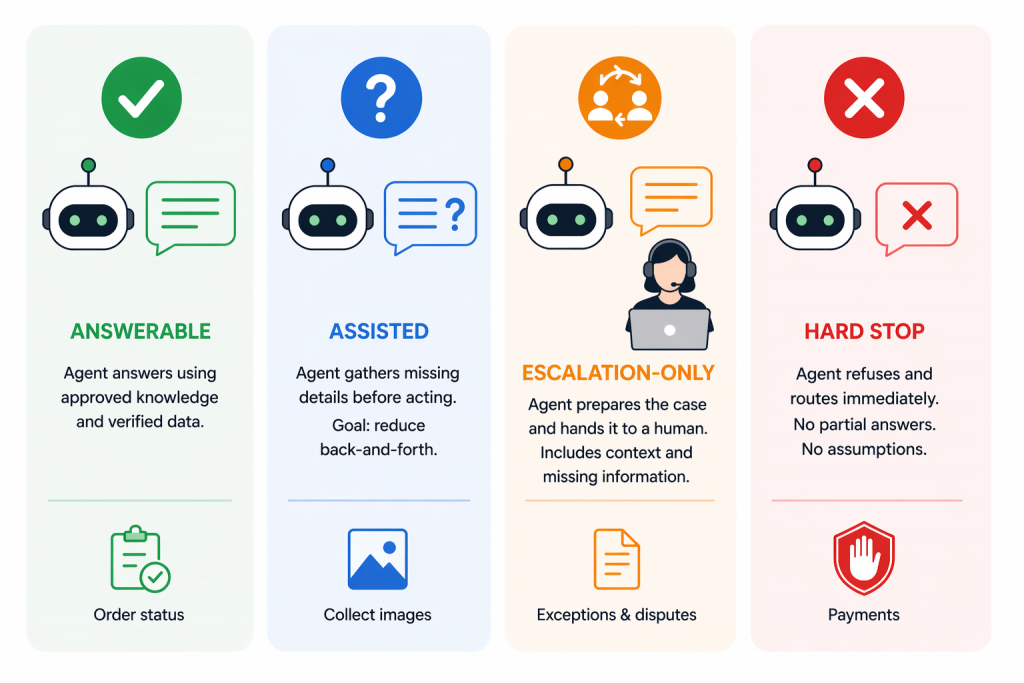
Fix this by defining four types of support requests:
- Answerable : The agent responds using approved knowledge and verified data such as order status, return windows, or shipping timelines.
The rule is simple. If the answer cannot be traced to a current source, it should not be given. - Assisted : The agent gathers missing details before acting. This includes collecting order IDs, images, or clarifying questions for damaged items or product fit.
The goal is to reduce back-and-forth, not rush to an incomplete answer. - Escalation-only : The agent prepares the case and hands it to a human. This applies to exceptions, disputes, or high-friction conversations.
A good escalation includes intent, context, and missing information so the next agent can continue without restarting. - Hard stop : The agent refuses and routes immediately. This includes payments, chargebacks, legal threats, or regulated claims.
No partial answers. No assumptions.
Safe resolution means the agent only handles requests where the outcome is predictable and verifiable. Everything else is slowed down or escalated.
A system that answers everything looks efficient in dashboards. In reality, it creates repeat contacts and support risk.
How to Validate Your Knowledge Layer Before Using AI
A Shopify customer service AI agent should not answer from general memory when the question depends on your store. It must rely on approved, retrievable knowledge such as help center articles, return and exchange policies, shipping zones, fulfillment cutoffs, product descriptions, sizing guides, care instructions, subscription rules, discount conditions, support macros, and internal exception notes.
Each response should map back to a clear source. A return question should reflect the current policy page. A sale-item query should account for any different rules tied to discounted products. A product-fit question should use structured product data such as sizing, materials, compatibility notes, or care instructions. A discount issue should reference the actual offer conditions, not a generic answer about promo codes.
AI exposes knowledge gaps quickly because it can repeat outdated or conflicting information at scale. Before launch, audit the sources behind your first support workflow and fix inconsistencies at the source.
- Remove duplicate policy pages so only one version exists
- Resolve conflicts between FAQs, product pages, checkout language, and support macros
- Separate customer-facing rules from internal discretion
- Mark edge cases that should escalate instead of being answered automatically
- Decide which source takes priority when two sources disagree
Do not launch a customer-facing workflow if your policy pages, product content, and support macros do not agree. Fixing the source of truth is more important than adjusting prompts or changing the model.t source conflict is more important than changing the model prompt.
Understand the Difference Between Models, ChatGPT, and Real Support Agents
ChatGPT can help your support team work faster, but it is not a customer-facing Shopify support agent by default. Teams use it internally to rewrite macros, summarize complaints, draft clearer policy explanations, or improve product guidance. That is internal assistance. It does not mean the system can safely handle live customer conversations where accuracy, policy alignment, and outcomes matter.
A GPT model is the language engine. It can generate a clear answer, ask follow-up questions, or summarize a ticket. But it does not decide what information is approved, whether order or account data can be used, whether a request is within policy, or when to escalate to a human. The model produces text. The support system controls what the agent can access, what actions it can take, what it must refuse, and how performance is measured.
OpenAI describes GPTs as tailored versions of ChatGPT that combine instructions, knowledge, and selected capabilities within ChatGPT. These are designed for use inside ChatGPT. In contrast, support agents used on Shopify stores are built through APIs and integrations that operate across websites, messaging channels, and backend systems.
The buying implication is straightforward. Do not accept a demo that treats “we use a strong model” as the full solution. Instead, evaluate how the system works in practice:
- Where does the agent run and which customer channels does it support
- Which approved knowledge sources it retrieves from and how they are kept up to date
- What data it can access such as orders, subscriptions, or customer history
- What actions it can take and where boundaries are enforced
- How escalation works and whether humans receive structured context
- How incorrect or risky answers are reviewed, corrected, and prevented over time
The model matters, but it is only one layer. What determines real support quality is how that model is controlled, connected, and evaluated in your store environment.
Why Retrieval Matters More Than Training for Shopify Support
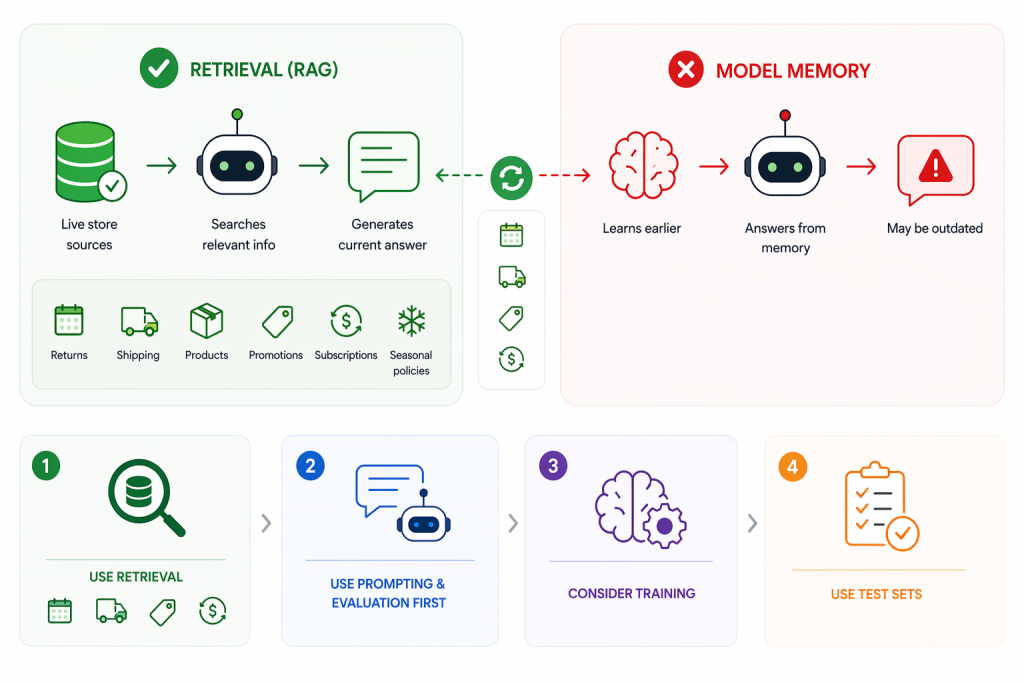
Answers that depend on changing store data should come from retrieval, not model memory. Retrieval-augmented generation lets the agent search approved sources during the conversation and use relevant policy, product, or support content to generate a response. OpenAI defines retrieval as semantic search over your data combined with models to produce grounded answers.
This is essential for anything that changes over time. Return windows, shipping cutoffs, product details, compatibility rules, care instructions, promotions, subscription terms, and seasonal policies should come from live sources. If your holiday shipping policy changes on Monday, the agent should reflect that immediately. A model trained earlier can still produce outdated answers if it cannot access the current source.
Training the model solves a different problem. It improves how the agent behaves, not what it knows. It helps with response format, classification, routing, and maintaining a consistent support tone. It does not fix missing or outdated knowledge. Before considering training, you need a clear evaluation setup based on real support queries.
Use this as a simple decision guide:
- Use retrieval for current policies, catalog data, shipping rules, promotions, and subscription logic that may change
- Use prompting and evaluation first to improve structure, tone, and consistency
- Consider training only if the agent has the right context but still formats, classifies, or routes poorly
- Use test sets to identify whether failures come from missing knowledge, weak retrieval, unclear instructions, or model behavior
Do not try to fix weak or inconsistent knowledge with model changes. Start with real support questions and test whether the agent can retrieve the correct source. If it cannot, fix retrieval and clean your data first. If it can but responds poorly, then improve prompts or consider training.
Shopify AI Customer Support Set Action Limits for Orders Refunds and Accounts
A Shopify AI support agent can know the correct policy and still create risk if it operates without clear action limits. Orders, refunds, subscriptions, payments, and account changes directly affect revenue, inventory, and customer trust. This is why “integration” is not enough. You need to define exactly what the agent can see, request, initiate, modify, refuse, and escalate.
Treat each workflow as a permission problem. In early stages, the safest role for the AI is to answer from verified data, collect required inputs, and prepare structured handoffs. High-impact actions such as refunds, account edits, or billing changes should remain gated until the agent proves reliable under real conditions.
| Workflow area | Safe early AI role | Human-review trigger |
|---|---|---|
| Order status | Answer from verified order data when status is available. | Missing data, conflicting tracking, unusual delays, or high customer frustration. |
| Returns | Explain the return policy and collect required details. | Damaged items, unclear eligibility, exceptions, or manual approval cases. |
| Refunds | Collect facts and summarize the request for review. | Any approval, override, high-value refund, dispute, or policy exception. |
| Subscriptions | Explain rules and guide users to the correct next step. | Billing disputes, cancellation exceptions, unclear renewal claims, or account-specific changes. |
| Product advice | Answer using product data and ask clarifying questions. | Missing fit context, regulated claims, or safety-sensitive recommendations. |
| Discounts | Explain offer conditions and eligibility rules. | Expired offers, stacked discounts, manual overrides, or goodwill exceptions. |
Refusal behavior should be built into your system, not treated as an edge case. The agent must clearly state when it cannot complete actions such as issuing refunds, changing payment details, or overriding policies without review. At the same time, it should make the next step useful by collecting the right inputs, summarizing the situation, and passing structured context to a human agent.
Before enabling any action-based workflow, test failure scenarios. Use real cases such as refund edge requests, missing tracking updates, customers threatening disputes, expired discounts, and incomplete product queries. These cases reveal whether your boundaries actually hold under pressure.
How to Evaluate Shopify AI Support Systems Using Real Evidence
Feature lists do not tell you how a system behaves under real conditions. What matters is whether the agent can show how it arrives at answers, what it can access, what it can change, and how failures are handled. In a demo, focus on evidence you can inspect, not polished responses. A reliable system should make its decisions traceable, its permissions clear, and its outcomes measurable.
Use this checklist to evaluate vendors in a practical way:
| Criterion | What to verify | Risk if missing | Evidence to ask for |
|---|---|---|---|
| Source visibility | Can the agent show which policy, product page, macro, or workflow shaped the answer | Answers appear confident but cannot be audited | Conversation with source trace or review panel |
| Commerce context | What order, customer, fulfillment, product, or subscription data the agent can use and under what permissions | Agent answers as if it knows context it cannot verify | Permission model and sample redacted workflow |
| Access control | What the agent can see, initiate, modify, or is restricted from | Loss of control over orders, refunds, or account actions | Workflow map with approval and restriction rules |
| Escalation quality | Does handoff include request, context, source used, missing details, and reason | Human agents must rework incomplete conversations | Sample handoff into the helpdesk |
| Testing controls | Can you test real transcripts before launch and review failures after launch | System learns on live customers instead of controlled tests | Test set workflow and review queue |
| Analytics | Does reporting separate unresolved queries, escalations, wrong answers, repeats, and task completion | Deflection metrics hide poor resolution quality | Analytics dashboard or report schema |
| Maintenance | How quickly policies, promotions, workflows, and macros can be updated or paused | Outdated answers persist during peak periods | Admin update flow and rollback controls |
| Cost behavior | What happens when conversation volume spikes | Unexpected costs or throttling during peak demand | Pricing terms and real usage examples |
Strong demos show how the system behaves under pressure. Look for source traces, permission controls, escalation outputs, test results, update workflows, and reporting views. These indicate whether the system can be trusted after launch.
Treat any claim about refunds, subscriptions, order changes, customer data, security, pricing, or resolution rate as unverified until you see documentation or a working example.
How to Roll Out Shopify AI Support Safely Without Scaling Too Early
Shopify AI Support Rollout Start Narrow and Expand with Confidence
A strong pilot should be narrow enough to inspect closely. Start with a support slice that is frequent, low risk, and easy to verify such as order tracking, shipping questions, policy clarification, or product FAQs. The goal is consistent, correct resolution within a controlled scope, not broad coverage.
Build the rollout using real data. Pull recent conversations, group them by request type, and score them by volume, risk, and knowledge readiness. Choose a high-volume, low-risk scope with clean source material. Align policies, product data, macros, and exception notes before launch. Define escalation triggers early and test using real transcripts, including messy and incomplete cases. Review failures and fix the source, retrieval, prompts, or boundaries based on the issue. Expand only after the first workflow performs reliably.
Use clear launch gates:
- Do not launch if sources conflict
- Do not launch if the agent answers outside scope
- Do not enable actions before refusal and escalation are reliable
- Do not expand if humans rewrite most handoffs
- Do not expand if repeat contacts remain high
These checks keep the rollout grounded. Weak answers usually come from source or workflow issues, not the model. Fix those before expanding.
Shopify AI Support Metrics Focus on Resolution, Not Deflection
Deflection is not resolution. An AI agent can keep tickets out of the inbox and still leave customers confused, trigger repeat contacts, or create more work than a clean human handoff. Measure success only when the customer gets a correct answer or completes the intended task within the approved scope.
Evaluate containment carefully. If a customer asks about return eligibility, the agent should apply the current policy, request missing details, and escalate exceptions. If the question is about a product before purchase, the response should reduce uncertainty using real product data, not keep the conversation open with vague replies.
Track signals that reflect real support quality:
- Unresolved questions
- Escalation reasons and patterns
- Wrong-answer clusters
- Repeat contacts after AI responses
- Reopened tickets
- Refund or return confusion
- Policy or product gaps
- Human rework after handoff
- Answer review outcomes
- Completion of low-risk tasks
- Customer satisfaction where measurable
Escalation is not failure by default. It is the correct outcome for risky, unclear, or sensitive cases. It becomes a failure when the handoff lacks context. A good escalation includes the request, relevant data, source used, missing information, and reason for transfer so the human can continue without restarting the conversation.
Use failure patterns to improve the system. If errors cluster around shipping rules, update the source. If too many product questions escalate, improve product data or narrow scope. If refund conversations reopen, tighten boundaries. Do not treat containment as success without checking repeat contacts, rework, and resolution outcomes.
Build Your Shopify AI Support Shortlist Around the Next Job to Automate
Your shortlist should come after a support audit, not before. Start with the work your queue already repeats such as order status questions, return eligibility, shipping rules, product fit, discount confusion, subscription changes, warranty requests, damaged-item complaints, and handoffs that lose context. The goal is to match tools to real support jobs, not compare features in isolation.
| Store situation | Better shortlist direction |
|---|---|
| Small store with repetitive FAQs and clean policies | Lightweight AI agent grounded in help docs, product pages, and clear escalation rules |
| Growing DTC brand with many SKUs | Tool with strong product-data grounding, variant logic, source review, and helpdesk handoff |
| Seasonal or promotion-heavy store | System with fast policy updates, promotion controls, usage visibility, and easy workflow pausing |
| Store with messy policies or many exceptions | Start with agent assist or internal drafting before customer-facing automation |
| Store evaluating a custom GPT chatbot | Evaluate using the same criteria: knowledge quality, permissions, testing, handoff, and maintenance |
Keep the evaluation consistent. Whether you are reviewing YourGPT or any other custom GPT chatbot, do not judge it by how it sounds in a generic demo. Check whether it fits the support jobs you selected, works from approved knowledge, respects escalation rules, and gives your team a way to review and improve outcomes after real conversations.
The shortlist should stay small. The real question is not which tool looks best overall, but which one you can trust with the next narrow slice of your support queue. Choose the system that proves safe handling of that workflow, then expand only when the next job is ready.
FAQ
What is the best AI customer service agent for a Shopify store?▼
The best AI customer service agent is one that reliably handles real support workflows, not just demos. It should use approved knowledge, respect action boundaries, and escalate complex issues with full context when needed.
Why do most AI support systems fail after launch?▼
Most fail because they are tested on ideal demos instead of real scenarios. Once live, they face incomplete queries, edge cases, and conflicting data, leading to inconsistent or incorrect responses.
Can AI fully replace customer support agents for Shopify?▼
No. AI should handle predictable, low-risk requests, while complex or sensitive issues like disputes or refunds should be escalated to human agents.
What kind of support requests should AI handle first?▼
Start with high-volume, low-risk tasks such as order tracking, shipping updates, and policy questions. These are easier to verify and safer to automate.
What is the difference between ChatGPT and a Shopify AI support agent?▼
ChatGPT is a language model that generates responses. A Shopify AI support agent is a controlled system that manages data access, actions, and escalation rules for safe customer interactions.
Why is retrieval more important than training for Shopify AI support?▼
Retrieval ensures the AI uses up-to-date store data like policies and shipping rules. Training improves tone and behavior, but without retrieval, answers can become outdated.
How do I know if an AI agent is safe for refunds or orders?▼
The agent should have strict permission boundaries. It should gather and summarize information first, while sensitive actions remain restricted until reliability is proven.
What should I check during an AI chatbot demo for Shopify?▼
Focus on transparency: where answers come from, what data is used, what actions are allowed, how escalation works, and how failures are handled.
How should I measure AI customer support performance?▼
Measure resolution quality, not just deflection. Track correct answers, repeat contacts, escalation quality, and reopened tickets to assess true performance.
How should I roll out an AI customer support agent for my Shopify store?▼
Start with a narrow workflow, test using real conversations, fix issues, and only expand once reliability is proven with minimal human intervention.
Conclusion
The right AI customer service agent for Shopify is the one that handles a real support workflow with accuracy, control, and visibility. It should answer from approved knowledge, respect clear permission boundaries, use live data through retrieval, and escalate with structured context. Without these, even a strong model will create risk in production.
Start with one high-volume, low-risk workflow and prove it end to end. Test it on real conversations, including messy cases. Measure outcomes based on resolution quality, not deflection. When issues appear, fix the underlying source, retrieval, or workflow rather than adjusting surface responses. This is how you move from a demo-ready system to one that performs under real customer pressure.
Platforms like YourGPT fit this approach because they combine knowledge grounding, permission control, workflow design, and review loops in one place. Instead of treating AI as a single feature, you can build, test, and refine each support workflow with clear boundaries and measurable outcomes.
Over time, this creates a system your team can trust. Each workflow becomes a validated unit that handles a specific job reliably. Expansion then becomes a controlled step, not a risk.

Related posts