Zendesk Review 2026: Pricing, Pros & Cons
TL;DR
Zendesk completed its acquisition of Forethought on March 26, 2026, bringing self-improving AI agents into its Resolution Platform and pushing Zendesk further toward AI-driven customer support.
The biggest evaluation risk is not the base price. Seats, AI add-ons, and per-resolution overages can push the final monthly bill 50 to 90% above the advertised plan price.
Base pricing starts at $19 per agent/month, with Suite Team at $55 and Suite Professional at $115. AI add-ons such as Copilot are billed separately at $50 per agent/month.
Reviews are mixed: Zendesk holds a strong 4.3/5 on G2, but scores much lower on Trustpilot, where billing, setup, and support complaints appear more often.
Zendesk has been the default name in customer service software since 2007, and most competitors still position themselves against it. That reputation is exactly why the gap between its pricing page and its actual invoice matters more here than for a newer platform. 2026 widened that gap rather than closing it.
Two changes drove that. Zendesk finished folding AI into every layer of the product, rebranding around a “Resolution Platform” instead of a ticketing tool. And in March, it closed its acquisition of Forethought, an AI agent company that had been building autonomous support since before ChatGPT existed. This review breaks down what Zendesk actually costs in 2026, what verified users report once the trial period ends, and what to check before signing an annual contract.
What Is Zendesk in 2026?
Zendesk is a cloud-based customer service platform built around ticketing, with messaging, voice, and AI agents layered on top of the core help desk. Founded in Copenhagen in 2007, it now runs out of San Francisco and is used by more than 100,000 businesses, including major brands like Uber, Lush, and Siemens.
The ownership picture matters more than it used to. Zendesk has been privately held since November 2022, when a consortium led by private equity firms Hellman & Friedman and Permira acquired it in a $10.2 billion deal. Since then, the company has made roughly a dozen acquisitions, mostly undisclosed in price, building toward the AI-agent capability it markets hard in 2026. The most significant closed on March 26, 2026, when Zendesk completed its acquisition of Forethought, an independent AI agent company known for a “Resolution Learning Loop” that detects gaps in existing support workflows and drafts fixes without a human retraining the model after every edge case.
For a buyer in mid-2026, this matters practically. You’re evaluating a platform mid-integration on its newest acquisition, worth building into your rollout timeline rather than treating as a footnote.
The Forethought Acquisition, Broken Down
Status. Closed. Zendesk announced its intent to acquire Forethought on March 11, 2026, and completed the deal on March 26, 2026, after clearing regulatory approvals.
What stays the same. Zendesk’s Suite pricing and existing Copilot and AI Agent billing are unchanged today. Forethought’s products now run as “Forethought AI Agents by Zendesk,” and the company has said they will keep working across other platforms, not exclusively inside Zendesk.
What’s actually unknown. Whether Forethought’s non-Zendesk integrations, including Salesforce, Genesys, and Five9, get the same investment long-term once the acquisition fully settles, and whether Forethought pricing eventually folds into Zendesk’s existing Automated Resolution billing.
What to do about it. If you rely on Forethought alongside a non-Zendesk help desk, ask directly about the multi-year integration roadmap before signing. Similar acquisitions, including Salesforce’s purchase of Slack and HubSpot’s purchase of Clearbit, saw investment in non-parent integrations slow within about a year.
Key Features of Zendesk
Zendesk’s core ticketing hasn’t changed much in concept, even as the AI layer has expanded fast.
- AI Agents and Copilot handle two different jobs. AI Agents resolve customer conversations directly. Copilot assists human agents with suggested replies, summaries, and next-step guidance. They’re billed separately, which matters for the pricing section below.
- Agent Workspace is the unified ticketing inbox, covering email, chat, voice, and social channels in one view, with triggers, macros, and automation rules handling routing.
- Zendesk Explore is the analytics and reporting layer, praised for depth but requiring admin-level familiarity to build anything beyond the standard dashboards.
- Marketplace lists over 1,800 apps, partners, and integrations, covering CRM, analytics, and collaboration tools without custom development in most cases.
- Help Center is the self-service knowledge base, which also doubles as a training source for the AI agents.
- Zendesk Talk covers voice and telephony, sold as part of Suite or as a standalone Contact Center add-on for teams that need it as their primary channel.
Zendesk Pricing in 2026
Zendesk splits its lineup into two product lines. Support is ticketing only. Suite is the full package: ticketing, messaging, live chat, telephony, and AI agents.
| Plan | Seat Price Annual | Seat Price Monthly | Notable Inclusions |
|---|---|---|---|
| Support Team | $19/agent/mo | ~$24/agent/mo* | Email ticketing, routing, prebuilt dashboards |
| Suite Team | $55/agent/mo | $69/agent/mo | AI Agents, AI Knowledge Base, omnichannel routing, live chat, telephony |
| Suite Professional | $115/agent/mo | ~$144/agent/mo* | Admin Copilot, App Builder, AI Writing Tools, skills-based routing, IVR |
| Suite Enterprise + Copilot | Custom | Custom | Intelligent Triage, Auto Assist, generative AI for voice, sandbox environment |
Prices verified against zendesk.com/pricing as of the June 2026 update. Suite Team’s $69/mo monthly rate is confirmed directly on Zendesk’s site. Support Team and Suite Professional monthly figures marked * are estimated at the roughly 20 to 25% premium reported across independent pricing trackers, since Zendesk doesn’t publish a monthly rate for every tier on the same page.
On top of seats, add-ons stack fast. Copilot is $50/agent/month. The Workforce Engagement Bundle, which covers QA and workforce management, is another $50/agent/month. Contact Center adds $83/agent/month. AI agents bill on a separate unit again, the “Automated Resolution,” with a small monthly allowance included per plan and overage running roughly $1.50 to $2.00 per resolution on third-party estimates not published directly by Zendesk.
Here’s a rough real-world example. A 10-agent team on Suite Professional pays $1,150 a month in seats alone. Add Copilot, QA, and workforce management, and the monthly total lands around $3,300 before any AI resolution overage, according to a pricing breakdown from eesel AI based on published rates.
Pros of Zendesk
- Ticketing that holds up at high volume. This is the recurring theme across every review platform. Users describe tickets staying organized, macros cutting repetitive work, and triggers routing requests without manual sorting. For teams handling steady, high-volume support, this is why they stay on Zendesk once it’s configured.
- A genuinely large marketplace. 1,800+ apps, partners, and integrations connect without custom development in most cases, and reviewers consistently name this as a reason they picked Zendesk over a smaller competitor.
- Reporting depth, once you’ve learned it. Zendesk Explore gets praised for how far you can customize a dashboard, though building a non-standard report takes admin-level familiarity. Multiple reviewers describe finding out the report they needed lived on the next tier up.
- Agent-side usability beats admin-side usability. Reviewers consistently rate the day-to-day ticket workspace as intuitive for frontline agents. The complexity concentrates in setup and configuration, not in the tool agents use every shift.
- Strong compliance posture. SOC 2 Type II, ISO 27001, 27018, and 27701, plus FedRAMP authorization, all documented at Zendesk’s Trust Center. For a tool handling customer PII, this is a complete certification set, though several of the features that make it meaningful in practice sit behind paid add-ons, covered in the security section below.
- Fast to trial, no obligation. The 14-day free trial defaults to Suite Professional access with no credit card required, so teams can test real ticket routing and AI resolution against their own content before committing budget.
Cons of Zendesk
- Add-on pricing creep. Copilot, QA, and Workforce Management are each priced separately from the base seat. Multiple G2 reviewers describe the same pattern: assuming a feature was bundled, then finding out mid-project it needed Copilot or a plan upgrade.
- Setup requires real time and staff. G2’s “Ease of Setup” score sits at 83%, the lowest of the platform’s core usability metrics, and “learning curve” shows up as a documented complaint in more than 180 G2 reviews. Practitioners estimate a minimum of four weeks for basic setup, plus roughly one week per 10 agents, so a 50-agent rollout runs 8 to 10 weeks.
- Zendesk’s own support draws sharp criticism. Separate from product ratings, Zendesk’s customer support experience scores 1.7/5 on Trustpilot, a notable figure given the company’s business is customer service. This measures something different than the G2 and Capterra product scores below, since Trustpilot’s pool skews toward end customers of Zendesk’s own clients rather than the admins running the platform, but the gap is large enough to flag.
- AI resolution rates trail the marketing. Zendesk’s own case studies cite automation rates as high as 80%. Independent analysis of live deployments finds fresh implementations typically resolving closer to 20% of tickets autonomously, with mature, well-tuned setups climbing toward 70 to 81% over time. Budget for the lower end in year one.
- Advanced AI Agents pricing isn’t published. The builder, third-party integrations, and reasoning controls sit behind a “talk to sales” add-on at every plan level, including Enterprise, so a real AI budget number requires a sales call rather than the pricing page.
- Compliance features cost extra. HIPAA support and data residency both require paid add-ons on top of Suite Professional or Enterprise, covered in the security section below.
Security and Risk
Zendesk handles customer conversation data, help center content, and often payment or account details agents reference mid-ticket, so its compliance posture carries real weight in a purchase decision.
- Certifications. SOC 2 Type II, ISO 27001, ISO 27018, and ISO 27701, plus FedRAMP authorization, per Zendesk’s Trust Center.
- Regulatory coverage. GDPR support includes a data processing agreement and binding corporate rules for EU transfers. CCPA is supported for California residents.
- HIPAA is not automatic. It requires the Advanced Compliance add-on on Suite Professional or Enterprise, a signed Business Associate Agreement, and specific manual configurations, including enforced single sign-on with two-factor authentication for every agent.
- Access control. SAML and OIDC support cover most enterprise identity providers, including Okta and Azure AD.
- Data residency. US, EU, Australia, and Japan hosting options come through the Data Center Location add-on, included at Enterprise and sold separately on Professional.
- Documentation access. Zendesk runs a self-serve Conveyor Trust Portal with current certifications, audit reports, and security questionnaire answers, so you’re not waiting on a sales rep for every customer security review.
- Acquisition and integration risk. The Forethought acquisition adds a variable certifications don’t cover. Roadmap and data-handling priorities can shift as integration continues, so it’s worth asking Zendesk’s sales team directly what happens to Forethought’s existing certifications and non-Zendesk integrations over the next year.
Zendesk Reviews and Ratings
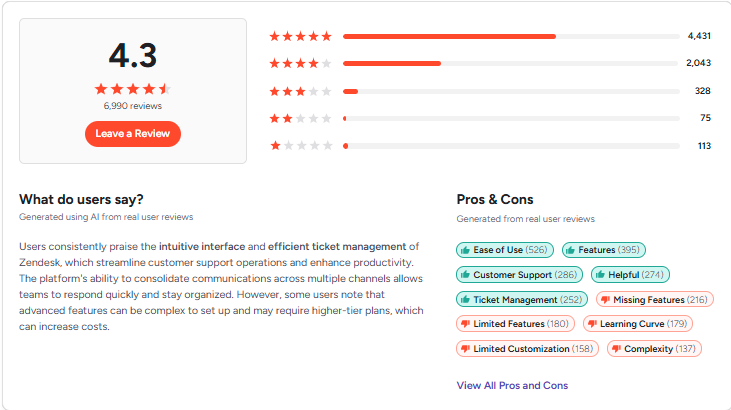
Zendesk holds roughly 4.3 out of 5 on G2 across about 6,800 reviews, with users repeatedly praising ticket organization, automation depth, and the size of the integration marketplace. Capterra shows a similar 4.4/5 from about 4,000 reviews.
Trustpilot paints a rougher picture for one specific thing: Zendesk’s own support. Zendesk’s customer support experience scores 1.7 out of 5 on Trustpilot, with recurring complaints about billing surprises and slow response times from Zendesk’s own team, not the product itself. The gap between the two scores comes down to who’s reviewing. G2 and Capterra skew toward buyers evaluating features during a purchase decision, while Trustpilot reviews often come from people reacting to a specific support or billing incident.
If that gap matters to your decision, it’s worth filtering Zendesk’s G2 and Capterra reviews for reviewers who match your company size. A setup complaint from a 200-agent enterprise account may not apply to a 10-person team evaluating Suite Team, and a value-for-money complaint from a small business may not represent what a well-resourced enterprise account experiences. Read for pattern match to your own situation, not just the raw star count.
How We Evaluated Zendesk
This review draws on published pricing pages, verified review platforms, and primary compliance documentation rather than a hands-on trial account, so it’s worth being clear about what that means.
- Core functionality. Whether Zendesk covers what a support team needs at the entry tier, and how much sits behind Suite Professional or Enterprise, based on the plan breakdown on Zendesk’s own pricing page.
- Standout features and integrations. The AI Agent resolution claims and the 1,800-plus app marketplace, checked against Zendesk’s own product pages rather than marketing copy alone.
- Ease of use and setup. Drawn from recurring themes across verified G2 and Capterra reviews and third-party implementation timelines, not a first-hand rollout.
- Support quality. Based on what verified users report about Zendesk’s own support responsiveness, since a support-software vendor’s own support record is a meaningful signal in itself.
- User sentiment. The G2, Capterra, and Trustpilot scores cited earlier in this review, read together rather than in isolation, since the gap between them tells its own story.
- Value for money. Entry pricing weighed against what a team actually pays once AI add-ons and resolution overages enter the bill.
We didn’t assign Zendesk a single weighted score across these categories. Doing that credibly needs a live test account, not published documentation and aggregated reviews.
Zendesk Alternatives
Zendesk fits best for mid-market and enterprise teams running structured, high-volume support with dedicated ops staff. Outside that profile, a few alternatives come up often.
- Freshdesk for teams that want a lower-cost entry point with solid ticketing and are willing to trade some AI depth for price.
- Intercom for product-led SaaS teams that want messaging-first support with in-app engagement built in, though it carries its own ownership uncertainty mid-Salesforce-acquisition.
- YourGPT for teams that want AI-first automation priced by usage instead of Zendesk’s seat-plus-add-on-plus-resolution stacking, with no per-seat charges.
- Help Scout for small, email-first teams that want simplicity over feature breadth.
Zendesk Alternatives by Priority
The list above covers what each tool is good at. This table is meant to move faster, matching a specific priority to a specific pick.
| If Your Priority Is | Choose | Why |
|---|---|---|
| Complex, high-volume ticketing with deep customization and multi-brand support | Zendesk | Mature automation and the largest marketplace in the category |
| Predictable, usage-based cost instead of seats plus per-resolution AI fees | YourGPT | Priced per conversation, no seat fees or resolution overage stacking |
| The lowest entry price with solid, straightforward ticketing | Freshdesk | Cheaper starting tier, less AI depth than Zendesk |
| In-app engagement and product-led onboarding, with budget to match | Intercom | Messaging-first, though evaluate its pending Salesforce acquisition first |
| A small, email-first team that wants minimal setup | Help Scout | Simplicity over feature breadth, not built for complex automation |
A detailed side-by-side comparison and a broader roundup of Zendesk alternatives are worth reading if cost predictability or AI-first automation is your priority.
Frequently Asked Questions
What is YourGPT?
YourGPT is a no-code AI agent platform that automates customer support, sales, and operations from one connected system. Rather than a single-purpose chat widget, it lets teams build, train, and deploy AI agents across web, mobile, and messaging without needing engineering resources.
How does YourGPT compare to Zendesk?
Zendesk is built primarily as a ticketing platform with AI agents and Copilot layered on top, billed separately per agent and per resolution. YourGPT is priced usage-based per conversation with no seat fees, and covers support, sales, and operations in one platform with a visual workflow builder called AI Studio and a choice of models across OpenAI, Anthropic, Google, and xAI instead of a single AI provider.
What channels does Zendesk support?
Zendesk supports email, live chat, voice, social messaging including WhatsApp, and a self-service help center, plus 1,800-plus marketplace integrations for connecting to the rest of a support stack. YourGPT covers a similar spread, including WhatsApp, Instagram, Telegram, Messenger, Slack, Discord, and native iOS and Android SDKs, all deployed from one agent configuration.
Does Zendesk include automation like YourGPT’s AI Studio?
Zendesk’s triggers, macros, and AI Agents handle routing, tagging, and first-line resolution inside the ticketing workflow. YourGPT’s AI Studio goes further with a visual node-based builder that supports custom Python and JavaScript, prompt-to-workflow generation, and step-by-step auto-debugging, priced into a lower entry tier than where Zendesk’s equivalent AI automation unlocks.
Is there a free trial?
Yes, both platforms offer one. Zendesk’s trial runs for 14 days with no credit card required and defaults to Suite Professional access. YourGPT’s trial runs for 7 days, also with no credit card required, so you can test either before committing to a paid plan.
Is Zendesk Worth It in 2026?
For a team running structured, high-volume support with someone to own configuration, Zendesk’s price holds up. The ticketing engine is mature, the marketplace is large, and the security certifications cover what most regulated industries ask for, once you’ve bought the right add-ons. For anyone evaluating it as a small team without dedicated support-ops staff, it’s worth modeling the fully-loaded cost, seats plus Copilot plus QA plus workforce management, against a usage-based alternative before signing an annual contract.
The Forethought acquisition strengthens Zendesk’s AI story, but it’s a variable still settling rather than a finished fact. Budget for the possibility that Forethought’s non-Zendesk integrations and pricing shift as 2026 and 2027 integration continues.

Related posts

Top 6 Yuma Alternatives & Competitors in 2026