Top 6 Yuma Alternatives & Competitors in 2026

TL;DR
The six Yuma alternatives compared here are YourGPT, Intercom Fin, Richpanel, Gorgias, Zendesk and Siena AI. YourGPT suits teams seeking AI-native, omnichannel agents that take action across support and sales. Fin and Siena offer options for keeping a supported helpdesk; Richpanel, Gorgias and Zendesk combine AI with a support workspace. Choose based on the tasks your agent must complete, the channels your customers use and the total cost of the setup.
Ecommerce conversations often connect service with a sale. A question about a product can lead to a recommendation; a delivery question may need an order lookup or an address change. The AI agent you choose needs access to the right information and permission to act, with a clear handoff when a person should take over.
Yuma is one option for that work. This guide compares six alternatives by their commerce integrations, support workflows and pricing, so you can see which fits your business. Whether you want to keep your current helpdesk or bring AI and your team into a different workspace, the starting point is what you want customers to be able to do.
Reasons to consider a Yuma alternative
A different AI agent is worth evaluating when you need more control over answers and actions, a different setup process, broader use cases or a pricing model that fits your volume. Start with the issue your team actually needs to solve:
- AI accuracy and human oversight. G2’s review summary notes that some users report inaccurate responses that require oversight. Yuma describes multilayer validation and review controls, but your team should still check answers against current product information and policies. If correcting replies takes too much work, test alternatives on the same difficult requests and compare accuracy, escalation behavior and the time your team spends reviewing them.
- Your team wants to manage more of the setup. Yuma describes account-managed configuration and optimization in the setup guidance linked above. Decide which changes your team needs to make directly, and which you prefer a vendor to maintain.
- Your workflows extend beyond the storefront. Yuma offers ecommerce support, sales and social products. If your team also needs agents for internal operations or non-commerce workflows, compare how each platform connects those systems, shares knowledge and controls access.
- Upfront cost and volume commitments. Yuma’s illustrative annual bundles start at $14,400 paid upfront for 12,000 resolutions, with a 12-month commitment. That works out to approximately $1.20 per resolution when the full allowance is used; higher-volume bundles offer lower unit rates. For a smaller store, paying for capacity it will not use can make the effective cost harder to justify. For a low-ticket store, compare that cost with order margins and the support work actually saved. Include any helpdesk you retain, and base the decision on expected automated resolutions rather than total incoming tickets.
Yuma alternatives at a glance
Use this table to narrow the shortlist by the support setup you want. The product sections explain the capabilities and pricing behind each choice.
| Product | Reason to shortlist | What happens to your helpdesk | Costs to include |
|---|---|---|---|
| 1. YourGPT | AI-native omnichannel agents that take action across ecommerce support and sales | Decide which existing support workflows to retain and connect | Selected subscription, AI Credit usage and any retained tools |
| 2. Intercom Fin | Add Fin to a supported helpdesk or use Intercom | Depends on standalone or Intercom deployment | Outcomes and any required helpdesk seats |
| 3. Richpanel | Evaluate AI alongside the team’s support workspace | Keep Richpanel if already using it or plan a migration | Applicable plan, seats, AI usage and required add-ons |
| 4. Gorgias | Evaluate ecommerce helpdesk and AI together | Existing Gorgias users can evaluate its AI without moving the queue | Helpdesk ticket allowance, AI usage and overages |
| 5. Zendesk | Evaluate AI within a wider support operation | Existing Zendesk users can retain their workspace | Relevant Support or Suite plan, seats and additional AI usage |
| 6. Siena AI | Add ecommerce automation to a supported helpdesk | Retain the connected helpdesk | Platform fee, automated-ticket usage and the existing helpdesk |
The 6 Yuma alternatives compared
We compared these platforms using official product pages, integration catalogs and pricing reviewed in September 2026. The focus is on ecommerce capabilities, compatibility with your helpdesk, control over actions and total cost. YourGPT publishes this guide and is included in the comparison; this is a documentation-based review, not a hands-on performance ranking.
1. YourGPT
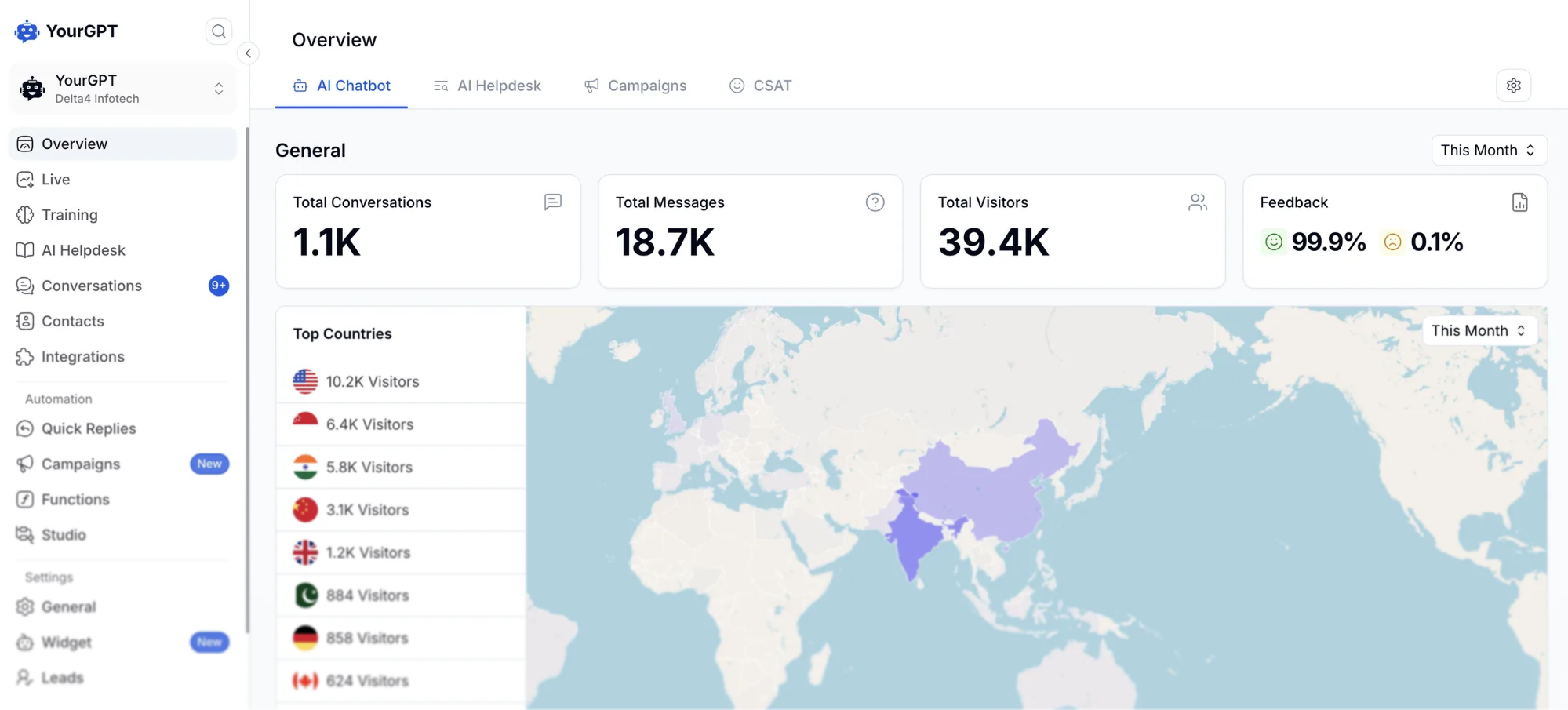
Best for: Teams that want an AI-native platform with omnichannel agents that take action across support, sales and operations
YourGPT is our AI-native platform for customer support, sales and operations. Train an agent on your product catalog, website, PDFs and store policies, deploy it across customer channels, and connect the tools it needs to complete tasks within conversations. Teams can start without code and add more involved workflows as their requirements grow.
For an ecommerce business, that can mean recommending a product before a purchase, tracking an order afterward or handling an approved order change within the conversation. Refunds, CRM updates and bookings require the relevant connected tools and workflow permissions. When a request needs personal attention, the agent can hand it to your team.
Features and integrations
- No-code setup: Build an agent around your store knowledge and configure its behavior without writing code. More advanced workflows can use Functions, APIs and webhooks.
- Actions within the conversation: Connect your commerce platform, CRM and other business tools so agents can track orders, process eligible refunds, update customer records or handle bookings. Functions and connected APIs perform the configured actions within the permissions and approval rules you set.
- Self-learning from support conversations: Smart Learning identifies unresolved queries and generates FAQ suggestions from past conversations. Your team reviews and refines the suggestions before adding them to training.
- Specialist agents and human handoff: Route work between support, billing or returns agents in one workflow, and transfer cases to a person with the conversation attached when needed.
- Omnichannel deployment: Integrations include website chat, WhatsApp, email, Instagram, Messenger, Telegram, Slack and Discord, with Twilio connections for SMS and phone support.
Shopify and WooCommerce are examples of commerce connections, while Salesforce, Zapier and Make connect other parts of your operation. The actions available depend on the connected system, its API and the permissions you configure.
Strengths: High resolution rates for repetitive requests and self-learning are central strengths. Our agents can resolve up to 90% of repeated queries, with results depending on the knowledge, workflows and requests involved. Self-learning helps your team close knowledge gaps identified in real conversations, while connected actions let agents complete tasks across support and sales. AI Credits provide usage-based billing rather than a fixed charge for each resolved ticket.
Limitations: Advanced workflows take more setup and testing than a basic knowledge-based agent. Connected actions need permissions and clear rules, and model choice affects credit consumption. Self-learning still includes human review of suggested knowledge improvements.
Pricing: Our plans start at $39 per month billed annually for Essential, $79 for Professional and $349 for Advanced, with custom Enterprise pricing available. Month-to-month prices are $59, $129 and $499. Professional includes Functions and API/webhook support, making it the relevant starting comparison for custom action workflows.
2. Intercom Fin
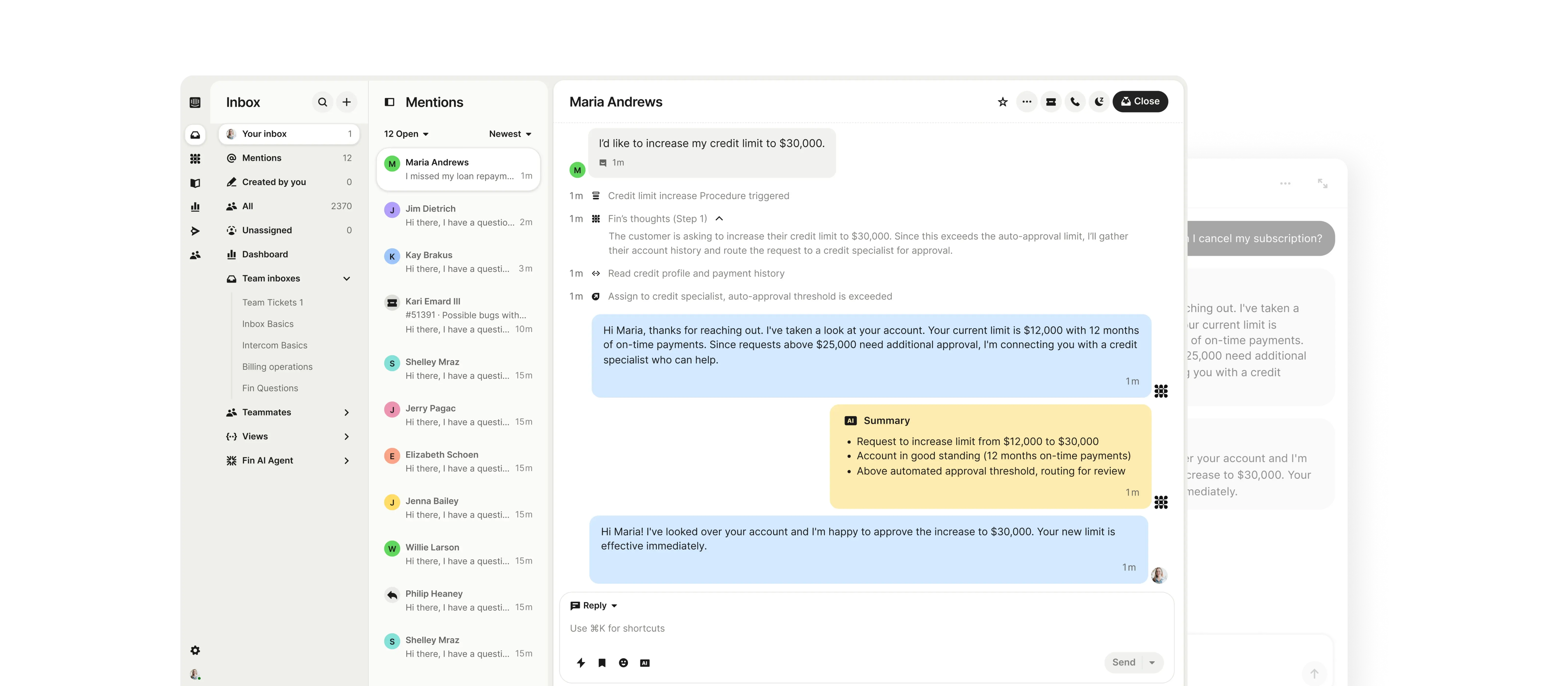
Best for: Teams that want an AI agent for their current helpdesk or an integrated Intercom setup
Fin offers two buying paths: add it to a supported helpdesk, or use it with Intercom’s own inbox. Separate those options when comparing costs. Using Fin does not automatically mean paying for Intercom seats.
Features and integrations
Fin’s capabilities extend beyond retrieving an answer:
- Connected actions: APIs, Data Connectors and MCP connect Fin to business systems so it can retrieve information and take configured actions.
- Procedures: Teams can define the steps for a request, including a planned handoff to a person or another workflow.
- Customer context: Fin passes the conversation to human teams with context, rather than requiring the customer to begin again.
- Deployment options: Fin lists Salesforce, HubSpot and Freshdesk among its helpdesk connections. Check the channels and functions available for your particular setup.
Strengths: You can evaluate Fin without first committing to a helpdesk migration. Teams choosing Intercom can combine the agent, inbox and ticketing in one platform. The published billing rules also distinguish ordinary escalation from completed Procedure work.
Limitations: A billable outcome does not always mean an issue was resolved without a human. Under Fin’s outcome rules, a successfully completed Procedure that deliberately hands off is billable; default or workspace-rule escalations are not. Failed Procedures are not billed as completed outcomes. Keep those categories separate when comparing automation performance.
Pricing: Using Fin with the Intercom platform means paying both the seat subscription and AI usage. Intercom plans cost $29 per seat per month for Essential, $85 for Advanced or $132 for Expert, billed annually, plus Fin from $0.99 per outcome. Optional add-ons and usage-based channels can increase the total.
Fin can also run on a supported third-party helpdesk. That option has a minimum monthly commitment and does not require Intercom seats, but you still pay for the helpdesk you retain. Compare the complete setup rather than treating the AI rate as the whole bill.
Fin charges at most once per conversation under its outcome rules. Voice and specialized requirements need a separate quote, so do not apply the text-support rate to every deployment.
3. Richpanel

Best for: Merchants evaluating a new helpdesk alongside customer self-service and AI
Richpanel deserves a place on the shortlist when the human support workspace needs attention too. Its helpdesk puts conversations, order history and connected customer data in the same workspace, so an agent can investigate an exception without opening a separate application for every detail.
Its AI agents use order data and store policies to handle requests through connected tools. Richpanel describes permissions for individual actions, allowing lookups to run automatically while refunds or order edits can require approval. That conversational automation is separate from the self-service portal customers navigate themselves.
Features and integrations
- Customer context beside the conversation: Order history and app information appear alongside replies, giving people the context they need when a customer asks about a purchase or subscription.
- Self-service workflows: Richpanel offers a customer portal and configurable workflows for common requests. Demonstrate each required order or return action with your store’s policies before assuming it is ready for production.
- Team operations: Assignment rules, macros, private notes, custom fields and analytics support the human work that remains after automation.
The integration directory names Shopify, WooCommerce and Magento, alongside Recharge, Loop Returns, AfterShip and Klaviyo. For a subscription-heavy store, include Recharge history and a subscription change in the pilot alongside a normal order inquiry.
Strengths: Richpanel combines an ecommerce support workspace with self-service options. Its named commerce integrations make it easier to evaluate how customer and order data will reach the team.
Limitations: A full helpdesk move adds work around history, routing, permissions and reporting. Channel availability and store limits vary by plan, so a lower seat price may not cover a multibrand operation.
Pricing: Richpanel charges for helpdesk seats and AI usage. Its public pricing shows inconsistent rates across the pricing page and calculator as of September 2026, so obtain a current written quote before budgeting. Ask for the seat price, AI-handled conversation rate, billing commitment and any add-ons as separate line items.
4. Gorgias
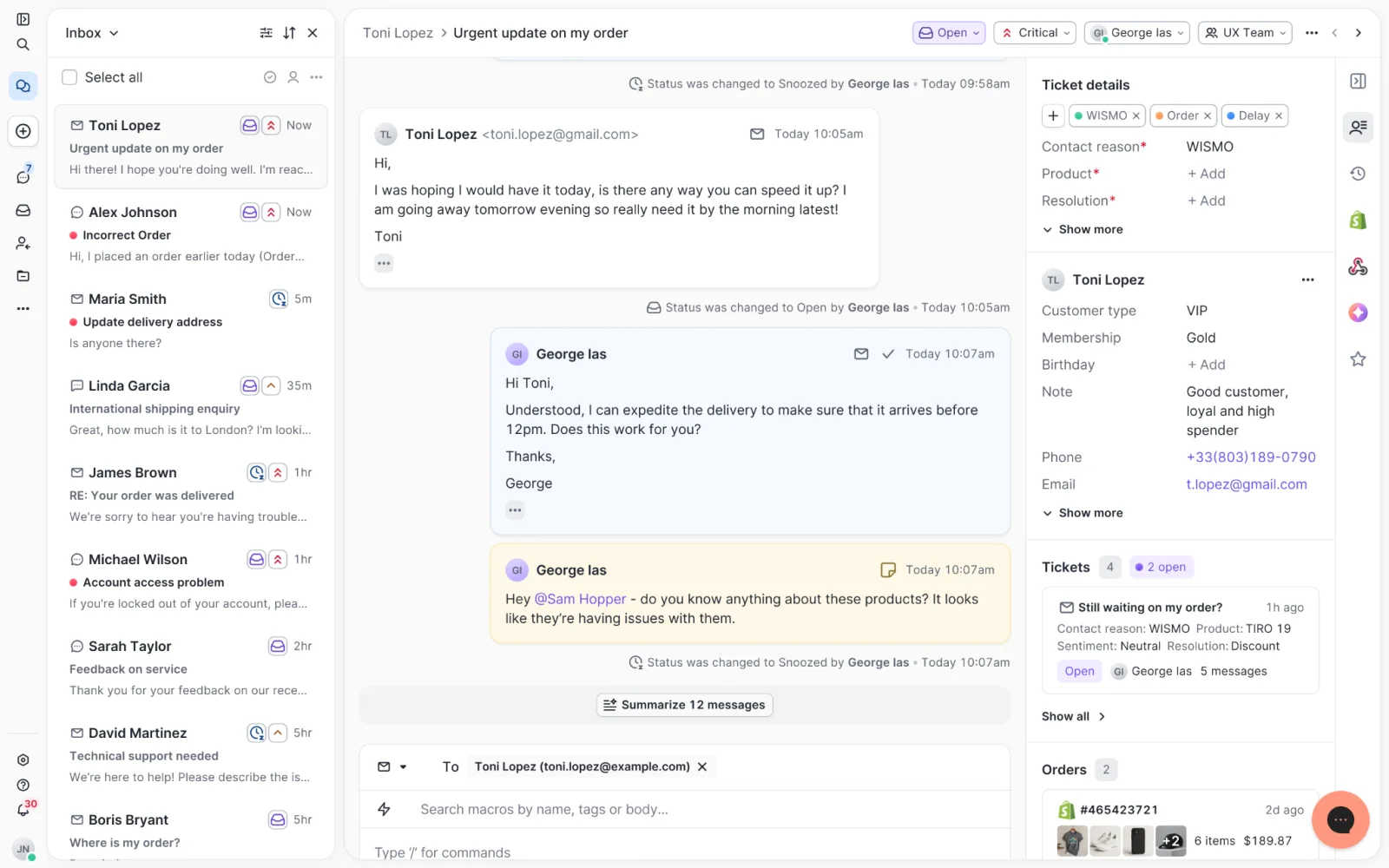
Best for: Shopify teams that want AI working inside their Gorgias helpdesk
If Yuma already runs on top of your Gorgias inbox, replacing it with Gorgias AI Agent does not require moving the inbox. The decision is whether Gorgias’s own automation can handle your store’s requests well enough to replace the separate AI layer.
For teams using another helpdesk, the evaluation also includes Gorgias’s ticketing workspace and the work needed to move into it.
Features and integrations
Gorgias AI Agent uses store knowledge, guidance and connected data to answer customers. Its capabilities extend beyond rules that send canned replies:
- Store-specific answers: Knowledge sources include help-center articles, website content, documents and Shopify data.
- Order actions: Connected Shopify actions include order cancellation and shipping-address changes. Teams configure which actions AI Agent can use and the conditions around them.
- Human and AI work in one inbox: The team can review the customer conversation in Gorgias when a request needs a person, keeping exceptions alongside the rest of its support work.
Strengths: Existing Gorgias customers can evaluate native AI while keeping their established inbox. Helpdesk pricing follows ticket volume rather than charging separately for each human agent.
Limitations: The base helpdesk charge and AI automation charge can apply to the same conversation. Seasonal increases therefore need a forecast for both meters, plus any Voice or SMS add-ons.
Pricing: Gorgias charges for the helpdesk subscription plus the AI Agent add-on. Its Basic plan with AI Agent shows $77 per month billed annually: $50 for the helpdesk and $27 for AI Agent, including 300 helpdesk tickets and 30 automated interactions per month. Automated interactions beyond that allowance cost $1.50 each; helpdesk ticket overages are billed separately.
Starter with AI Agent is $40 per month on monthly billing: $10 for the helpdesk plus $30 for AI Agent, including 50 tickets and 30 automated interactions. Its additional automated interactions also cost $1.50 each. The $1.50 is an overage rate, not an extra charge on every interaction already included in the AI allowance.
A billable helpdesk ticket requires a message sent from Gorgias by a person, AI Agent or Rule; receiving an unanswered ticket alone does not qualify. Current pricing can count an AI-resolved conversation toward both helpdesk and automation usage. Some accounts created before May 28, 2025 retain legacy either-or billing, depending on their AI Agent subscription and Shopping Assistant upgrade status.
5. Zendesk

Best for: Teams whose AI decision must fit an established Zendesk support operation
Zendesk is particularly relevant if your team already uses its ticketing, routing and reporting. Evaluating native AI in that environment does not automatically mean replacing the helpdesk. A merchant moving from another platform has a separate decision to make about the support workspace itself.
Features and integrations
- Customer conversations: Zendesk Suite brings messaging, live chat and ticketing into the support workspace.
- Knowledge and AI: A knowledge base and AI agents support answers to customer requests. Distinguish autonomous actions from tools that assist a human agent when evaluating a demo.
- Routing and administration: Higher plans add capabilities such as skills-based routing and additional administration tools for teams sharing support responsibilities.
The official Shopify integration displays Shopify customer and order information inside Zendesk Support and Chat. For autonomous order lookups, Zendesk documents connecting an AI agent to customer-order data.
Keep that distinction in a demo. Ask the vendor to show the AI retrieving the correct customer’s order and handling the required exception. Seeing a Shopify sidebar in a human agent’s ticket is not evidence that the AI can cancel or refund the order.
Strengths: Existing Zendesk teams can compare AI options around the workflows they already use. The broader support platform provides routing, knowledge and reporting capabilities alongside automation.
Limitations: Seat subscriptions, AI usage and optional add-ons need separate budgeting. Plan-level feature differences matter, and a vendor’s automated-resolution classification does not replace your own checks for correct answers and completed actions.
Pricing: Zendesk pricing lists Suite Team at $55 per agent per month billed annually and Suite Professional at $115. Support Team starts at $19, but it is the basic support plan, not a like-for-like substitute for the full Suite configuration described here. Confirm the included automated-resolution allowance and additional usage charges for your proposed setup.
6. Siena AI
Best for: Ecommerce teams that want automation across an established helpdesk and commerce stack
Siena is worth considering when your support work crosses several systems. A subscription change may involve one service, a return another, and the conversation itself a helpdesk. The useful question is whether Siena can connect those parts for the requests your team receives.
Features and integrations
Siena’s integration catalog gives concrete examples of the work its connections support:
- Subscriptions: Recharge supports shipment skips, address changes and frequency changes. Other listed subscription connections include Skio, Smartrr and Stay AI.
- Returns and shipping: Loop Returns supports return requests and status checks, while AfterShip supplies shipment and returns information.
- Store operations: Shopify connects order inquiries with store data and actions. Fulfil and fulfillment providers offer additional connection paths.
- Helpdesk continuity: Gorgias, Zendesk, Kustomer, Intercom, Dixa and Gladly appear in the catalog, allowing teams to assess Siena alongside their existing conversation system.
For a subscription business, test a request that crosses both the helpdesk and subscription service. That shows whether the customer receives a confirmed change or a reply that still leaves the work with your team.
Strengths: Siena covers several specialist ecommerce systems, which can matter more than a long list of generic channels. Its platform includes an unlimited sandbox, giving your team room to test behavior before directing customer conversations to it.
Limitations: The platform fee is payable in addition to automation usage and your existing helpdesk costs. Sandbox testing can expose errors; it cannot guarantee that every production answer or action will be correct. Confirm what counts as an automated ticket, how repeat contacts are treated and which implementation services your quote includes.
Pricing: Siena publishes a platform fee of $750 per month, plus $0.90 per automated ticket. It also asks for ticket volume and team size to prepare a quote. Your total also includes the helpdesk you keep and any services specified in the quote.
What each Yuma alternative costs
A lower AI rate is useful only after you know what it measures and what else you need to buy. These September 2026 price components are starting points, not quotes for equivalent workloads. Vendor pricing links and conditions appear in the product sections above.
| Option | Relevant base charge | AI usage basis | Include in your estimate |
|---|---|---|---|
| 1. YourGPT | Professional $79/month billed annually for the custom workflows discussed | AI Credits included with the selected plan | Credit usage by model and workload plus retained tools |
| 2. Intercom Fin | Intercom Essential $29/seat/month billed annually; higher plans $85 or $132 | Fin from $0.99/outcome in addition to seats | Intercom subscription plus AI usage and optional add-ons; external-helpdesk deployments retain that helpdesk’s cost |
| 3. Richpanel | Confirm current seat price in writing | AI-handled conversations at the quoted rate | Seats, AI usage, commitment and add-ons |
| 4. Gorgias | Basic helpdesk $50/month billed annually | AI add-on $27/month includes 30 automated interactions; $1.50 each beyond allowance | $77/month combined on annual billing, plus AI and helpdesk overages and optional channels |
| 5. Zendesk | Suite Team $55/agent/month billed annually | Automated resolutions under the selected agreement | Seats plus additional AI usage and optional features |
| 6. Siena AI | $750/month platform fee | $0.90 per automated ticket | Existing helpdesk and agreed implementation scope |
For each finalist, calculate the subscription, human seats, AI usage and required add-ons over the same period. Include any helpdesk you retain. Keep one-time migration and implementation costs separate so you can see both the ongoing bill and the first-year expense.
A handled conversation, a billable outcome and a successful AI resolution are different measurements. For your own comparison, define success as a correctly completed request within your rules and without human involvement. Report billable handoffs separately. Then divide the relevant recurring software cost by the number of conversations meeting that same success definition, rather than comparing vendors’ headline percentages.
If a broader support-platform change is on the table, our ecommerce chatbot comparison covers additional options. For this shortlist, the next step is a focused pilot.
How to test a Yuma replacement before switching
The product comparison narrows the list. A pilot shows whether those products can handle your store’s work. Choose two finalists and give each the same approved knowledge, policies and representative historical conversations, including exceptions that required a person.
Keep these checks separate so a fast answer cannot hide an incomplete action:
- Check the answer against its source. Compare policy and product answers with the current source material. Record unsupported claims, missing conditions and cases where the agent should have asked a follow-up question.
- Verify order access. Use authorized test customers and orders. Confirm that the agent identifies the correct customer, retrieves the correct order and does not expose another customer’s information.
- Test permitted and blocked actions. Use a sandbox or approved test orders for refunds and changes. Confirm the resulting store record, test a request outside your policy and check that the action log distinguishes success from failure.
- Follow the human handoff. Check that the right person receives the transcript, relevant order details, actions already attempted and the unresolved request. Confirm that the AI stops acting where your workflow requires human control.
- Measure completion separately from speed. Record response latency, then the time until the customer’s request is actually completed. Count delayed actions and human work. Agree an observation window for reopened cases before interpreting the resolution rate.
- Reconcile the usage bill. Match each test conversation to the vendor’s charge definition. Include chargeable handoffs, usage that did not resolve a request, minimum commitments and any seats or subscriptions needed for the setup.
Count each conversation once when reporting successful AI resolutions, even if a failed case has several problems. An initial pilot reveals configuration gaps; it does not establish a reliable resolution rate for every future request.
Frequently asked questions
Can I switch gradually instead of moving everything at once?
Yes, if the tools let you route a limited set of requests or one channel separately. Keep the existing process available for other requests. Give each conversation a clear owner so two automations do not answer it or take the same action. Expand only after the pilot confirms that answers, actions and handoffs work as intended.
Can I reuse the knowledge I already prepared for Yuma?
You can use source material your business owns, such as product information, policies and help articles, in the replacement’s supported training formats. Do not assume vendor-specific rules or configurations will transfer automatically. Refresh outdated policies and test the new agent’s interpretation before routing customers to it.
Should the AI be allowed to issue refunds immediately?
Begin with the refund cases your team can define clearly and test safely. Set the required identity checks, eligibility rules and approval boundaries before enabling the action. A connected refund tool needs those controls around it. Keep exceptions with a person until you have verified how the agent handles them.
What should I keep before switching off Yuma?
Retain the policies, automation rules, reports and conversation records you are entitled to export and still need. Decide which open conversations move and which the current team will finish. Historical tickets may remain in your existing helpdesk; a separate archive can be enough if you are changing it. Confirm retention requirements and access before ending the old service.
Conclusion
A successful switch leaves your team with fewer unresolved requests and a system it can maintain. Keeping your existing helpdesk can reduce migration work; moving to a different workspace may be worthwhile when the inbox itself is part of the problem.
Use the pilot results to decide what to move first. Expand only when the new setup completes the required actions, gives people enough context to handle exceptions and stays within the budget you agreed. That evidence is more useful than a vendor’s headline automation rate.
Build an AI agent for support and sales
Create your agent in YourGPT, train it on your business knowledge, and connect the tools it needs to answer questions and take action.

Related posts