How to Replace Gorgias With an AI Store Agent
Before you cancel Gorgias, you need to know where the next order question will go, who will handle an unresolved return and how your team will retrieve an old conversation.
Replacing the inbox transfers responsibility for that work. YourGPT can answer from store knowledge, use connected tools and assist the human team, but each role needs to be configured and tested. The migration is complete when the required work can continue without the old account.
This guide uses YourGPT, with Shopify examples for store actions. You can apply the same migration approach to other ecommerce platforms and frameworks, adapting the integrations, API connections and setup steps to your store. The core process stays the same: preserve the right records, connect AI and human workflows, and verify the replacement before retiring Gorgias.
TL;DR
Replace Gorgias in stages: preserve usable conversation records, train the AI on current policies, connect store actions, and test every customer channel and human handoff. Start with a controlled pilot, then move the workflows that pass your checks. Cancel Gorgias only when your required records, routes and open conversations no longer depend on it. Use reviewed conversations to improve the agent after launch.
Choose which support workflows to move
Start by deciding whether you want to replace website chat first or move your whole support operation. That choice determines which integrations, records and team processes you need to carry over.
Map the work that must continue
Review recent conversations alongside the rules, macros and reports your team uses. For each recurring request, note where it arrives, where the correct information lives, what needs to happen and who handles exceptions. Include work that happens after a reply, such as a refund approval or a promised follow-up.
Use this worksheet to check that you have covered the work your team does today:
| Current support job | Replacement must provide | Evidence to keep |
|---|---|---|
| Product and policy questions | Answers grounded in approved current sources | Source and answer checked together |
| Product selection and purchase help | Relevant catalog advice and correct cart actions | Product requirements and resulting cart checked |
| Order status | An authorized lookup of the correct order | Lookup result matched to the verified shopper |
| Refund or delivery exception | A permitted action or a named human owner | Confirmed action result or received handoff |
| Email and social requests | A working incoming and outgoing route | Delivered conversation and reply |
| Historical disputes | Accessible records with the required context | A checked archive and retrieval procedure |
Add any assignment rules, reporting fields or team processes your operation cannot lose. Check what each feature means in practice. For a human handoff, a teammate needs to receive the conversation, understand what happened and send a reply that reaches the customer.
Include every channel your customers use
YourGPT supports web chat and messaging integrations including WhatsApp, Instagram, Messenger, Telegram, Slack, Discord, LINE, email and Twilio SMS, plus phone integrations. Choose the routes your customers actually use; each connection needs its own setup and test.
The available features differ by channel. The email integration supports text and HTML, but does not support cards, carousels or Studio workflows. If your proposed email workflow depends on one of those, resolve that requirement before committing to a full replacement.
For each channel, distinguish what you can transfer, what you must rebuild and what you will retain elsewhere. If a required process still needs Gorgias, define a partial migration with a clear owner for the remaining work. That is a useful boundary, provided the team can explain it and customers can still reach support.
Check the renewal date, contractual notice deadline and planned end of access now. Submitting notice and losing access are different events; the schedule must leave room for verification and rollback. Once the scope is agreed, preserve the records the new operation will need.
Preserve records and prepare current knowledge
An archive answers what happened. A knowledge source tells the agent what should happen now. Keep them separate so yesterday’s exception does not become tomorrow’s policy.
Export conversation content rather than ticket links
Gorgias documents two different ticket export paths. A view export contains metadata and ticket links, not message bodies. For conversation text, open an exportable Analytics report, drill into a metric, choose Export, then Export with message content.
The message-content export covers the most recent 30 days within the selected period, up to 100,000 tickets. It includes public messages, with exclusions for internal notes, ticket events and specified social content. If the required archive exceeds those boundaries, request a custom export with the necessary fields and date range.
Before accepting the archive:
- Compare downloaded records with their original tickets, including older and unresolved cases.
- Check the dates, message bodies and any attachments or notes your team needs. Record missing material explicitly.
- Ask a teammate to retrieve a required conversation from the saved files without using its Gorgias link.
- Store the archive where authorized teammates can access it, and assign someone to maintain that access.
A file that downloaded successfully can still be an incomplete archive. Finish this check while the original account is available.
Turn approved answers into training sources
Start with current shipping, returns, warranty and product information. In YourGPT Training, use Add New Link for individual pages, or Crawl → Extract for multiple links. Check the training status and inspect the source before testing an answer; the website training instructions cover both routes.
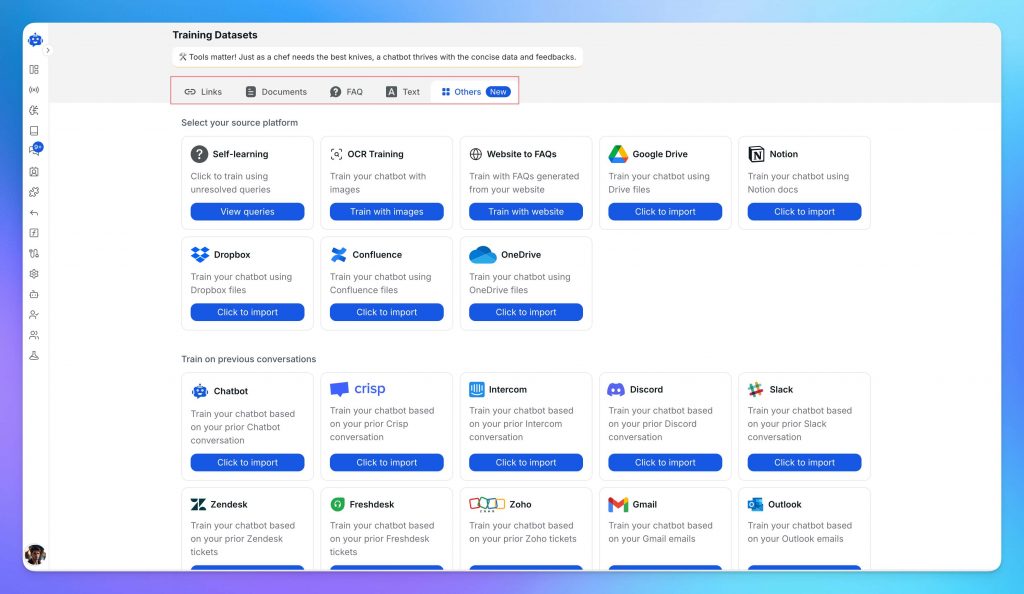
Use the source that holds the approved information. Keep historical conversations separate from the answers the agent should use today.
Review the macros and internal answers your team relies on. Remove obsolete instructions, personal customer details and one-off exceptions. Keep the approved decision rule and its owner; add the reviewed material as an appropriate document or text source.
YourGPT supports document training including CSV files. Uploading a CSV for knowledge does not recreate Gorgias tickets, assignments, private notes or historical events in a new inbox. Verify any conversation-history migration requirement separately.
Reserve real requests that were not used to build the training material for evaluation. They should include different wording, missing details and questions the sources cannot answer. This tests how the agent uses knowledge, rather than whether it can repeat it. With the approved knowledge in place, connect the live information and actions those answers cannot supply.
Build the store workflows your team needs
YourGPT can combine knowledge with connected actions, but the implementation must match the work in your scope. Confirm access to the required capabilities before building; the current plan comparison lists AI Studio, Functions and human escalation under Professional.
Its Autonomous Agent in AI Studio can select from the skills you provide, including knowledge retrieval and API calls. Give those skills clear permissions and success conditions. Connecting an API supplies a way to act; it does not decide which action your store should allow.
Install the widget and synchronize store data
For the Shopify implementation in this guide, install the widget on a duplicate theme first. Copy its script from Integration, add it once in Layout → theme.liquid, and use the theme preview to inspect it. Follow the Shopify installation instructions and avoid inserting a second copy of the same script.
Installation makes the widget available. Synchronization supplies changing store information. In the Shopify integration, Webhooks & Synchronization → Products and Customers have separate Real-time Sync URLs. Configure the creation and update events in the product and customer sync instructions, then verify an approved test change reaches the intended source.
Customer synchronization includes name, email and phone, not order history or addresses. Keep that boundary explicit when planning order support. Written policies also need an owner who refreshes the relevant source when the policy changes.
Specify the order workflow before connecting it
Before connecting order support, agree on what the agent can access, what it can change and how it should handle a failed request:
| Part of the workflow | What to specify |
|---|---|
| Customer identity | How the system establishes who is asking |
| Allowed lookup | Which service and fields the agent may access |
| Ownership check | How the requested order is matched to the verified customer |
| Permitted action | Whether the agent may only read information or perform an approved change |
| Success evidence | The returned record or confirmed result that supports the reply |
| Failure route | What happens when identity is unresolved, access is denied or the service fails |
If you already have an AI Studio template file, use File → Import to load it. Inspect its scenarios and configure the credentials and store endpoint it requires before testing it against your store.
Shopify issues the credential. Use Shopify’s custom-app and API-access instructions: new custom apps use the Dev Dashboard, while older Shopify Admin tutorials describe a legacy route. Have the integration owner confirm the permissions and credential lifecycle. Keep credentials out of customer messages, training material and screenshots.
A working API connection does not establish that a shopper may access an order. Our identity-verification guide explains signed identity data. The lookup must still enforce order ownership; an email or order number typed into chat is not sufficient proof.
For a refund or another write action, define the approval boundary before enabling it. Require a verified result from the connected system before reporting success. If the action has not been implemented, route the request to a person rather than generating a confirmation. Test authorized access, rejected access and service failure independently.
Enable recommendations and cart actions
Pre-purchase work belongs in the migration scope when your team already helps customers choose. Our agent can recommend alternatives, accessories and bundles during a shopping conversation. Ground those recommendations in the customer’s stated requirements and current catalog; do not infer fit or compatibility that the product data does not establish.
For Shopify, enable Agent Mode, then open Functions → AI Copilot Actions → Shopify. Our Shopify actions let your agent search the catalog, show product cards and details, add items to the real cart and view that cart. Check which actions are enabled in your account before testing the shopping experience.
Use a product request from your own conversations to test the sequence. Confirm that the recommendation meets the requirements, the selected variant reaches the cart and unavailable stock cannot be added. A conversational add-to-cart request prompts for confirmation; clicking a product card’s Add button acts directly. Check both paths against the actual cart.
These are shopper-facing actions. The human team’s Support Copilot serves a different role, which becomes important when a request moves beyond the AI’s permitted work.
Prepare the channels and the human team
A working storefront agent covers one route into your business. Before evaluating the replacement, connect the other routes in your scope and prepare the people who will receive exceptions.
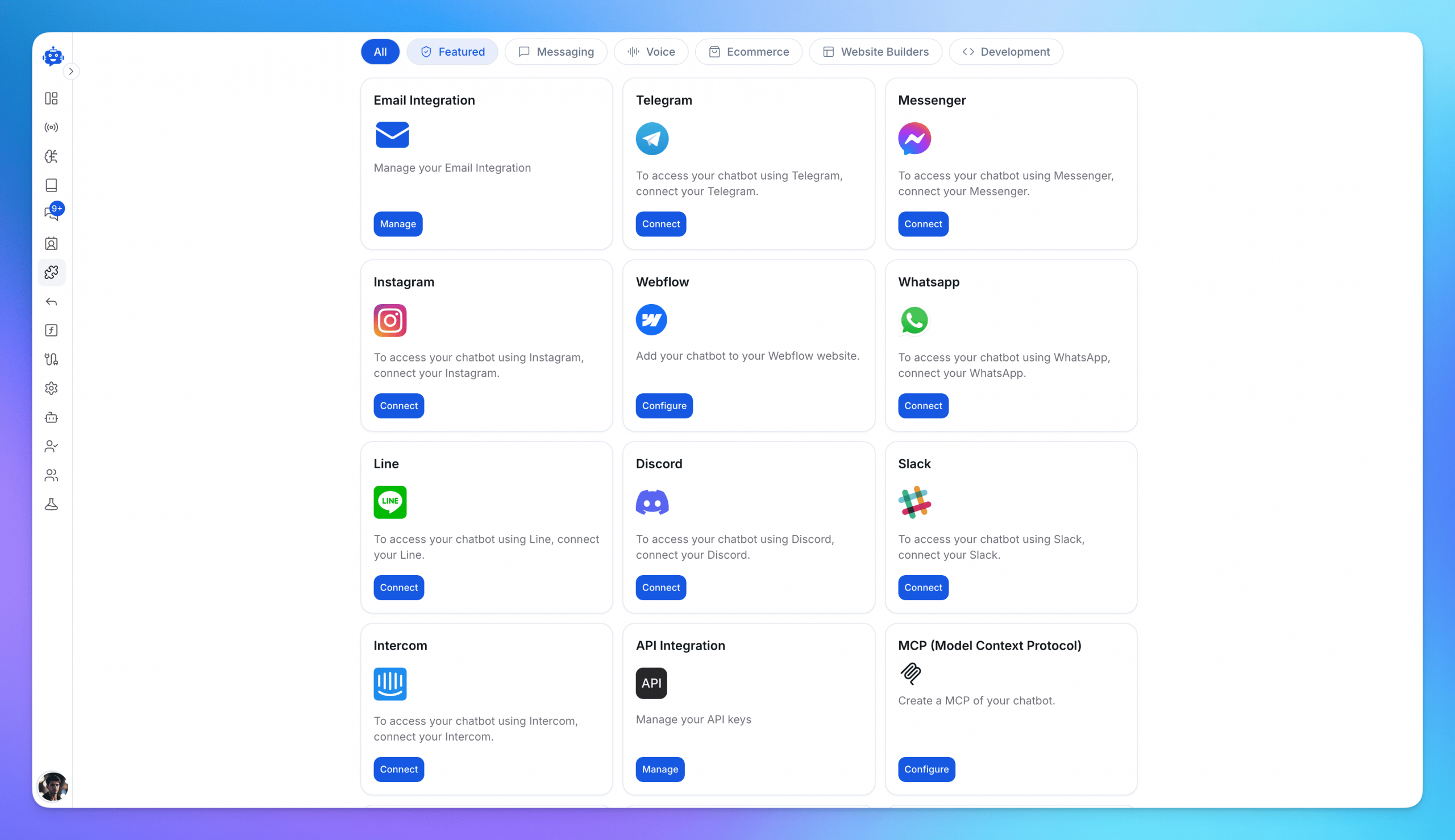
Connect the channels your customers use, then verify incoming messages, replies and human handoffs for each one.
Connect each channel and test messages and replies
Create a connection record for each channel: account owner, destination, reply identity, required permissions and person responsible for testing. Follow the channel’s integration guide, then send a real test conversation from outside the operator dashboard. Check both receipt and reply.
For email, create the YourGPT email workspace and configure forwarding from the existing mailbox using the email setup instructions. Configure the intended AI reply behavior and test what it answers, skips or passes to a person. Forwarding new mail is a routing change, not an import of historical threads.
Repeat the test for messaging and phone routes in your scope. Verify the formats and interactions customers actually use instead of assuming the web experience carries over. If a channel cannot handle something your customers need, note it in the worksheet and resolve it before moving that channel.
Deliver a handoff a teammate can act on
In AI Studio, use Actions → Escalate to Human when a person should take control. Assign Member routes the conversation but does not pause the workflow. Choose the action that matches whether you need to transfer control or only assign a teammate.
Make sure the teammate taking over can see:
- The customer’s unresolved request and desired outcome.
- Verified identity or order context where applicable, with unresolved verification clearly flagged.
- The information retrieved and actions already attempted, including failures.
- The reason for escalation and any commitment already made to the customer.
- The receiving person or team and the next step the customer has been told to expect.
Check that your setup passes this information to the teammate; selecting an escalation action does not necessarily supply every detail. Have the receiver open the conversation and reply. Confirm that the customer receives that response without competing automated messages.
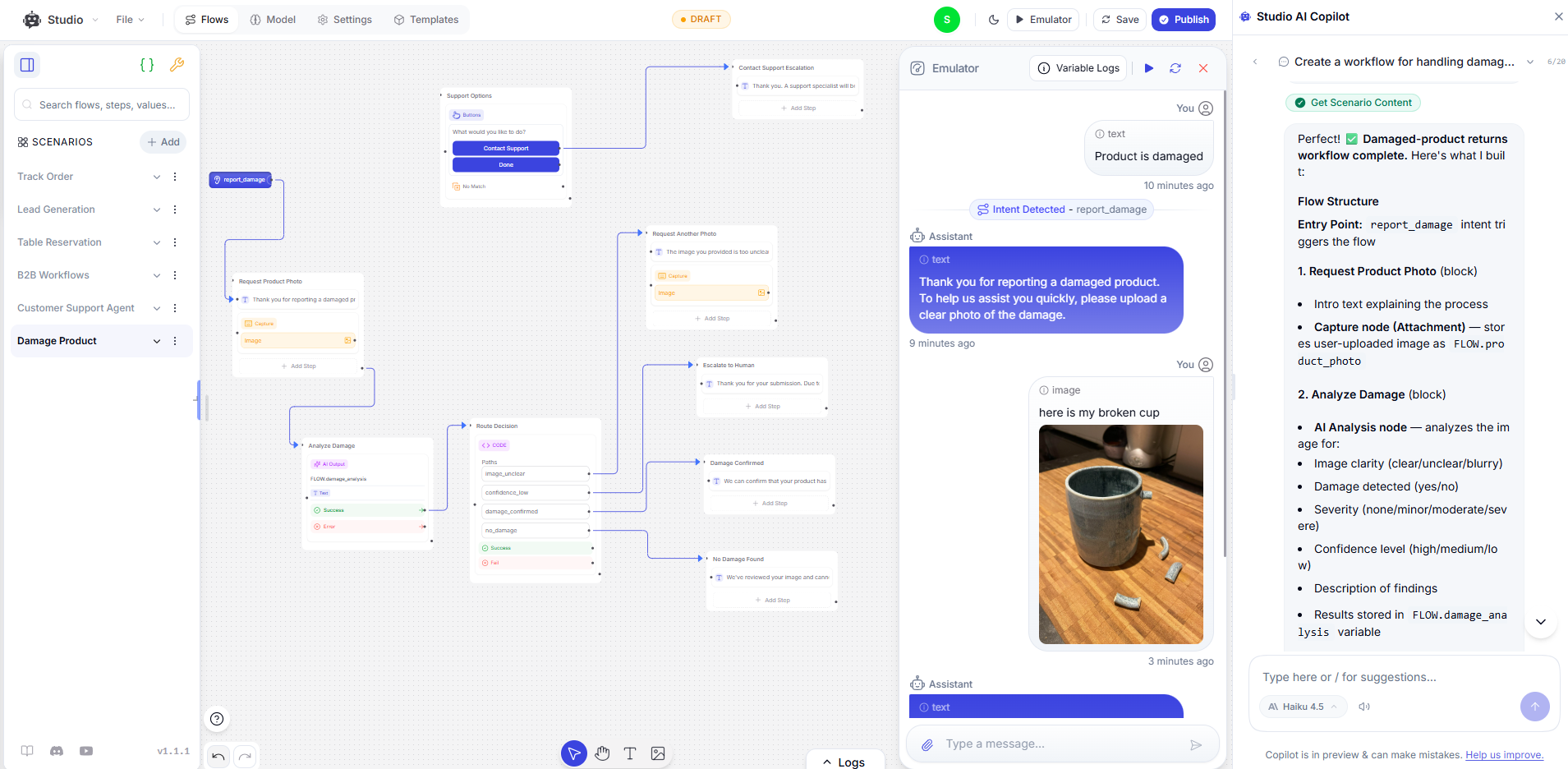
An AI Studio damaged-product workflow with evidence collection and escalation. Test the receiver’s experience as well as the agent’s path.
When the receiving team is unavailable, provide the contact route or follow-up process your team can actually honor. Test that branch too. An escalation recorded in a log is not enough if no one owns the next response.
Equip people with native Support Copilot
Our native AI Support Copilot provides suggested replies, conversation summaries and automatic translation. It assists the person handling the conversation; it is distinct from the storefront actions that help a shopper use the cart.
Use an actual exception from your queue to prepare the team. Ask the receiver to compare its summary with the original conversation, identify the unresolved decision and check the suggested response against the applicable policy. If translation is involved, confirm that it preserves the meaning of the request and any commitment in the reply.
The person remains responsible for discretionary decisions and the final response. This rehearsal shows whether assistance reduces the work of understanding a case or merely produces another answer to inspect. With the routes and people ready, the pilot can evaluate the complete service.
Prove the replacement before moving customers
Build the evaluation from recent requests that represent the work you plan to transfer. Remove personal data where unnecessary, use approved test accounts for private lookups, and keep destructive actions in a sandbox or behind human approval.
Test completed requests and failure paths
Write the expected outcome before running each case. Keep a test log with the channel, request type, expected result, actual result, evidence, failure owner and retest status. The evidence might be a returned order record, a changed cart or a reply received by a teammate.
| Test case | Pass condition | Stop the rollout if |
|---|---|---|
| Product recommendation and cart action | Suitable in-stock product and correct variant in the real cart | Advice contradicts the catalog or the wrong item is added |
| Human-assisted reply | Summary and suggested response match the conversation and policy | Missing context or an unsupported promise reaches the customer |
| Routine policy question | Answer agrees with the current approved policy | It invents an exception or uses an obsolete rule |
| Authorized order lookup | Correct shopper sees the correct order state | Data belongs to someone else or comes from a stale record |
| Unauthorized order request | No private information is disclosed | Typed identifiers alone grant access |
| Failed service or missing information | Accurate explanation and working fallback | The agent claims success without a confirmed result |
| Request for a person | Teammate receives the needed context and can respond | Handoff disappears or automation keeps answering |
| Unstaffed support period | Customer receives the agreed next step | The system promises an unavailable human |
Test AI Studio logic in the Emulator. Test browser actions, cart changes and identity through the storefront, and channel-specific behavior through each connected channel. For a permitted write action, inspect the connected system afterward; the generated reply is not proof that the change happened.
Compare the pilot against the existing workflow
Select a limited part of the agreed scope for a controlled live pilot and name a support lead who can stop it. Establish the baseline from a comparable mix of existing requests, rather than comparing a simple AI test set with the entire historical queue.
Define what counts as an eligible request before measuring it. Keep unsuccessful eligible requests in the denominator, and classify outcomes consistently: completed by AI, completed with human involvement, or still unresolved. If you report an AI completion rate, divide requests verified as completed by AI without human involvement by all eligible requests in the same evaluated group, including human-assisted and unresolved cases. State the channel, request mix and review period alongside it.
Also review repeat contacts and the human work left behind. An apparent increase in AI completion is not a useful improvement if customers return with the same issue or teammates must repair incorrect actions. Assign a reviewer to unresolved cases and knowledge corrections during the pilot, so learning is part of operating the service from the beginning.
There is no universal number of tickets or hours that makes a migration ready. Set acceptance criteria for the scope you chose, then have the support lead and integration owner review the evidence. Private-data disclosure, false action confirmations and lost handoffs are stop conditions. Keep an affected workflow on its existing route until the fault is repaired and the relevant tests pass.
Move traffic with a tested fallback
A successful pilot gives you evidence to change a route. It does not remove the need to manage conversations already in progress or to recover from a problem after the switch.
Switch routes and preserve open conversations
Choose a cutover window when the support and integration owners can respond. Save the previous routing and widget configuration, name the person who can restore it, and agree which failures trigger restoration.
Use the following checks for each route you move:
- New conversations: enable the tested destination and disable the old route where appropriate. For storefront chat, verify a fresh customer session on desktop and mobile.
- Existing conversations: finish them in the old system or assign a documented continuation path. Keep an owner and status for each unresolved case.
- Replies to older messages: test where the next reply arrives and whether the responder has the context. Avoid leaving two teams independently answering the same customer.
- Historical records: confirm that authorized teammates can retrieve the required archive without opening an old ticket link.
- Recovery: confirm that the rollback owner can restore the affected route while the old access remains available.
If the new route fails, restore customer access to support first and investigate afterward. Keep a record of which channels have moved and which still depend on Gorgias; that record determines whether the next step is appropriate.
Close remaining dependencies before cancellation
Review the migration worksheet with the people who own the work. A remaining email route, unresolved conversation or archive requirement is a dependency to close, not a reason to describe an incomplete migration as finished.
Reconfirm the planned end-of-access date and the agreement’s notice requirements. Gorgias documents ticket-based helpdesk billing and separate automation charges. Compare the Gorgias ticket and automation charges with the new platform’s subscription, usage and remaining human workload; a per-seat comparison may not describe your costs.
For self-serve accounts, the current cancellation instructions use Settings → Account → Billing and usage → Helpdesk Manage → Cancel auto-renewal. Managed accounts should contact their customer success manager. Confirm the effective end date and remaining charges under your agreement. Uninstalling the Shopify app does not cancel the subscription.
Once you have left Gorgias, keep your store information current, check that integrations still work and make sure someone owns unanswered requests.
Improve your agent over time with self learning
With Smart Learning, your agent can improve from the conversations it handles. We track unresolved queries and generate FAQ suggestions from past conversations so your team can identify gaps in its knowledge. Review and refine those suggestions against your current store policies before adding them to training.
If the agent gives an incorrect answer, check the information behind it first. A missing return condition or an outdated shipping policy needs a correction in the training source. After updating it, ask the original question again and check that the answer reflects the change.
Some problems need a knowledge update; others need a change to the integration or handoff. Use the conversation to work out what went wrong:
| Finding in a conversation | Repair owner and action | Retest |
|---|---|---|
| Approved policy is missing or outdated | Knowledge owner corrects the source and updates training | Original request plus different wording |
| Sources disagree | Policy owner resolves the conflict before training changes | Requests affected by both versions |
| Order lookup fails | Integration owner checks access, credentials and service response | Successful, denied and unavailable paths |
| Escalation reaches no one | Support owner corrects routing or coverage | Receiver opens and answers the handoff |
| Recommendation ignores a requirement | Catalog or workflow owner checks the source and selection behavior | Same requirement against relevant product variants |
Record the correction, owner and retest result. Review the change before making it part of the agent’s working knowledge; a one-off concession still should not become general policy. Keep the original failure in your evaluation set so a later change does not quietly reintroduce it.
Over time, these corrections help the agent handle more of the questions customers actually ask. Keep testing them so you can see which changes improve the answers and which still need work.
Frequently asked questions
Can I replace Gorgias without moving everything at once?
Yes. You can start with website chat while your team continues handling email in Gorgias. Give each conversation one clear home so customers do not receive competing replies. Once the new setup handles that first channel reliably, move the next one. Keep Gorgias active for any work you still need it to do.
Will this work if my store is not on Shopify?
Yes. We use Shopify for the examples, but the migration process applies to other ecommerce platforms too. What changes is how you connect your catalog, orders and cart. Check the integrations or API access available for your store before building those actions.
Can I bring my old Gorgias conversations into YourGPT?
You can use reviewed answers from past conversations as training material. Recreating your ticket history is a separate job: uploading a CSV for training does not restore tickets, assignments or internal notes in a new inbox. Keep a separate, searchable archive of the conversations your team needs.
What happens when the AI cannot help a customer?
Set up a handoff to your support team, with the customer’s question and the steps already attempted. Our native Support Copilot can help the teammate catch up with a summary and suggested reply. If nobody is available, the customer should receive your actual follow-up process, not a promise of an immediate response.
How long should I keep both systems running?
Until the work you are moving can run without Gorgias. Try the new setup with real requests and check that replies reach customers, order actions work and teammates receive escalations. Finish or transfer open conversations before ending access. Your renewal and notice dates also matter, so check them before scheduling the switch.
Will switching to YourGPT cost less?
Switching can lower your AI support costs, especially when per-resolution charges make up a large part of your bill. With YourGPT, AI usage is measured in AI Credits based on the model and tokens used, rather than a separate fee for each resolved conversation. You can also build product recommendations, connected store actions and human support into the same setup. Compare the plan and credits you need with your Gorgias helpdesk, AI and add-on charges. Use your pilot to measure both the savings and the work completed for customers.
Conclusion
The decision to retire Gorgias comes down to a practical question: if the account were unavailable tomorrow, which customer requests or team responsibilities would stop moving? Any required work on that list is still part of the migration.
YourGPT provides the tools for a different division of work. The AI can answer from approved knowledge and carry out connected actions; people can handle exceptions with context and native Copilot assistance. That division becomes valuable when the AI finishes the tasks it is allowed to perform and the team can take over the rest without reconstructing the conversation.
Approve the replacement against your migration worksheet and pilot evidence. If only storefront chat is ready, move that scope and keep an explicit plan for the remaining channels. If the required routes, records and actions can operate without Gorgias, close the dependency and maintain the review process that keeps them reliable.
The lasting improvement is work that reaches a correct outcome with less avoidable effort from customers and staff. Measure the new service against that standard, including the cases where the AI needs help.
Build the first workflow for your store
Create your agent, add one approved policy source, and test a real request before moving customer traffic.

Related posts

Top 6 Yuma Alternatives & Competitors in 2026