Top 8 AI Agents in Game Development
TL;DR
AI agents in game development handle scripting, debugging, content generation, and in-engine testing inside production tools.
They reduce repetitive work across quests, characters, and environments where small changes often require updates across both design and code.
These agents sit inside development workflows, differ from traditional game AI, and are used across production pipelines.
Game development is full of connected work. A quest is not just writing. It touches dialogue, branching logic, player triggers, animation cues, asset references, testing, and often code. When one part changes, the rest of the workflow has to catch up.
That is where AI agents are becoming useful. They do not replace the creative direction of a studio. They help teams move through repeatable production work faster: writing variations, generating assets, assisting with code, testing logic, creating audio, supporting animation tasks, and handling player support outside the game.
The important shift is that these tools are not all doing the same job. A coding agent helps with scripts and engine-side implementation. An asset agent helps produce visual material. A music agent supports sound and composition. A support agent handles player questions, billing issues, and community workflows.
This blog looks at the AI agents being used across game development today, where each one fits, and how to choose the right tool based on the workflow you actually need to improve.
What Is an AI Agent in Game Development?
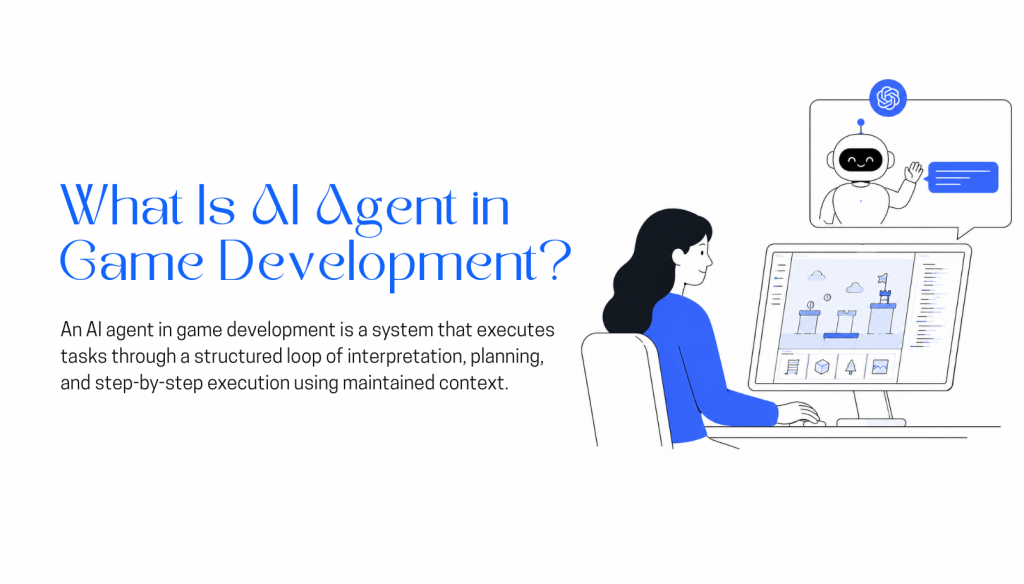
An AI agent in game development is a system designed to handle multi-step work across different parts of the production pipeline. Instead of generating a single output from one prompt, the agent can maintain context, use tools, interact with project data, and continue executing tasks across multiple steps.
Game studios use different types of AI agents for different workflows. Coding agents assist with gameplay systems, debugging, scripting, and engine-side implementation. Asset generation agents help create textures, concepts, UI elements, 3D assets, or environment variations. Animation and voice agents support motion workflows, lip sync, dialogue generation, and cinematic production. Music and sound agents help with soundtrack ideation, adaptive audio, or sound effect generation. Support and operations agents handle billing questions, player issues, moderation workflows, and community support across Discord, websites, or messaging channels.
What makes these systems agentic is not just generation quality. The system can preserve state, access external tools, evaluate intermediate outputs, retry failed steps, and continue execution using runtime context instead of restarting from scratch after every prompt.
Most AI agents combine reasoning, memory, and tool execution. The reasoning layer decides what action should happen next. The memory layer keeps track of previous steps and working context. The tool layer allows interaction with APIs, files, engines, databases, asset pipelines, or external services during execution.
Execution starts with a defined task or production goal. The agent breaks the work into smaller steps, executes them sequentially, and updates its context after each action. Outputs from earlier steps influence later decisions, which allows the system to revise, regenerate, or branch into different actions during runtime.
This makes AI agents useful for production workflows where the task is iterative, connected to external systems, or dependent on changing project context rather than isolated one-shot generation.
Best AI Agents in Game Development in 2026
AI agents in game development serve different needs, including content creation, coding, automation, and character interaction. This list covers tools selected for their practical use, output quality, and role across the game development pipeline.
1. Unreal Engine
Unreal Engine is a real-time 3D engine used to build games, simulations, virtual production projects, and cinematic experiences. It is known for high visual quality, strong performance control, and support for large-scale interactive environments.
Developers can create gameplay using Blueprints for visual scripting or C++ for deeper customization. Unreal Engine is not an AI agent itself, but it provides the environment where AI tools, NPC systems, automation workflows, and procedural content can be integrated into a game project.
Features
- Real-time rendering system: High-fidelity lighting, materials, and visual effects for interactive 3D environments
- Blueprint visual scripting: Node-based system for building gameplay logic without writing code
- C++ gameplay framework: Full control over engine-level systems and performance-critical game logic
- Cinematic and animation tools: Built-in sequencing, animation systems, and virtual production workflows
- Cross-platform deployment: Supports PC, console, mobile, VR, and simulation environments
Limitations
- Requires strong optimization for large scenes and high-fidelity assets to maintain stable performance
- Dual workflow (Blueprint + C++) introduces complexity in team collaboration and project structure
- Production-scale projects often need dedicated technical expertise for engine-level tuning and build pipeline management
Pricing
- Free to use: No upfront cost
- 5% royalty: After $1M USD lifetime gross revenue per product
- Enterprise: Custom licensing for large organizations
Best For
High-fidelity game development, large-scale interactive simulations, cinematic experiences, and production environments that require advanced rendering and full control over gameplay systems.
2. Inworld
Inworld is a platform for creating AI-driven in-game characters that can respond dynamically during gameplay. Instead of relying only on fixed dialogue trees, developers can define a character’s personality, background, goals, knowledge, and scene context to generate more natural text or voice interactions.
It can be integrated into engines like Unity and Unreal to support NPC conversations, companions, quest characters, and interactive storytelling systems. Inworld is most useful when a game needs responsive character behavior, but teams should still manage performance, moderation, narrative consistency, and fallback dialogue for important gameplay moments.
Features
- Real-time NPC interactions: Characters respond during gameplay using text or voice
- Character behavior design: Define personality, tone, memory, and response rules
- Engine integration: Works with Unity and Unreal for runtime NPC behavior
- Context-based responses: Uses game state and player actions to shape dialogue
- Voice and animation support: Supports speech output and in-game animation triggers
Limitations
- Requires careful design to keep NPC behavior consistent across long gameplay sessions
- Performance and cost scale quickly when many NPCs run simultaneously
- Deep gameplay integration needs custom engine-side engineering
Pricing
- On-Demand: Free
- Creator: $25/month
- Developer: $300/month
- Growth: $1,500/month
- Enterprise: Custom pricing
Best For
Building real-time AI NPCs with voice and text interactions, personality-driven behavior, and engine-integrated character systems for games.
3. Claude Code
Claude Code is an agentic coding tool from Anthropic designed to work directly inside a project’s codebase. It can read files, understand repository structure, edit code across multiple scripts, and run terminal commands, making it useful for tasks that require more than a single code suggestion.
Instead of responding only to isolated prompts, Claude Code works from a broader development goal, such as fixing a bug, adding a feature, refactoring logic, or updating tests. This makes it valuable for game development workflows where one change may affect gameplay scripts, UI logic, build files, and related systems at the same time.
Features
- Full project context handling: Works across entire game codebases including gameplay systems, scripts, and supporting logic
- Multi-step development execution: Breaks down tasks like feature creation or system updates into sequential changes across files
- Command execution for build pipelines: Runs tests, builds, and validation steps as part of development workflows
- Iterative debugging workflow: Identifies issues in gameplay code, applies fixes, and re-checks results
- Multi-file refactoring support: Updates related scripts and systems together to maintain consistency across the project
Limitations
- Changes can break engine-level references like prefabs, scenes, or serialized data in Unity/Unreal projects
- Limited awareness of runtime behavior, so gameplay bugs often need manual testing and fixes
- Cannot directly work inside engine editors, so asset and scene-level adjustments require developer handling
Pricing
- Pro: $20/month
- Max: $200/month
- Team: Per-seat pricing
- Enterprise: Custom pricing
Best For
Automating game code development tasks such as gameplay feature implementation, debugging scripts, refactoring systems, and managing multi-file changes in engine-based projects.
4. YourGPT
YourGPT is an AI agent platform for building support, sales, and operational agents across in-app, websites, emails, and voice systems. For gaming companies, it is mainly useful for player support, billing and account automation, community assistance, lead capture, and support workflows powered by game documentation, FAQs, policies, APIs, and connected data sources.
For gaming companies, YourGPT is especially useful for player support, account and billing assistance, community queries, onboarding, and issue resolution. Agents can be trained on game documentation, FAQs, policies, troubleshooting guides, and connected data sources to provide faster, more consistent help while reducing the workload on support teams.
Features
- Player support agents: Answer account, gameplay, billing, troubleshooting, and policy-related questions.
- Knowledge-based responses: Train agents on game documentation, FAQs, patch notes, policies, and support content.
- Multi-channel deployment: Run agents across website chat, Discord communities, WhatsApp, Telegram, Email, and other player-facing channels.
- API and integration support: Connect with CRMs, helpdesks, databases, order systems, or player-related systems.
- Guided support workflows: Collect required details, route issues, trigger approved actions, and escalate when human help is needed.
- Human handoff: Transfer complex or sensitive issues to support teams with full conversation context.
Limitations
- Limited free plan to 7-day free trial.
- Requires correct setup for the ideal output.
Pricing
- Essential: $39/month on annual billing.
- Professional: $79/month with expanded features and higher usage limits.
- Advanced: $349/month for larger teams and more complex workflows.
- Enterprise: Custom pricing based on scale, requirements, and deployment needs.
Best For
Player support, billing and account help, game documentation assistants, Discord and community support bots, lead capture, and companion experiences connected to game data through APIs or structured knowledge.
5. Scenario
Scenario is a game asset generation platform focused on custom AI model training for consistent art production. Instead of relying only on generic prompts, teams can train models using their own reference art, style guides, and existing assets to generate outputs that better match a project’s visual direction.
It is useful for creating and iterating on characters, props, environments, textures, icons, and UI elements while keeping a consistent style across production. For game teams, Scenario can speed up concepting, asset variation, and visual exploration, but final assets still need artist review before being used in production.
Features
- Custom model training: Trains directly on your reference art so outputs match your game’s visual style, not a generic baseline
- Style-consistent generation: Keeps characters, props, and environments visually coherent across multiple asset passes
- Multi-model workspace: Run and compare different trained models within a single project
- Batch production: Generates asset variations in volume for faster pre-production and production iteration
- Pipeline-ready export: Assets export in formats that plug directly into standard game production tools
Limitations
- Output quality depends entirely on the training data, so weak or inconsistent references produce inconsistent results
- Detailed or complex art directions often need iterative prompt work and manual cleanup before assets are production-ready
- Custom model workflows are compute-heavy at scale
Pricing
- Starter: $10/month
- Pro: $30/month
- Max: $50/month
- Enterprise: $125/month
Best For
Studios that need consistent visual asset pipelines for characters, environments, and style-defined game worlds, both indie teams and production-focused studios.
6. Cursor
Cursor is also a code editor with AI assistance built into its core workflow. It understands full project structure rather than individual files, which lets it update interconnected scripts together and trace issues across gameplay, UI, and backend code in one workspace. It has no visibility into what happens at runtime inside an engine.
We included Cursor in the coding category because its autocomplete and pair-coding experience are genuinely good for day-to-day development work. The latest Composer 2.5 update also feels far more capable when working across interconnected gameplay systems, scripts, and tools.
Features
- Full project awareness: Works across entire game codebases including gameplay scripts, tools, and systems
- Multi-file gameplay editing: Updates connected scripts together, useful for gameplay loops, UI systems, and backend logic
- AI-assisted gameplay scripting: Generates and modifies C#, C++, or tool scripts used in Unity and Unreal workflows
- Debugging across systems: Helps trace issues across gameplay, UI, and backend code in one workspace
- Natural language code changes: Converts instructions into structured edits across game development projects
Limitations
- Not aware of engine runtime behavior, so gameplay issues still need in-engine testing
- Large refactors in game projects can affect multiple dependent gameplay systems unexpectedly
Pricing
- Hobby: Free
- Pro: $20/month per user
- Business: $40/month per user
- Ultra: $200/month per user
Best For
Game development workflows involving scripting, gameplay logic updates, debugging, and refactoring across Unity or Unreal codebases.
7. ElevenLabs
ElevenLabs is an AI voice generation platform used to create voice audio for games, interactive apps, trailers, and narrative content. Teams can generate NPC dialogue, narration, tutorial lines, and localized voiceovers quickly, which is useful when scripts change often during development.
For game studios, ElevenLabs can reduce the time and cost involved in recording temporary or iterative voice lines. It is especially helpful for prototyping dialogue, testing character voices, and producing multilingual audio, while final production use should still consider voice direction, licensing, consistency, and quality review.
Features
- AI voice generation: Produces natural-sounding speech for characters, narration, and in-game systems
- Voice cloning: Replicates a specific voice style across sessions to keep recurring characters consistent
- Multilingual output: Generates voice lines across languages and regional accents for localization
- Low-latency speech: Supports real-time voice responses for dynamic NPC interactions
- API integration: Fits into existing game pipelines and external tooling
Limitations
- Costs scale with usage, so dialogue-heavy projects with constant iteration and localization can get expensive fast
- Tone, pacing, and character consistency can drift across long sequences, so generated lines still need a human review pass
Pricing
- Starter: $6/month
- Creator: $11/month
- Pro: $99/month
- Scale: $299/month
- Business: $990/month
- Enterprise: Custom
Best For
Studios that need scalable NPC dialogue, multilingual voice lines, or dynamic speech systems without a full recording pipeline.
8. Runway
Runway is a generative video and image platform used to create short clips, animated sequences, visual concepts, and stylized scenes from text prompts, reference images, or existing footage. For game teams, it can support early visual exploration, trailer concepts, mood videos, cutscene ideas, and marketing assets without relying on a full editing or animation workflow.
It is most useful during pre-production and content iteration, where teams need to test visual direction quickly. Runway can speed up concept development and promotional content creation, but final outputs should still be reviewed for consistency, quality, licensing, and alignment with the game’s art direction.
Features
- Text-to-video generation: Creates video clips from text prompts or image references
- AI video editing: Removes, replaces, or transforms visual elements in existing footage
- Image and motion generation: Produces animated visuals and scene variations from simple inputs
- Cinematic output controls: Adjusts style, motion, and composition across generated clips
- Rapid iteration: Generates multiple variations quickly for concept exploration
Limitations
- Long sequences are hard to keep visually consistent, as characters and environments tend to drift between cuts
- Most outputs need manual cleanup before they fit into a final production pipeline
Pricing
- Standard: $12/month per user
- Pro: $28/month per user
- Unlimited: $76/month per user
- Enterprise: Custom
Best For
Short-form video generation, cinematic prototyping, and early-stage visual concept work.
Benefits of Using AI Agents in Game Development
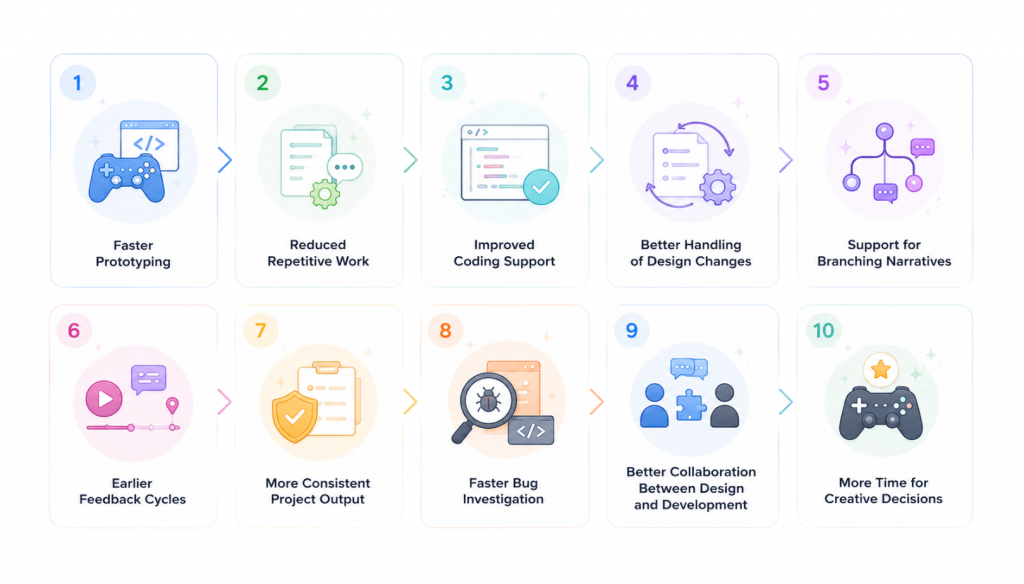
AI agents help game development teams reduce repetitive work, move faster, and keep production workflows more consistent. Their value is strongest when they have access to project context, such as the codebase, design documents, assets, and gameplay systems.
- Faster prototyping : AI agents can help create early gameplay scripts, test mechanics, dialogue drafts, or simple systems quickly. This allows teams to validate ideas before spending major development time on them.
- Reduced repetitive work : Games often require many variations of similar content, such as quest text, NPC dialogue, item descriptions, level notes, or test cases. AI agents can generate these drafts faster while developers and writers focus on refinement.
- Improved coding support : AI agents can assist with writing scripts, debugging gameplay logic, reviewing code, and suggesting fixes. This is especially useful when changes affect multiple systems or files.
- Better handling of design changes : When a gameplay rule or feature changes, related content and code often need updates. AI agents can help identify affected areas and suggest consistent changes across the project.
- Support for branching narratives and quests : Quest systems, character interactions, and branching dialogue require structured writing at scale. AI agents can help produce first drafts, alternate paths, and dialogue variations.
- Earlier feedback cycles : By generating rough versions of content, code, or prototypes quickly, AI agents help teams test ideas earlier. This reduces the chance of discovering major issues late in production.
- More consistent project output : When connected to project guidelines and existing assets, AI agents can help maintain consistency in tone, naming, formatting, documentation, and gameplay logic.
- Faster bug investigation : AI agents can review patterns in code and help trace recurring errors. This can save time during sprints when developers need quick insight into where a problem may be coming from.
- Better collaboration between design and development : AI agents can help translate design notes into technical tasks, draft implementation plans, and keep documentation aligned with actual gameplay systems.
- More time for creative decisions : By reducing mechanical and repetitive tasks, AI agents allow developers, artists, designers, and writers to spend more time on gameplay quality, player experience, and creative direction.
What to Evaluate When Using AI Agents in Game Development
Before adopting an AI agent, check how safely it fits into your engine, workflow, and production pipeline. The goal is to improve speed without creating hidden bugs, performance issues, or extra review work.
- Check engine compatibility with Unity, Unreal, Godot, or your custom engine.
- Make sure the agent can handle engine-managed assets such as prefabs, scenes, blueprints, serialized files, and animation systems safely.
- Confirm the agent has enough project context, including gameplay logic, UI, save systems, backend services, and state management.
- Review how well it works with your codebase structure. Modular projects are usually easier for AI agents to support than tightly connected systems.
- Define where the agent will be used, such as ideation, prototyping, coding, testing, dialogue, or runtime NPC behavior.
- Use version control so every AI-generated change can be tracked, reviewed, and reversed.
- Test AI-generated code before merging it into the main project.
- Check performance impact, especially for runtime agents used in NPCs, dynamic dialogue, or live gameplay systems.
- Review data privacy and access permissions before giving the agent source code, assets, player data, or internal tools.
- Make sure the agent follows your team’s coding standards, naming rules, documentation style, and creative direction.
- Start with low-risk tasks such as documentation, test cases, placeholder content, bug investigation, and prototype scripts.
- Keep human review in the workflow so developers, designers, and writers remain in control of final decisions.
FAQ
What are the best AI agents for game development?▼
There isn’t a single best option, it depends on the task. Claude Code and Cursor are used for coding and debugging, YourGPT for player support, Inworld for NPC behavior, Scenario for asset generation, ElevenLabs for voice, and Runway for video.
How is this different from normal AI tools like ChatGPT or game AI NPCs?▼
Game AI controls in-game behavior like enemies or NPC movement. AI agents help build the game by working on code, assets, dialogue, and development workflows rather than gameplay itself.
Can AI agents fully build a game on their own?▼
No. They can assist with parts of development such as code generation, asset creation, and testing support, but core systems, design decisions, and gameplay logic still require developers.
Where do AI agents actually fit in a game development pipeline?▼
They are used across production stages like prototyping, scripting, content generation, debugging, and asset creation, usually alongside engines like Unity or Unreal rather than inside them.
Are AI agents only useful for big studios, or can indie developers use them too?▼
Both can use them. Indie developers often use them to speed up small teams, while larger studios use them to handle scale-heavy tasks like content generation, refactoring, and automation across systems.
Conclusion
AI agents are becoming a practical part of the game development pipeline, especially in areas where teams handle repetitive, structured, and time-consuming work. Ideation, scripting support, content variation, testing, documentation, and NPC interactions are all areas where AI can reduce manual effort and help teams iterate faster.
The strongest results come when AI agents are used with clear boundaries. Core gameplay systems, performance tuning, animation quality, creative direction, and player experience still require human judgment and close control inside engines like Unity, Unreal, and custom toolchains.
For studios and developers, the value is in choosing the right agent for the right stage of production. A brainstorming tool, a coding assistant, and a runtime NPC agent each serve different purposes and should be evaluated differently. With the right context, review process, and workflow limits, platforms like YourGPT can help teams speed up production while keeping developers in control of the final game experience.

Related posts

Top 7 Customer Service Email Management Software in 2026

8 Best AI Shopping Assistants for WooCommerce Stores

Best WhatsApp WordPress Plugins for Support