Engage Your Audience in a New Way with YourGPT Campaigns
At YourGPT, we’ve always believed businesses need one platform for customer support, sales, and engagement. These are not separate parts of the customer journey. They shape how businesses communicate, build relationships, and move conversations forward.
That belief continues to guide how we evolve YourGPT, building toward a more connected way for teams to manage communication, context, and customer interactions in one place.
Today, we are taking another step in that direction with the launch of YourGPT Campaigns.
What Is YourGPT Campaigns?
YourGPT Campaigns gives businesses a way to initiate outreach across Email, WhatsApp, SMS, and AI phone agents from one platform.
Sending the first message is only part of the process. Campaigns also helps teams manage replies and continue the conversation.
When a contact responds, AI can continue the conversation using the full context of the original campaign and the interactions that follow. That means businesses can start outreach, handle replies, and keep the conversation moving toward the campaign objective from the same platform.
This is what makes YourGPT Campaigns different. It helps cover the full outreach loop, from initiating the conversation to managing the engagement that follows across channels.
How Teams Can Use Campaigns
Campaigns is designed for moments when your team wants to reach a specific audience with a clear message and a defined purpose. It helps you start outreach across channels and manage the conversations that follow in the same place.
Common use cases include:
- Introducing new audiences to your business: Reach out to newly added users, customers, leads, patients, students, members, or contacts with a clear first message, while staying ready to continue the conversation when they respond.
- Following up after important interactions: Continue engagement after demos, inquiries, consultations, appointments, bookings, property visits, or service interactions, with replies handled in the same platform.
- Sharing updates, reminders, and announcements: Send timely communication to a defined audience and manage follow-up questions or responses without breaking context.
- Re-engaging a specific audience: Reach back out to customers, leads, or contacts when there is a clear reason to restart the conversation, and let AI help carry that interaction forward.
- Supporting a specific business initiative: Launch targeted outreach around a product launch, event, seasonal campaign, strategic priority, or time-sensitive promotion, while keeping the engagement that follows connected to the campaign goal.
With the right audience, message, and objective in place, Campaigns becomes a practical way to start meaningful outreach and carry the conversation forward from inside YourGPT.
How to Create Your First Campaign
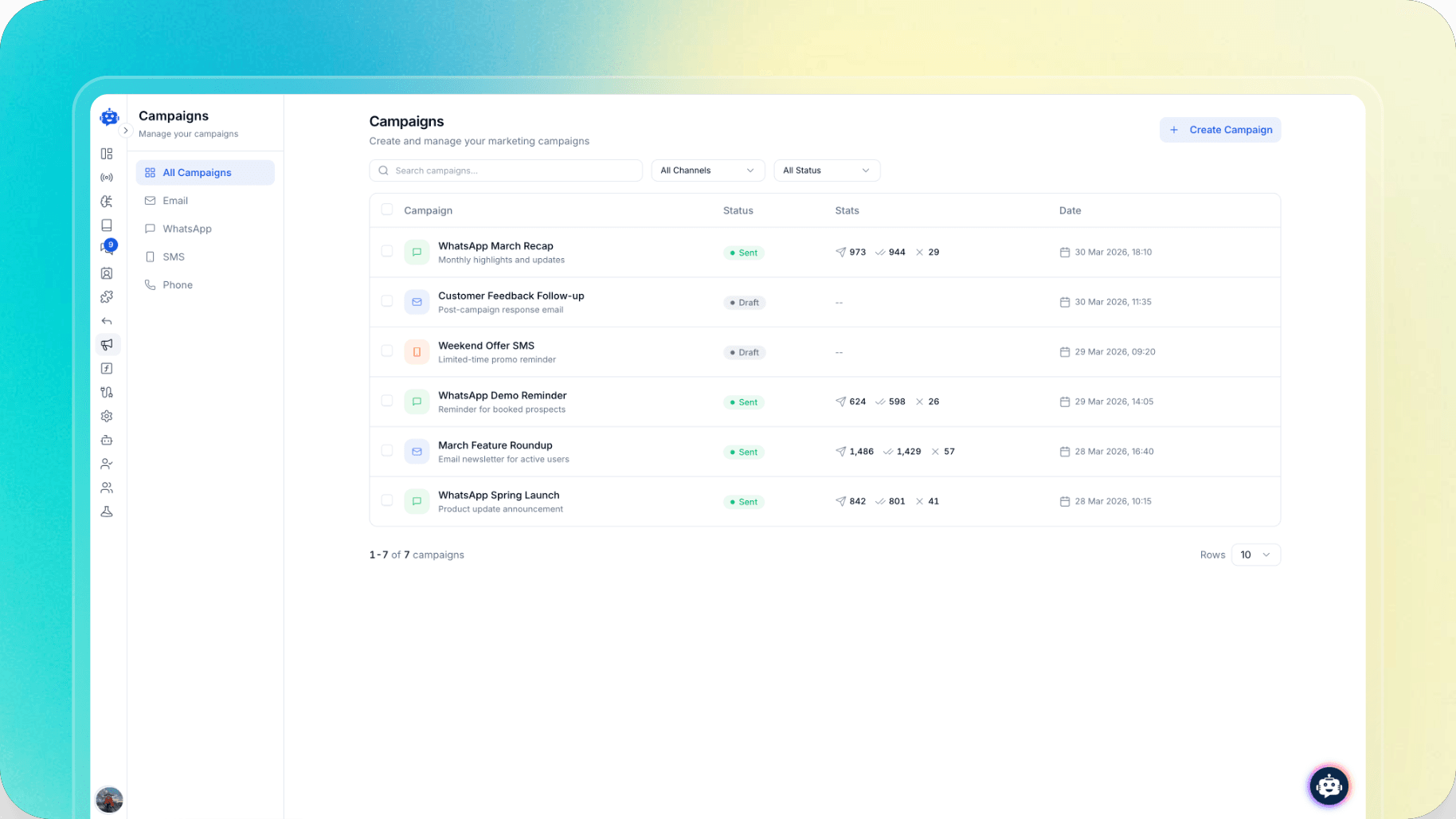
Campaigns can be created and managed directly from inside your YourGPT AI agent project dashboard.
To get started, open your project and go to Campaigns from the sidebar.
From there, create a new campaign and choose the channel you want to use: Email, WhatsApp, SMS, or AI phone agents.
Before you begin, it helps to have a few things ready:
- A clear campaign name your team will recognize later
- The channel you want to use
- The audience or segment you want to send to
- The message or campaign objective you want to communicate
Step 1: Create the campaign
Start by creating a new campaign and selecting the channel you want to use. This is where you define whether the campaign will go through Email, WhatsApp, SMS, or AI phone agents.
Before moving forward, make sure the selected channel is already configured inside your project.
Step 2: Select the audience
Choose the audience you want to send to. This might be a contact list, a filtered segment, or another defined group.
A clear audience helps ensure the campaign is aligned with the message, objective, and business context behind it.
Step 3: Add the campaign details
Once the audience is selected, add the campaign objective and the rest of the campaign details. Then create the message itself.
For email campaigns, this includes creating the template. For other channels, the message should match the format and intent of that channel.
Step 4: Send and track
Once the campaign is ready, send it from inside the product and monitor it from the same place.
Drafts, sent campaigns, delivery status, and campaign visibility remain available inside the Campaigns area, so your team can continue managing outreach after launch.
Conclusion
Campaigns gives businesses a way to start outreach inside YourGPT and keep the conversation moving when contacts respond.
By keeping the campaign, the reply, and the engagement that follows connected in one platform, teams can manage the full outreach loop more effectively across channels.
YourGPT Campaigns is now live for Advanced and Professional users inside their AI agent projects.

Related posts