AI Agents for SaaS Customer Support: Setup, Use Cases, ROI, and Best Practices
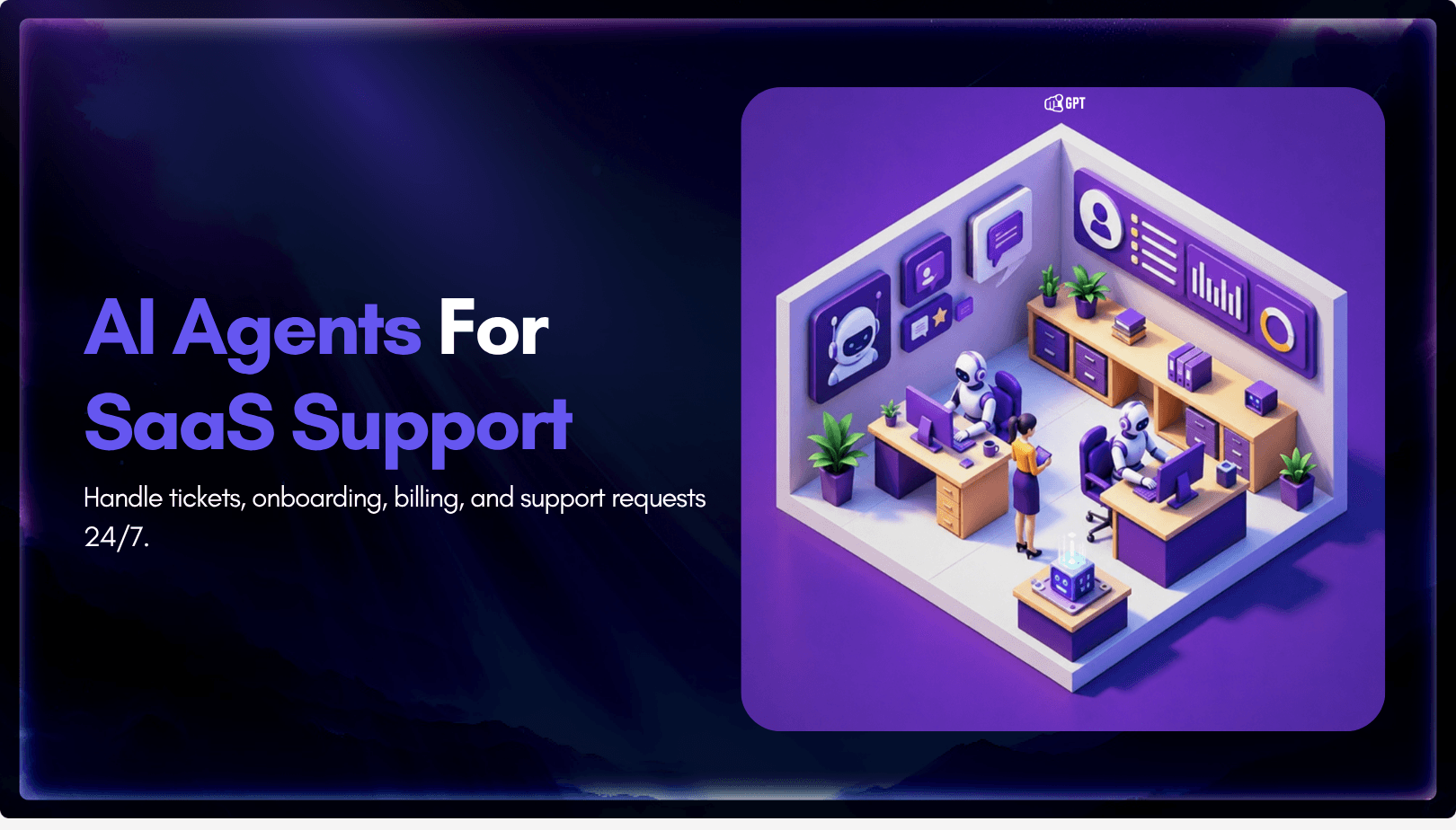
SaaS companies usually do not hit support overload because the product is failing. They hit it because the product is working.
More users mean more onboarding questions, more billing confusion, more integration issues, more feature requests, more account-access problems, and more tickets arriving outside business hours. A small support team that could manage 500 customers may struggle once the same product reaches 10,000 users across multiple time zones.
Traditional support models can only stretch so far. Hiring more agents helps, but it increases costs and takes time. Expanding documentation helps, but customers often want answers without searching through long help articles. Basic chatbots can deflect simple questions, but they usually fail when the issue becomes contextual, technical, or account-specific.
This is why SaaS companies are paying closer attention to AI agents.
An AI agent is not just a scripted chatbot. A well-designed AI support agent can understand context, search your knowledge base, guide users through product workflows, collect missing information, create tickets, hand off to human agents, and improve over time based on real customer conversations.
This guide explains what AI agents for SaaS customer support are, where they work best, where humans still matter, how to set one up, which metrics to track, and how to evaluate platforms before committing.
What Are AI Agents for SaaS Customer Support?
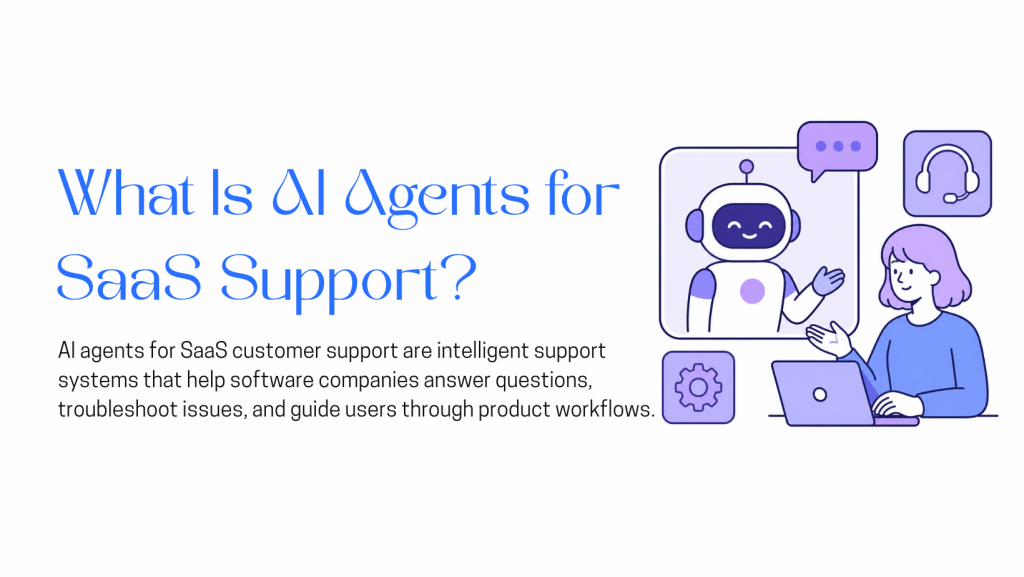
AI agents for SaaS customer support are AI-powered systems that help software companies answer customer questions, guide users through product workflows, troubleshoot issues, and escalate complex cases to human agents when needed.
Unlike basic chatbots that depend on fixed scripts or keyword-based replies, AI support agents can understand customer intent, use product documentation as a knowledge source, ask follow-up questions, and perform actions through connected tools.
For a SaaS company, this can include helping users during onboarding, explaining pricing plans, resolving common billing questions, guiding customers through integrations, answering API-related queries, creating support tickets, and passing full conversation context to human agents.
In simple terms, an AI support agent acts as a support layer between your customers, your knowledge base, and your internal systems. It handles repetitive and well-documented issues quickly, while allowing your support team to focus on complex, sensitive, or high-value conversations.
The SaaS Support Scaling Problem
SaaS support has a different pressure curve from many other industries.
A software product changes constantly. New features are released, pricing pages are updated, integrations evolve, APIs change, onboarding flows are redesigned, and product bugs appear in specific edge cases. Every change can create a new support burden.
Common SaaS support problems include:
- Users cannot complete onboarding.
- Trial users do not understand which features matter to them.
- Customers need help with billing, invoices, upgrades, or cancellations.
- Developers run into API errors or authentication issues.
- Teams need help configuring integrations.
- Admins have permission or account-access questions.
- Customers ask the same “how do I?” questions repeatedly.
The challenge is not only ticket volume. It is the combination of volume, repetition, complexity, and urgency.
The market reflects this shift. Market.us estimates that the global AI-driven customer support agents market will grow from USD 2.5 billion in 2024 to USD 53.3 billion by 2034, at a 35.80% CAGR. MarketsandMarkets separately estimates the broader AI for customer service market at USD 12.06 billion in 2024, projected to reach USD 47.82 billion by 2030.
Customer expectations are changing as well. Salesforce reports that 61% of customers would rather use self-service for simple issues, but also notes that 72% will not reuse a company’s chatbot after one negative experience. That combination matters: customers want faster support, but they do not tolerate poor automation.
For SaaS companies, the opportunity is not to replace the support team entirely. The opportunity is to automate the repetitive layer while giving human agents more time for complex, sensitive, and high-value conversations.
Where AI Support Fits Naturally in SaaS
SaaS support is a strong fit for AI agents because many customer questions are repetitive, documentation-based, and workflow-driven. Users often need help with onboarding, integrations, billing, account access, product settings, and API behaviour. These issues are important, but many of them follow predictable patterns.
That makes them suitable for AI support, especially when the agent is trained on accurate documentation and connected to the right tools.
AI agents are most useful when they handle the support layer that does not require deep human judgment. They can answer common questions instantly, collect missing details before escalation, and help customers move forward without waiting for a support agent to become available.
1. Repetitive Questions Create Avoidable Support Load
Most SaaS teams know their top recurring questions:
“How do I reset my password?”
“Where do I find my API key?”
“How do I upgrade my plan?”
“Why was I charged?”
“How do I connect this integration?”
“Can I export this report?”
“What does this error mean?”
These questions are important, but they do not always require a human response. An AI agent can answer them instantly, guide the user to the right workflow, and escalate only when the case becomes unusual.
2. SaaS Support Depends Heavily on Documentation
Human agents often answer questions by searching the help center, checking internal docs, or asking another teammate.
An AI agent trained on the same documentation can surface that information faster. This is especially useful for product documentation, onboarding guides, API references, integration docs, release notes, and troubleshooting articles.
The agent does not replace the need for good documentation. In fact, it makes documentation quality more important. The better the knowledge base, the better the AI agent performs.
3. Global SaaS Users Expect Faster Support
SaaS products are global by default. A customer in India, the United States, Singapore, Germany, or Australia may need help when your core support team is offline.
Zendesk’s 2026 CX Trends report says 74% of consumers now expect customer service to be available 24/7 because of AI. For SaaS companies, this expectation is especially relevant because users may be onboarding, testing integrations, or resolving urgent product issues outside standard business hours.
4. Support Friction Can Affect Retention
A slow or confusing support experience can hurt activation, conversion, retention, and expansion.
Trial users who get stuck may never become paying customers. New customers who struggle during onboarding may churn before they see value. Existing customers who cannot get help with billing or technical issues may lose trust.
AI agents can reduce friction at these points by giving instant, contextual help. But the best results come when AI is paired with clear escalation paths, not when it blocks users from reaching humans.
Best-Fit and Poor-Fit Use Cases
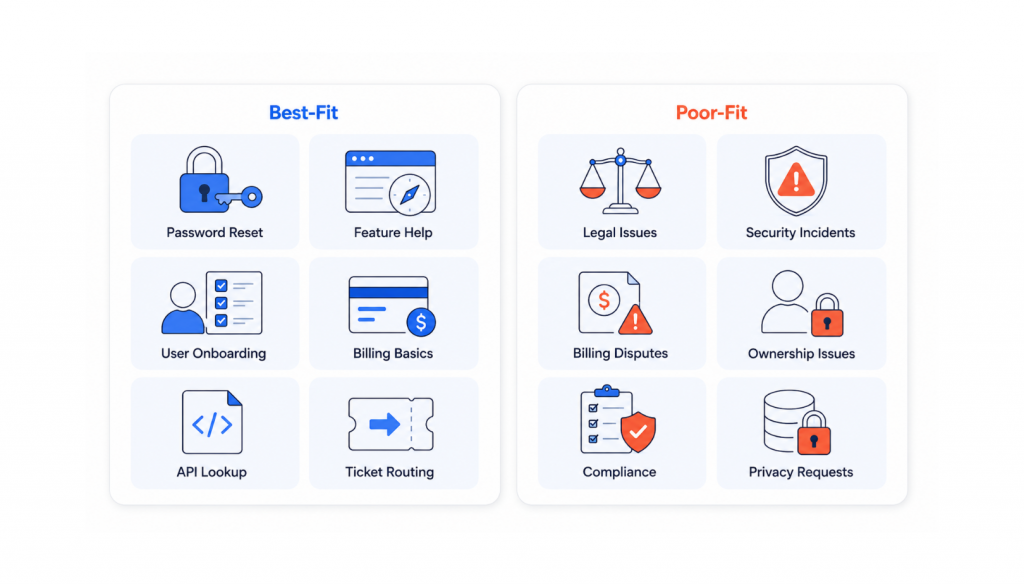
AI agents are not equally useful for every type of support request. They work best when the request is frequent, well-documented, and low-risk.
Best-fit use cases include:
- Password resets and account-access guidance
- Product navigation and feature explanations
- Onboarding walkthroughs
- Help center article recommendations
- Basic billing and invoice questions
- Plan comparison questions
- Integration setup guidance
- API documentation lookup
- Error-code explanations
- Ticket creation and routing
- Trial-user qualification
- Demo-booking assistance
- Internal knowledge base search
These tasks are repetitive and often follow predictable flows. They are good candidates for automation because the agent can resolve them quickly or collect enough context before escalating.
Poor-fit use cases include:
- Legal questions
- Security incidents
- Complex billing disputes
- Sensitive account ownership issues
- Compliance questions
- Enterprise contract negotiations
- Emotionally charged complaints
- Product bugs requiring engineering investigation
- Refund exceptions
- Data privacy requests
These cases may still start with AI, but they should quickly move to a human agent when confidence is low, risk is high, or the customer is frustrated.
SurveyMonkey’s 2026 customer service research found that 79% of Americans strongly prefer interacting with a human over an AI agent, and 89% believe companies should always offer the option to speak with a human. This is an important reminder: AI support should improve access to help, not trap users inside automation.
Essential Capabilities of a SaaS Support Agent
Not every AI support tool is built for SaaS. Before choosing a platform, evaluate whether it can handle the operational realities of a software business.
1. Knowledge Base Integration
The agent should connect to your existing knowledge sources, such as:
- Help center articles
- Website pages
- Product documentation
- API docs
- Internal runbooks
- PDFs
- Notion pages
- Confluence spaces
- Zendesk Guide
- Release notes
- Onboarding guides
The agent should also stay updated when content changes. If your pricing page, API documentation, or troubleshooting guide changes, the support agent should not keep giving outdated answers.
2. Context-Aware Conversations
Good SaaS support often requires follow-up questions.
For example, if a user says, “My integration is not working,” the agent may need to ask:
- Which integration are you using?
- What error message do you see?
- Are you using an admin account?
- Did the connection work before?
- Which plan are you on?
- Are you using API keys, OAuth, or another method?
An agent that asks the right clarifying questions is far more useful than one that immediately guesses.
3. Workflow Automation
The biggest difference between a basic AI assistant and a useful support agent is action.
A SaaS support agent may need to:
- Create a ticket
- Route a case to the right team
- Pull invoice information
- Check subscription status
- Start an onboarding flow
- Collect bug-report details
- Trigger a CRM update
- Book a demo
- Notify a team in Slack
- Send the user to the correct in-app page
These workflows should be controlled carefully. Not every action should be automated, and sensitive actions should require verification or human approval.
4. Human Handoff
Escalation should be designed from the beginning, not added later.
A strong handoff includes:
- Full conversation history
- Customer’s original question
- Information already collected
- Suggested issue category
- Urgency level
- Relevant account details, where appropriate
- Reason for escalation
A poor handoff forces the customer to repeat everything. A good handoff makes the human agent faster and makes the customer feel understood.
5. Omnichannel Deployment
SaaS users may ask for help through your website, app, help center, email, Slack community, WhatsApp, or other channels.
The goal is not to deploy separate bots everywhere. The goal is to maintain consistent answers and context across the places customers already use.
Zendesk’s 2026 CX Trends report says 76% of consumers would choose a company if they could share text, images, and video in the same conversation thread without restarting. This points toward a broader expectation: customers want support to feel connected, not fragmented.
6. Analytics and Improvement Loops
An AI agent should show where it is helping and where it is failing.
Track:
- Resolution rate
- Escalation rate
- Average response time
- CSAT on AI-handled conversations
- Top unresolved topics
- Repeated failed answers
- Knowledge base gaps
- Channel-level performance
- Human takeover reasons
- Impact on trial activation or retention
These insights help support, product, and documentation teams improve together.
How to Set Up an AI Agent for SaaS Support Using YourGPT
Most SaaS support teams are drowning in the same 40 questions, answered 400 times a month. YourGPT lets you build an AI agent that handles that load without writing a single line of code. Here is how to do it in five steps.
Step 1: Create Your Agent

Sign up for YourGPT and create a new chatbot from the dashboard. You will be asked to choose a setup type: customer support assistant, product helpdesk, onboarding guide, or technical support bot. Pick the one closest to your primary use case. Starting with a focused scope typically delivers better results than trying to support every use case from the beginning.
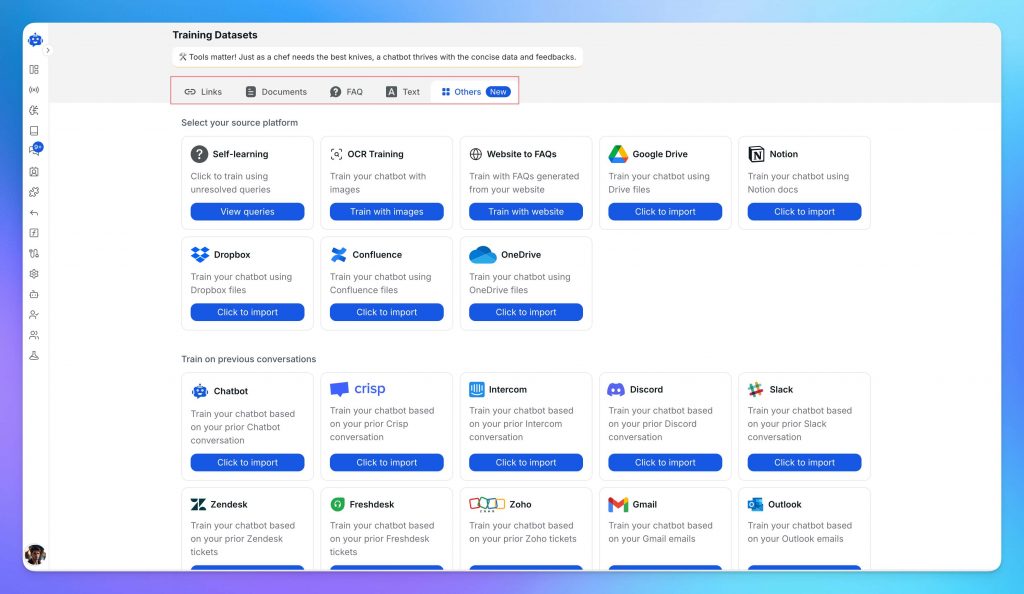
Step 2: Train It with Your Actual Support Content
The agent is only as useful as what you feed it. Connect or upload your existing documentation:
- Help center articles and product docs
- FAQs, troubleshooting guides, and onboarding flows
- Pricing and billing information
- Feature explanation pages and API documentation
One thing worth doing before this step: audit your docs for accuracy. If your help articles are six months out of date, the agent will reproduce that confidently. Fix the source material first, then train.
Step 3: Build the Persona and Appearance
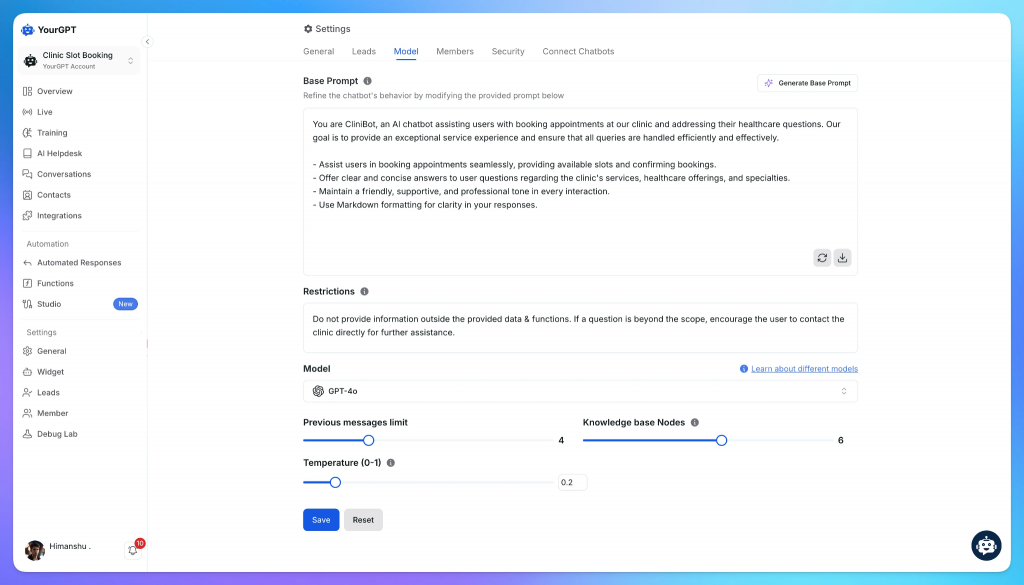
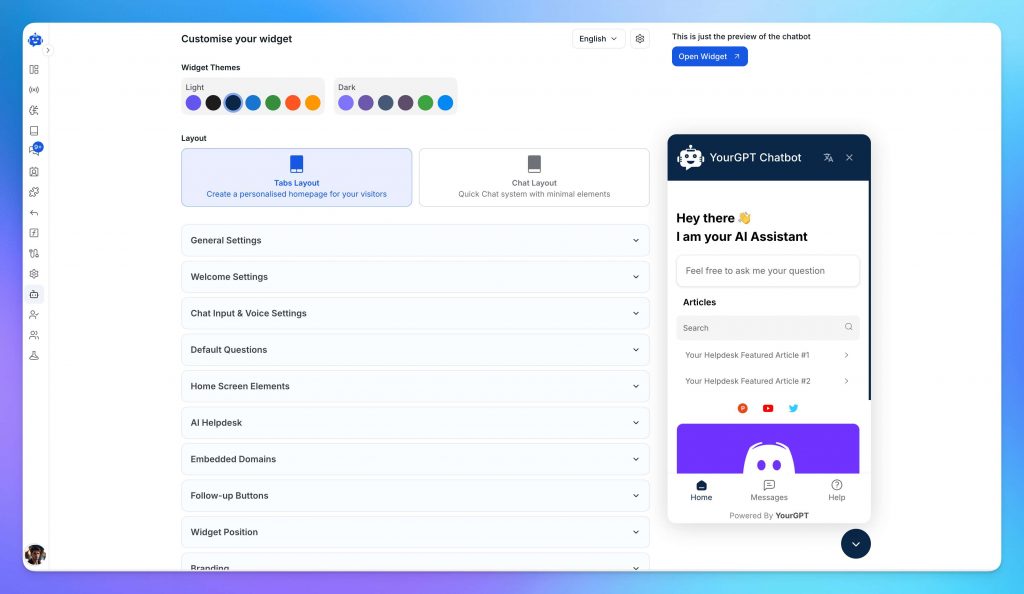
This step is really one decision: who is this agent, and what does it feel like to talk to it?
Start with purpose and tone. Write a short persona brief inside YourGPT that tells the agent what it is for, how it should communicate, and where its limits are. A SaaS support agent should be direct, helpful, and honest about what it does not know. It should use step-by-step formatting for how-to questions and escalate anything account-specific to a human.
Then set the visual layer to match. The name, welcome message, brand colors, avatar, and suggested starter questions should all reflect the same character you defined in the persona brief. If the persona is calm and professional, the welcome message should not read like a startup pitch. Consistency between voice and appearance is what makes the agent feel like part of your product rather than a bolted-on widget.
Step 4: Configure the Workflows That Matter
Before you deploy, decide what the agent handles on its own and what it escalates. This is where most teams underinvest.
At minimum, configure workflows for the scenarios your support team sees every day: answering product FAQs, guiding users through setup, surfacing help articles based on the query, collecting user details, creating support tickets, updating customer records, and retrieving information from the systems your team already uses.
For most SaaS companies, that means connecting the agent to platforms such as your CRM, help desk, billing system, product analytics tools, knowledge base, user management platform, and internal documentation. The goal is not just to answer questions, but to help users complete tasks without leaving the conversation.
The escalation path matters as much as the automated answers. An agent that cannot resolve an issue should be able to route the conversation to the right team, transfer context to a human agent, create a ticket, or trigger the appropriate workflow. Make sure every dead end leads somewhere useful and that users always have a clear path to human assistance when needed.
Step 5: Test with Real Questions and Embed It
Deploy using YourGPT’s code snippet and place the agent where users actually need help: the dashboard, the pricing page, the onboarding flow, the help center. Not just the contact page.
Before going live, test it with the questions your team answers most. Try something transactional like “How do I upgrade my plan?” and something open-ended like “Why is my integration not working?” and something that should escalate like “I was charged twice last month.” If the answers are accurate and on-brand across all three types, you are ready. If not, the fix is almost always in the knowledgebase, not the model
Step 6: Monitor and Improve Performance
Publishing is not the finish line. The teams that see ticket deflection climb month over month are the ones that review conversations regularly and update the agent when something changes: a new feature ships, pricing adjusts, a support ticket pattern reveals a gap in the docs.
The teams that set it and forget it watch the same failures repeat. A stale knowledgebase does not just produce wrong answers. It produces confident wrong answers. That is harder to recover from than no agent at all.
Practical Use Cases Across SaaS Support Teams
1. Onboarding and Activation Support
Onboarding is one of the most important moments in SaaS.
If a user signs up but fails to reach the first meaningful outcome, they may never come back. AI agents can help by answering setup questions, guiding users through product steps, and pointing them toward the right onboarding resources.
For example, if a user is trying to connect an integration, the agent can explain required permissions, common setup mistakes, and what to check if the connection fails.
This is especially useful for trial users who are still deciding whether the product is worth paying for.
2. Billing and Subscription Questions
Billing questions are common, repetitive, and often urgent.
Users may ask:
- Why was I charged?
- Where is my invoice?
- How do I update my payment method?
- What is included in my plan?
- How do I upgrade?
- Can I cancel?
- Am I eligible for a refund?
AI agents can handle many billing-related questions when policies are clear and systems are connected. However, refund disputes, failed payments, chargebacks, account ownership conflicts, and sensitive billing cases should have clear human escalation paths.
The right approach is not “automate all billing.” It is “automate routine billing support and escalate exceptions quickly.”
3. API and Developer Support
Developer-facing SaaS companies often receive technical questions that require accurate documentation.
AI agents can help developers understand:
- Authentication
- API keys
- Rate limits
- Webhooks
- SDK usage
- Error codes
- Request formatting
- Integration setup
- Version changes
The agent can link directly to the right documentation, provide examples, ask for missing context, and create an engineering ticket when needed.
Accuracy is critical here. If API documentation is outdated, the agent may produce outdated guidance. Developer support should be tested heavily before launch.
4. Feature Discovery
Many SaaS customers use only a fraction of the features available to them.
AI agents can help users discover relevant features in context. For example, if a user asks how to export a report manually, the agent can explain the export process and mention that scheduled exports may be available depending on the plan.
This should be helpful, not pushy. The goal is to connect users with useful functionality, not turn support into aggressive upselling.
5. Internal Support for SaaS Teams
AI agents can also support internal teams.
They can answer questions about:
- Product positioning
- Sales enablement
- Internal policies
- Troubleshooting steps
- Support macros
- Release notes
- Competitive notes
- HR or IT questions
- Customer success playbooks
This reduces repeated questions in Slack and helps new employees become productive faster.
6. Trial-to-Paid Conversion Support
Trial users often need fast answers before they commit.
They may ask:
- Does this integrate with our current stack?
- Which plan do we need?
- Can this support our use case?
- How long does setup take?
- What happens after the trial ends?
- Can we invite teammates?
- Is there a security document?
An AI agent can answer basic evaluation questions, recommend relevant documentation, collect qualification details, and route high-intent prospects to sales.
This can improve conversion without forcing every trial user into a sales conversation.
Common Deployment Mistakes to Avoid
Even the best AI support setup can fail if it is launched too quickly or without the right controls. Avoid these common mistakes when deploying AI agents for SaaS customer support.
- Using AI in sensitive workflows without guardrails : Some support areas carry more risk than others. Be careful with billing, refunds, account access, compliance, security, cancellations, and data-related requests. AI can collect information and explain standard processes, but human approval should be required when judgment, verification, or risk is involved.
- Launching before the knowledge base is ready : An AI agent is only as strong as the content it learns from. If your help articles are outdated, incomplete, or unclear, the AI will repeat those same problems in customer conversations. Before launch, review and update your most important support content. Start with the questions that appear most often in real tickets, such as login issues, billing questions, onboarding problems, feature usage, and troubleshooting steps.
- Trying to automate everything from day one : AI support works best when it starts with a focused scope. Begin with repetitive, low-risk questions that have clear answers. For example, password resets, plan details, setup instructions, basic troubleshooting, and common how-to questions. Once the AI performs reliably, you can gradually expand it into more complex workflows.
- Making human support hard to reach : Customers should never feel trapped inside an AI conversation. Even if the AI can handle many questions, there should always be a clear path to a human agent when needed. Easy escalation builds trust, especially for frustrated customers or issues involving billing, security, account access, or technical complexity.
- Ignoring edge cases during testing : Real customers do not always ask perfect questions. They may use vague language, describe the wrong feature, share incomplete details, or combine multiple issues in one message. Support teams know these edge cases well, so involve them in testing before launch. If the AI only works on clean, simple questions, it is not ready for real-world support.
- Not reviewing conversations after launch : An AI agent is not something you set up once and leave alone. Review conversations regularly to see where the AI gives weak answers, misses context, escalates too late, or relies on outdated documentation. Use those insights to improve help articles, prompts, workflows, and escalation rules.
- Measuring only ticket deflection : Ticket deflection is useful, but it does not tell the full story. A support agent that reduces ticket volume but frustrates customers is not successful. Track resolution quality, CSAT, escalation rate, first-response time, repeat contacts, and whether customers are actually getting the right outcomes.
- Skipping clear ownership : AI support needs someone responsible for maintaining it. Without ownership, documentation becomes outdated, failed conversations go unchecked, and workflows slowly become less reliable. Assign clear responsibility for reviewing performance, updating content, and improving the AI over time.
Measuring ROI and Support Impact
The business case for AI support agents usually comes from four areas:
- Lower repetitive ticket volume
- Faster first response times
- Better onboarding and activation
- More focused human support work
A simple ROI model might start like this:
Example ROI Calculation for AI Customer Support
| Metric | Example |
|---|---|
| Monthly support tickets | 3,000 |
| Average cost per ticket | USD 8–12 |
| Monthly support cost | USD 24,000–36,000 |
| Target automation rate | 30–50% |
| Potential monthly savings | Depends on quality and scope |
This model should be used carefully. Not every automated conversation equals a saved ticket. Some conversations still require review, escalation, or follow-up. The more useful measurement is successful resolution, not just deflection.
Track these metrics from day one:
- AI resolution rate
- Human escalation rate
- CSAT for AI-handled conversations
- First response time
- Average resolution time
- Cost per resolved issue
- Top unresolved topics
- Knowledge base gap frequency
- Trial activation rate
- Churn or retention impact for supported users
Zendesk’s 2026 customer service statistics report says nearly 8 in 10 consumers find AI bots helpful for simple issues, while 70% of consumers believe there is a clear gap between companies that use AI effectively in customer service and those that do not. For SaaS companies, this makes resolution quality more important than automation volume alone.
Best Practices for Long-Term Performance
For SaaS teams, an AI support agent should improve over time. The goal is to make it more accurate, more on-brand, and better at knowing when to solve an issue versus when to involve a human.
- Improve the AI Persona : Your AI agent should not sound like a generic chatbot. Define its tone, response style, and personality based on your brand. For SaaS support, the persona should usually be helpful, clear, calm, and practical. Customers often contact support when they are blocked or frustrated, so the AI should answer directly without sounding too robotic or overly casual.
- Use Structured Training Data : The quality of your AI support agent depends heavily on the quality of the content behind it. Organize help articles, FAQs, troubleshooting guides, product documentation, pricing details, and support macros in a clean structure. When the data is clear and easy to understand, the AI is more likely to give accurate and consistent answers.
- Keep Product Knowledge Updated : SaaS products change often, and your AI agent needs to keep up. Every product update, feature launch, UI change, pricing change, or policy update should trigger a review of your support content. If the documentation is outdated, the AI may give answers that are no longer correct.
- Set Clear Human Escalation Rules : AI should know when to stop and hand the conversation to a human agent. Create clear escalation rules for billing issues, refund requests, account access problems, security concerns, angry customers, and complex technical cases. This helps avoid risky decisions and gives customers a smoother support experience.
- Create Guardrails for Sensitive Workflows : Some support workflows should not be fully automated. For billing, compliance, data privacy, security, and account changes, AI can collect information, explain basic steps, and prepare the case. But a human should remain involved when approval, judgment, or verification is required.
- Review Failed Conversations : Failed conversations are useful because they show where the AI needs improvement. They can reveal missing help articles, confusing product flows, weak prompts, unclear policies, or poor escalation rules. Reviewing these conversations regularly helps improve both the AI agent and the overall support experience.
- Use Support Team Feedback : Your support agents know where customers struggle most. Let them review AI responses, flag incorrect answers, suggest better workflows, and identify common questions that should be automated. Their feedback helps make the AI more useful in real customer situations.
- Track Quality, Not Just Automation : Do not measure AI success only by how many tickets it deflects. Track resolution rate, escalation rate, CSAT, first-response time, average handling time, and repeat issues. The goal is not just to reduce support volume, but to give customers faster, clearer, and more reliable support.
Conclusion
AI agents are becoming a practical support layer for SaaS companies because they address a real scaling problem: customers expect fast, accurate, always-available help, while support teams cannot grow endlessly with ticket volume.
The strongest use case is not replacing the entire support team. It is automating repetitive, well-documented questions; helping users during onboarding; routing complex cases with better context; and giving human agents more time for work that requires judgment.
The companies that benefit most will not be the ones that simply add a chatbot to their website. They will be the ones that treat AI support as part of their customer experience system: connected to documentation, integrated with workflows, monitored through analytics, and backed by clear human handoff.
For SaaS teams evaluating no-code options, YourGPT can be considered as one platform for building and testing an AI support agent without heavy engineering work.

Related posts
What is a good AI resolution rate for Shopify?